Mason の Counter-Strike 2
ゲーム Counter-Strike 2 用に動作するプライベート チート メイソンを購入する
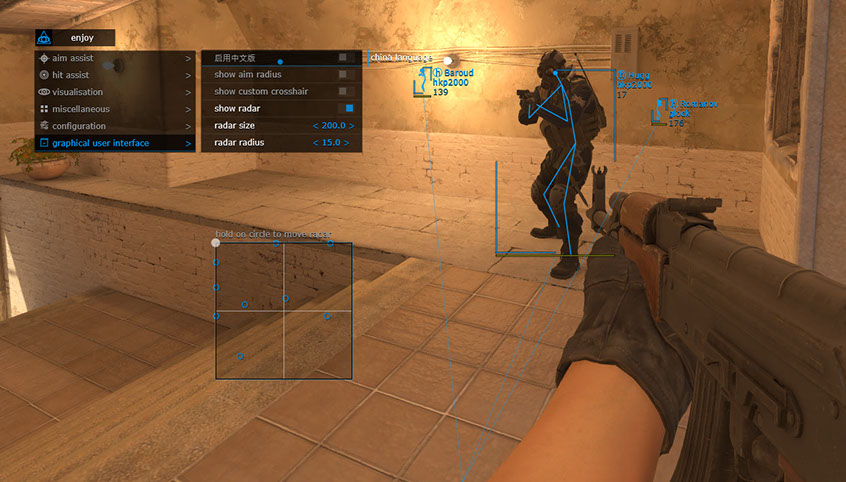
ゲーム Counter-Strike 2 のチートの開発者は、誰がチートに最も安い価格を設定できるかを競っているようです。 メイソンはまた、価格を下げてペニーに対してチートを提供するという原則に従いました。 0.5 ドルで、この開発者の他のプロジェクトで実証されている、アンチチートをバイパスする最新の方法を使用した有効なチートを入手できます。 標準的な関数セットであり、魔法のような機能はありません。 つまり、起動とインストールが簡単になります。 この伝説的なゲームがチーターの大量流入にさらされているのは残念です。 今では誰もが補助プログラムを利用できるようになりました。 公園を歩きながら、または噴水に手を突っ込むことで、チートを購入するために必要な金額を集めることができます。 オンライン人口が 70 万人から 100 万人にも及ぶアンチチートの価格としては、このような取るに足らないものです。 開発者はトラブルメーカーとは絶対に関わりたくないので、現実に適応する必要があります。 チートを購入し、同じチーターと戦い、ソフトウェアがどのように動作するかを測定します。
システム要件
🔔 チートの状態は開発者の通知に基づき当社のTelegramボットから自動更新されます — そちらで最新情報をフォローしてください。多くのチートはゲームの変更後に自動更新されるため、「確認中」の状態はチートが動作しないという意味ではなく、確認までの不確実性にすぎません。不安ですか?サイトのチャットで質問するかお問い合わせをご確認ください。
グローバルキー — 世界中で使用可能。
銀行カードが当社の決済システムで使えない場合、Binance ギフトカード (USDT) でお支払いいただけます。
この方法には固定 +10% のサービス手数料がかかります。プロモコードや割引は適用できません。
- この支払い方法がご希望の商品に対応しているか、お問い合わせください
- お住まいの国のマーケットプレイス(Paxful、Binance、または現地の販売店)で必要な金額の Binance ギフトカード (USDT) を購入してください — お好みの支払い方法で
- ギフトカードのコードを送信してください — 購入を有効化し、商品をお届けします
USDT (TRC-20) はチェックアウト時にもご利用いただけます — 追加手数料なし。
機能
エイムアシスト
- 現在の武器 / 選択した武器の設定
- タブを有効にする/エイムボットをアクティブにする
- エイムキー / エイムボットが動作するようにキーを設定します (エイムボットが動作するには、選択したキーを押し続ける必要があります)
- エイムスポット / エイムボットが動作するように体の部分を設定します
- エイムスムーズ / エイムボットのエイムスムーズさを設定
- エイム半径 / エイムボットの半径を設定します
- 照準精度 / エイムボットの照準精度を設定
- 反動を補正する / エイムボット機能の実行中に武器の反動補正を有効にする
- 発見されたもののみ / レーダーに見える敵のみにエイムボットが機能するように設定します
- 自動切り替え / 殺害時にターゲットを自動変更
- RCS しきい値 / エイムボットによる反動補正のレベルを調整できるようにします
- トリガー遅延 / トリガーボットが起動するまでの遅延を調整できます
構成
- CPUの節約 / CPUリソースの節約
- クリップボードから構成をロード / 保存された設定構成をロード
- 設定をクリップボードに保存 / 選択した設定をクリップボードに保存
グラフィカルユーザーインターフェース
- メニュー言語選択/メニュー言語選択(対応言語:英語/中国語)
- エイム半径を表示 / エイムボットの半径を表示
- カスタム十字線を表示 / 画面の中央に十字線を表示します
- レーダーを表示 / レーダーを有効にする (画面上でレーダーを移動するには、マウスの矢印をレーダーに向けて LMB を押します)
- レーダーサイズ / レーダーサイズの設定
- レーダー半径 / レーダー半径の設定
ヒットアシスト
- タブ有効化/トリガーボットのアクティブ化
- トリガーキー / ボットトリガーのキーを設定します
- チームを無視 / ボットをアクティブにして自身のチームトリガーを無視します
視覚化
- タブの有効化 / ビジュアル機能のアクティブ化
- 境界ボックスを表示 / プレーヤー上に 2D 四角形を表示
- スケルトンを表示 / プレーヤーにスケルトンを表示
- スナップラインを表示 / プレイヤーにラインを表示
- プレイヤーの武器を表示 / プレイヤーの武器を表示
- プレイヤーの体力を表示 / 敵の体力を表示
- プレイヤー名を表示 / プレイヤーのニックネームを表示
- プレイヤーの装備を表示 / 敵の装備を表示
- 雪を植えたC4 / C4プラントの位置と爆発までの時間を表示
- 距離表示 / 相手までの距離を表示
- チームを無視 / 自分のチームを無視してアクティブ化
- 発見されたプレイヤーを無視 / 「可視」プレイヤーを無視してアクティブ化
* ソフトウェアの機能は開発者の裁量でいつでも変更される場合がありますが、情報を常に最新の状態に保つよう努めます。
カスタマーレビュー
すべてのレビューよくある質問
Masonの使用は安全ですか?
Masonのインストールと起動方法は?
Counter-Strike 2のアップデート後もMasonは動作しますか?
Masonにはどんな機能が含まれていますか?
どの支払い方法が利用できますか?
サポートにはどう連絡しますか?
お支払い後、ソフトウェアのアクティベーション、起動、使用方法の詳細な説明をお届けします。
説明はお支払い前に指定されたメールアドレスに送信されます。
ダウンロードリンクと必要なコンポーネントもそちらでご確認いただけます。
チートコミュニティ
チートのアップデート、検出ステータス、他プレイヤーからのサポート — TelegramとDiscordで。