Mason 용 Counter-Strike 2
Counter-Strike 2 게임에 대해 작동하는 개인 치트 Mason을 구입하세요.
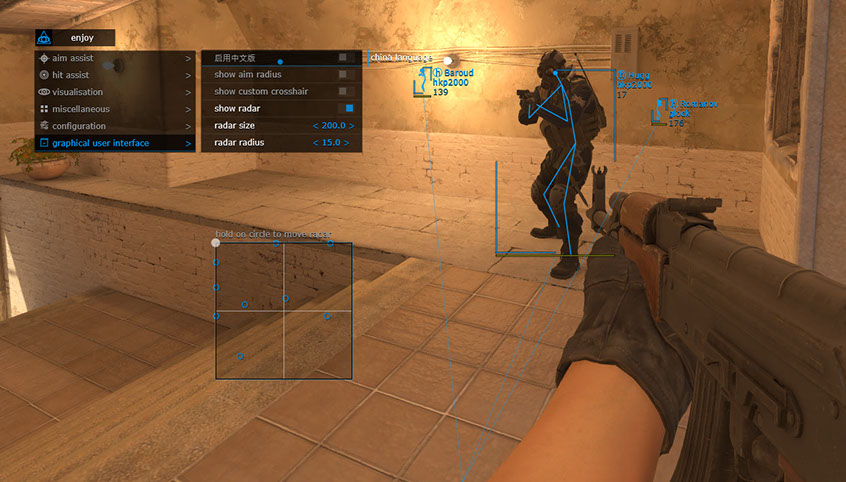
Counter-Strike 2 게임의 치트 개발자들은 누가 치트에 가장 저렴한 가격을 책정할 수 있는지 경쟁하고 있는 것 같습니다. 메이슨은 또한 가격을 낮추고 1센트에 치트를 제공한다는 원칙을 따랐습니다. 0.5달러에 이 개발자의 다른 프로젝트에서 입증된 치트 방지 우회의 현대적인 방법을 사용하는 작동하는 치트를 얻을 수 있습니다. 표준 기능 세트에는 마법의 기능이 없습니다. 이는 시작과 설치가 쉽다는 것을 의미합니다. 전설적인 게임에 사기꾼이 대거 유입된다는 점은 안타까운 일입니다. 이제 모든 사람이 보조 프로그램을 이용할 여유가 있습니다. 공원을 산책하거나 분수대에 손을 넣어 치트 구매에 필요한 금액을 모을 수 있습니다. 온라인 인구가 70만에서 100만 명에 달하는 치트 방지 제품에 대한 이러한 미미한 가격입니다. 개발자들은 말썽꾼을 상대하고 싶지 않기 때문에 현실에 적응해야 합니다. Buy a cheat and go fight with the same cheaters, measuring how the software works.
시스템 요구사항
🔔 치트 상태는 개발자 알림에 따라 텔레그램 봇에서 자동으로 업데이트됩니다 — 그곳에서 소식을 확인하세요. 많은 치트는 게임 변경 후 스스로 업데이트되므로 «확인 중» 상태가 치트가 작동하지 않는다는 뜻은 아니며, 확인 전까지의 불확실성일 뿐입니다. 확실하지 않나요? 사이트 채팅에서 문의하거나 연락처를 확인하세요.
글로벌 키 — 전 세계에서 사용 가능.
은행 카드가 결제 시스템에서 작동하지 않는 경우, Binance 기프트 카드 (USDT)로 결제할 수 있습니다.
이 방법에는 고정 +10% 수수료가 부과됩니다. 프로모션 코드 및 할인은 적용할 수 없습니다.
- 이 결제 방법이 원하시는 제품에 사용 가능한지 문의해 주세요
- 국내 마켓플레이스(Paxful, Binance 또는 현지 판매자)에서 필요한 금액의 Binance 기프트 카드(USDT)를 구매하세요 — 편리한 결제 수단으로
- 기프트 카드 코드를 보내주시면 — 구매를 활성화하고 제품을 전달해 드립니다
USDT (TRC-20)도 결제 페이지에서 사용할 수 있습니다 — 추가 수수료 없이.
기능
조준 지원
- 현재 무기 / 선택한 무기에 대한 설정
- 탭 활성화 / aimbot 활성화
- 조준 키 / 조준봇이 작동할 키를 설정합니다. (조준봇이 작동하려면 선택한 키를 길게 눌러야 합니다.)
- 조준 지점 / aimbot이 작동할 신체 부위 설정
- 부드러운 조준 / 부드러움을 목표로 하는 aimbot 설정
- 조준 반경 / 조준봇의 반경을 설정합니다
- 조준 정밀도 / aimbot 조준 정확도 설정
- 반동 보상 / aimbot 기능이 실행 중일 때 무기 반동 보상 활성화
- 발견된 경우에만 / 레이더에 보이는 적에게만 작동하도록 조준봇 설정
- 자동 전환 / 사망 시 타겟 자동 변경
- RCS 임계값 / aimbot의 반동 보상 수준 조정 가능
- 트리거 지연/트리거봇이 활성화되기 전에 지연을 조정할 수 있습니다.
구성
- CPU 절약 / CPU 자원 절약
- 클립보드에서 구성 로드/저장된 설정 구성 로드
- 구성을 클립보드에 저장/선택한 설정을 클립보드에 저장
그래픽 사용자 인터페이스
- 메뉴 언어 선택 / 메뉴 언어 선택 (사용 가능 언어: 영어 / 중국어)
- 조준 반경 표시 / 조준봇의 반경 표시
- 사용자 정의 십자선 표시 / 화면 중앙에 십자선 표시
- 레이더 표시/레이더 활성화(레이더를 마우스 화살표로 레이더에 가리키고 LMB를 누르면 화면에서 레이더를 이동할 수 있습니다.)
- 레이더 크기 / 레이더 크기 설정
- 레이더 반경 / 레이더 반경 설정
히트 어시스트
- 탭 활성화 / 트리거 봇 활성화
- 트리거 키 / 봇 트리거 키 설정
- 팀 무시/봇을 활성화하여 자체 팀 트리거 무시
시각화
- 탭 활성화 / 시각적 기능 활성화
- 경계 상자 표시 / 플레이어에게 2D 사각형 표시
- 스켈레톤 표시 / 플레이어에게 스켈레톤 표시
- 스냅라인 표시/플레이어에게 라인 표시
- 플레이어 무기 표시 / 플레이어 무기 표시
- 플레이어 체력 표시 / 적 체력 표시
- 플레이어 이름 표시 / 플레이어 닉네임 표시
- 플레이어 장비 표시 / 적 장비 표시
- 눈이 쌓인 C4 / C4 플랜트 위치 및 폭발 시간 표시
- 거리 표시 / 상대와의 거리 표시
- 팀 무시 / 자신의 팀 무시 활성화
- 발견된 플레이어 무시 / "보이는" 플레이어 무시 활성화
* 소프트웨어 기능은 개발자의 재량에 따라 언제든지 변경될 수 있지만, 당사는 항상 정보를 최신 상태로 유지하기 위해 노력하고 있습니다.
고객 리뷰
모든 리뷰자주 묻는 질문
Mason을(를) 사용하는 것이 안전한가요?
Mason을(를) 어떻게 설치하고 실행하나요?
Counter-Strike 2 업데이트 후에도 Mason이(가) 작동하나요?
Mason에는 어떤 기능이 포함되어 있나요?
어떤 결제 수단을 사용할 수 있나요?
고객 지원은 어떻게 문의하나요?
결제 후 소프트웨어의 활성화, 실행 및 사용에 대한 자세한 안내를 받으실 수 있습니다.
안내는 결제 전 제공한 이메일 주소로 전송됩니다.
다운로드 링크와 필요한 구성 요소도 함께 제공됩니다.
치트 커뮤니티
치트 업데이트, 탐지 상태, 다른 플레이어의 도움 — 텔레그램과 디스코드에서.