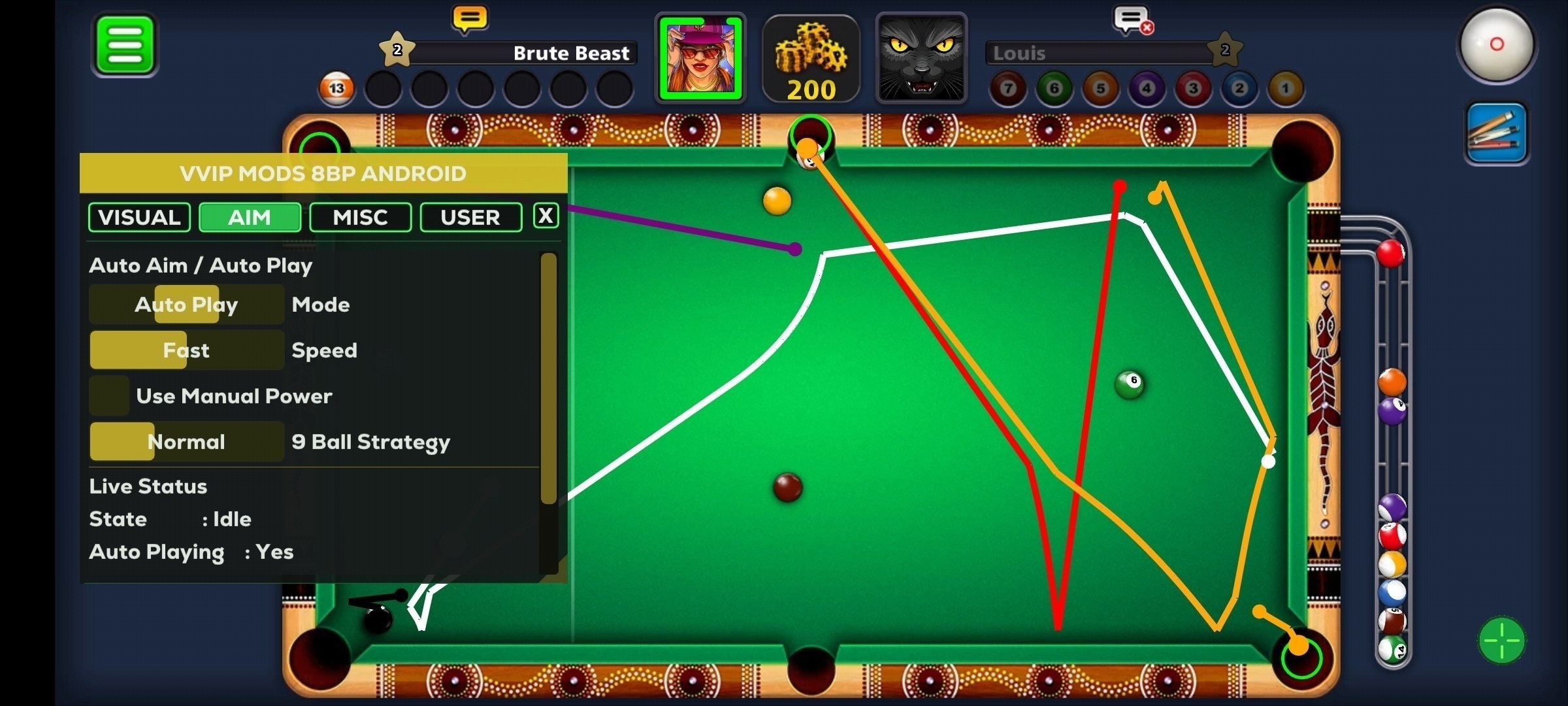
The current 8 Ball Pool catalog contains one listed build: Attic for Android. This means the practical choice is not between competing products but between feature groups and access periods. Attic includes trajectory drawing, AutoPlay, and Auto Queue, does not require root access, and is intended for the official Miniclip version of 8 Ball Pool.
Start with the 8 Ball Pool software page, then compare your needs with the Attic 8 Ball Pool features and requirements. The main criteria are a suitable Android device, the official game version, the desired level of automation, and a 3-day, 7-day, or 30-day plan. The catalog does not provide the build’s current status, so request an up-to-date confirmation from the stated technical support before paying and launching it.
What options are available
There are no several listed builds with enough information for a product ranking. Attic is the only named option, so it would not be meaningful to declare a winner. Instead, the useful comparison is between parts of the same product:
- Drawing for trajectory and pocket visuals;
- AutoPlay for automatic play and related controls;
- Auto Queue with three listed modes;
- access periods of 3, 7, or 30 days.
The three plans are confirmed as duration choices. They are not described as separate editions, and the catalog does not state that their feature sets differ. A longer period should not be treated as an upgraded version unless technical support confirms that distinction before purchase.
Drawing tools for trajectory information
The Drawing group contains three listed controls:
- Draw Lines for trajectory lines;
- Draw Pockets for pocket highlighting;
- Line Thickness for adjusting line thickness.
Attic is described as showing the paths of the object ball and cue ball after a shot, including multi-cushion bounce lines. This group is relevant when the main requirement is additional geometric information on the table.
Drawing is separate from automatic play. Lines and pocket highlights are visual features, while AutoPlay is the group associated with automatic gameplay. Line Thickness changes the displayed line thickness; no additional behavior for this setting is specified.
If trajectory visualization is the main reason for your purchase, ask technical support to confirm that Drawing currently works with your game version and device. Broad Android compatibility is stated, but the catalog does not provide a current function or build status.
What the AutoPlay group includes
The Auto Play group lists:
- Enable AutoPlay;
- Scan Mode with Fast and Slow options;
- AI Mode with Safe, Balanced, and Aggressive styles;
- Smooth Cue;
- Auto Retry.
This represents a more automated use case than Drawing alone. If you want visual lines while retaining control of your own actions, Drawing is the directly relevant group. If you need the listed automatic play capability, AutoPlay and its settings are the features to examine.
Fast and Slow are confirmed as scan-speed options. Safe, Balanced, and Aggressive are confirmed as selectable AI styles. However, the catalog does not define their algorithms, measured accuracy, or behavioral differences. Their names do not prove that one is more reliable, effective, or safe than another.
Smooth Cue and Auto Retry are also listed without detailed technical explanations. If either function is essential to your intended use, ask technical support to explain its current behavior. A detailed setup and installation guide is stated to be included, but the catalog does not confirm separate documentation covering the internal logic of every mode.
What is confirmed about Auto Queue
Auto Queue has an enable control and three listed modes:
- Last;
- Smart;
- Table.
The Russian catalog description identifies these as table-selection modes. The specific logic of Last, Smart, and Table is not explained. Their names alone are not sufficient to establish how each option selects a table or how the modes differ in practice.
If Auto Queue is the deciding feature, request a current explanation of all three modes from technical support before choosing a plan. Do not assume additional behavior that is not included in the product description.
Comparing features by intended use
| Intended use | Relevant group | Confirmed options | What to confirm before payment |
|---|---|---|---|
| Display visual shot information | Drawing | trajectory lines, pocket highlights, line thickness | current operation with your game version and device |
| Use automatic play | AutoPlay | Fast/Slow, Safe/Balanced/Aggressive, Smooth Cue, Auto Retry | current build status and behavior of the required modes |
| Use Auto Queue | Auto Queue | enable control, Last, Smart, Table | the exact logic of the three modes |
| Obtain short-term access | 3-day or 7-day plan | plan duration | included features and when the period begins |
| Obtain longer access | 30-day plan | plan duration | included features and when the period begins |
This comparison does not identify a universal winner because every row refers to Attic. The choice depends on whether you require visual information, automatic play, Auto Queue, or a combination of those groups.
Device and game requirements
The confirmed Attic requirements and characteristics are:
- Android platform;
- no root access required;
- stated compatibility with all Android smartphones and tablets;
- the official Miniclip version of 8 Ball Pool.
No-root operation means that root access is not listed as a prerequisite. It is not evidence of account safety and does not replace a current compatibility check.
The catalog states compatibility with all Android smartphones and tablets, but it does not provide a specific Android version, processor family, or other detailed system requirements. For that reason, confirm your exact device and Android version with technical support before payment.
Support for iOS or other platforms is not listed. If your device does not run Android, do not assume that this build is compatible without separate confirmation.
Pre-purchase and pre-launch checklist
Use this checklist before selecting an access period:
- Confirm that you use an Android smartphone or tablet.
- Verify that your copy of 8 Ball Pool is the official Miniclip version.
- Decide whether you need Drawing, AutoPlay, Auto Queue, or several groups.
- Ask technical support for the current build status because it is not provided in the catalog.
- Confirm compatibility with your device model and Android version.
- Request clarification for any mode whose behavior is not explained.
- Ask whether the 3-day, 7-day, and 30-day plans include the same functions.
- Confirm when the selected access period begins.
- Before launch, request another current confirmation of status and compatibility.
Do not choose the 30-day plan simply because you expect additional functions. The catalog confirms the longer duration but does not describe different feature tiers.
Data limitations and practical conclusion
The catalog provides no information about bans, software detection, penalties, or account safety. It therefore cannot support a promise that there will be no consequences or provide an account-safety guarantee. No-root operation and stated Android compatibility are not evidence of such safety either.
Attic is relevant for consideration when you use Android and the official Miniclip version of 8 Ball Pool and need trajectory drawing, AutoPlay, or Auto Queue. Drawing covers the visual-information use case, AutoPlay provides the listed automatic-play controls, and Auto Queue offers Last, Smart, and Table modes. Choose the plan according to the required duration. Make the final decision only after technical support confirms the current status, device compatibility, behavior of important modes, and contents of the selected plan.
Dominate 8 Ball Pool with our software
Statuses update automatically; ambiguous cases are reviewed manually. Sales may be paused during extended updates.