FOCUS: prepare Windows before launch
Windows preparation for standard FOCUS products: anti-cheat software, core isolation, VBS, hypervisor components and the required restart.
Disabling or removing protection increases the risk of computer infection. A compatibility requirement does not establish that a file is safe. If your browser or antivirus displays a warning, stop the download or launch and send support the threat name and file source. Do not bypass the warning or restore a quarantined file without verification.
Download
Which products this guide covers
This page covers Windows preparation for FOCUS products other than Roblox External and Roblox Account Manager. Those products have separate guides below. Check the selected product page for its Windows builds and compatibility.
1. Check installed anti-cheat software
The developer requires removing FACEIT Anti-Cheat, Riot Vanguard and other installed anti-cheat software before launching FOCUS, then restarting the PC. Games that require those components may not start until they are reinstalled.
2. Core isolation
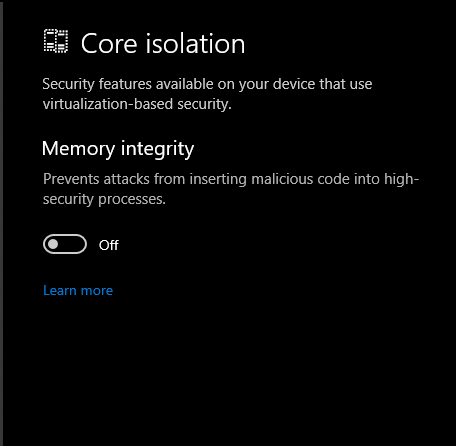
Open Windows Security → Device security → Core isolation details. Turn off only the two settings listed below. The wording and appearance may vary between Windows builds.
Memory integrity — HVCIMicrosoft vulnerable driver blocklist
3. VBS and Windows features
The developer requires VBS (Virtualization-Based Security) to be off. Open Turn Windows features on or off and clear only the features listed below.
Hyper-VWindows Hypervisor PlatformVirtual Machine PlatformWindows SandboxMicrosoft Defender Application Guard
4. Hypervisor startup
Open Terminal or Command Prompt as an administrator and run the developer-listed command:
bcdedit /set hypervisorlaunchtype off5. Restart and hardware virtualization
Restart the PC; the changes do not apply until a restart. Do not disable VT-x / AMD-V in BIOS. Keep hardware virtualization enabled.
If the program still does not start
Recheck each step and the selected product requirements. When contacting IVSOFTE support, include the order number, product name, Windows build and exact error text. Keep your license key out of public messages.