Select an image to view it larger.
Arcane DayZ
Arcane DayZ — Aimbot, ESP and No Clip
Global keys — work worldwide.
Payment with a Binance card may be available for selected products. Contact us privately before buying to check availability and agree the details.
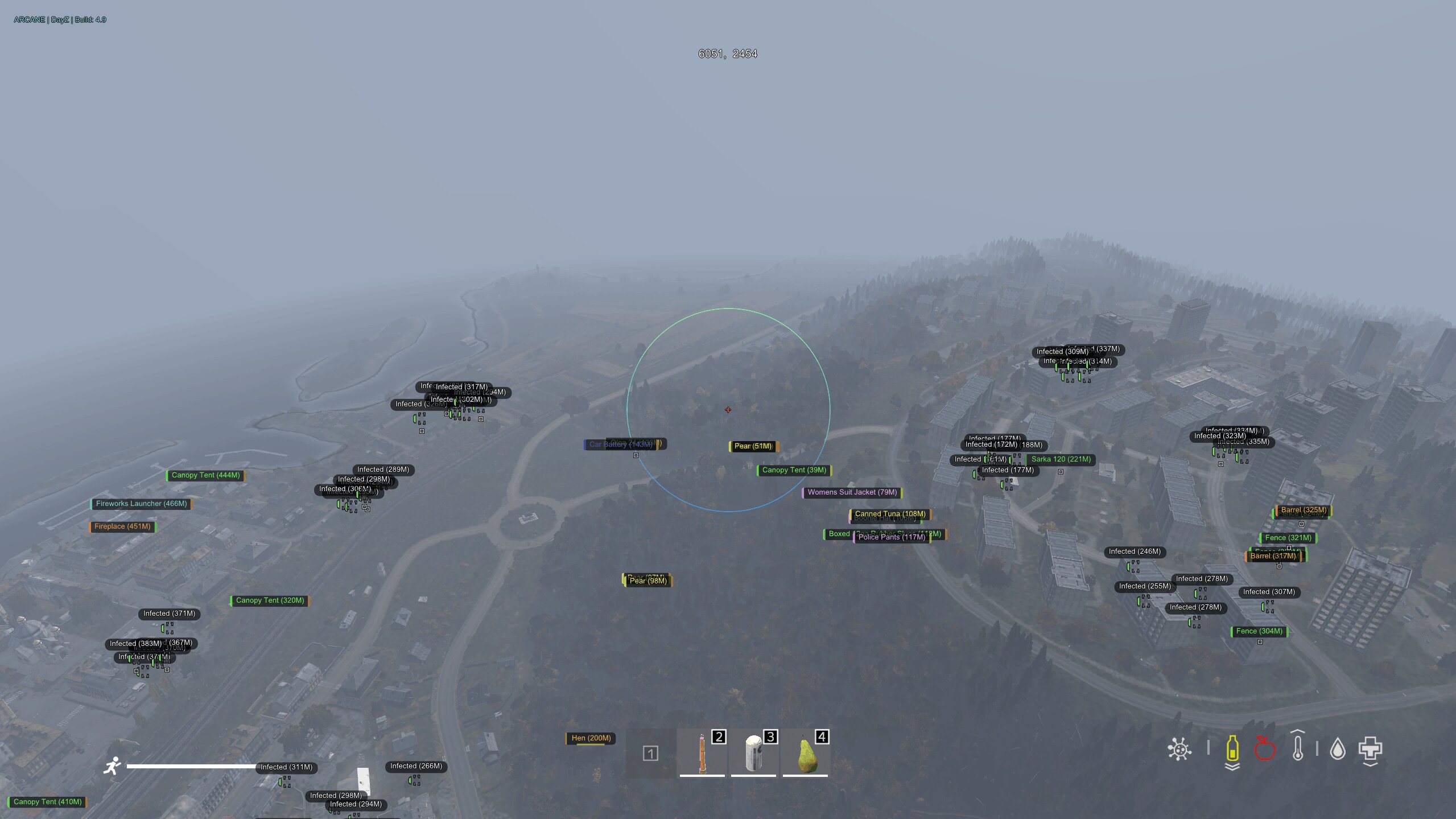
Arcane for DayZ combines aimbot with separate ESP controls for players, infected, animals, vehicles and items. Filter loot by category and condition, inspect inventories and reduce visual clutter with battle mode.
No Clip, Always Day, No Grass and third-person view controls are included. Save and load configurations; choose a 1, 7 or 30-day license.
Designed for the Steam client on Windows 10/11 with Intel or AMD processors and NVIDIA or AMD graphics. Use windowed or borderless mode. The developer lists no included spoofer and no USB drive requirement.
System Requirements
Features
Aimbot
- Enable aimbot
- FOV radius
- Maximum aim distance
- Ignore players
- Ignore infected
- Ignore animals
- Target bone: nearest, head, neck or pelvis
- FOV circle: solid or gradient
- Target line: solid or gradient
Player ESP settings
- Item in hands
- Trace lines
- Show inventory only when hovering
- Maximum player distance
Infected ESP settings
- Maximum infected distance
Vehicle ESP
- Enable vehicle ESP
- Distance
- Inventory
- Maximum vehicle distance
Item ESP
- Enable item ESP
- Distance
- Quality as text or bar
- Maximum item distance
- Battle mode
Equipment and consumables
- Food
- Drinks
- Cooking
- Backpacks
- Vests
- Clothing
- Medical supplies
- Consumables
Player corpses
- Enable player corpse ESP
- Distance
- Inventory
- Hide in battle mode
- Maximum player corpse distance
Animal corpses
- Enable animal corpse ESP
- Distance
- Hide in battle mode
- Maximum animal corpse distance
Configurations
- Menu languages: English and Chinese
- Save configuration
- Load configuration
Player ESP
- Enable player ESP
- Friends
- Corner or square boxes
- Solid or gradient box fill
- Head dot
- Health bar
- Name
- Distance
- Inventory
Infected ESP
- Enable infected ESP
- Corner or square boxes
- Solid or gradient box fill
- Head dot
- Health bar
- Name
- Distance
- Inventory
- Traces
Animal ESP
- Enable animal ESP
- Health as text or bar
- Distance
- Maximum animal distance
Weapons and supplies
- Weapons
- Magazines
- Ammunition
- Explosives
- Suppressors
- Optics
- Attachments
- Melee weapons
- Vehicle supplies
Item quality filters
- Pristine
- Worn
- Damaged
- Badly damaged
- Ruined
Infected corpses
- Enable infected corpse ESP
- Distance
- Inventory
- Hide in battle mode
- Maximum infected corpse distance
Miscellaneous
- No Clip (free flight)
- Always Day
- Local position
- Unlock third-person view
- No Grass
- Helicopter crash sites
- Static crosshair
Customer Reviews
All reviewsFrequently Asked Questions
What features are included in Arcane DayZ?
What payment methods are accepted?
How to contact support?
Payment is confirmed, but the product is missing. How long should I wait?
I have a key. Where are the download and instructions?
After payment you will receive detailed instructions on activation, launch and use of the software.
Instructions will be sent to the email address specified before payment.
You will also find a download link and necessary components for the software.
Cheat community
Cheat updates, detection status and help from other players — in our Telegram and Discord.