Arcane Hunger
Arcane Hunger — aimbot, ESP, radar and free camera cheat
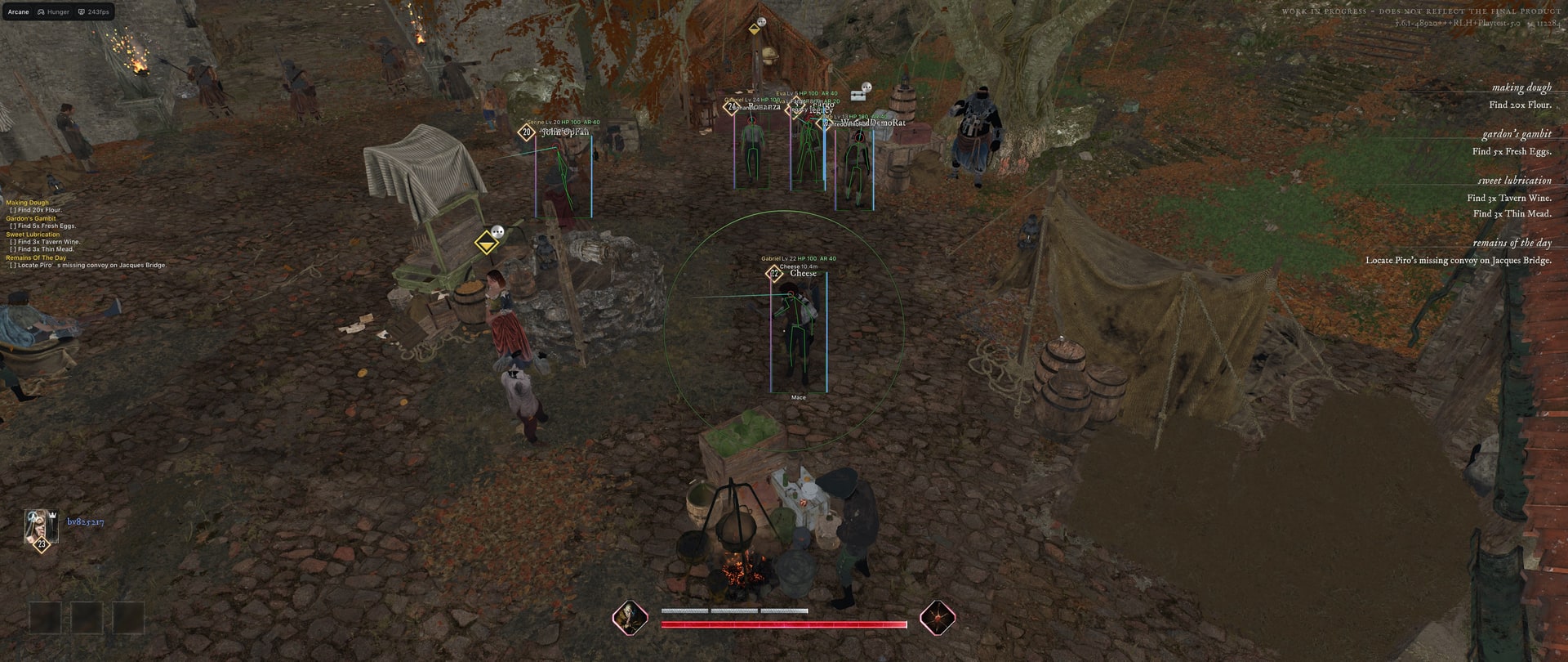
Arcane Hunger combines aimbot, player, bot, mob and item ESP, radar and off-screen indicators. It includes extraction and quest displays, weapon controls, free camera, battle mode and configuration profiles.
System Requirements
🔔 Cheat statuses update automatically from our Telegram bot via developer notifications — follow the news there. Many cheats update themselves after game changes, so a “Checking” status does not mean the cheat is broken — it is just uncertainty until confirmed. Not sure? Ask in the site chat or on our Contacts page.
Global keys — work worldwide.
Payment with a Binance card may be available for selected products. Contact us privately before buying to check availability and agree the details.
Features
Aimbot
- Enable
- Keybind
- Force aim key
- Lock target
- Shift to head
- Visibility check
- Ignore teammates
- Max distance
- Prediction: (Fallback bullet speed)
- Prediction cross: (Cross size)
- Target switch delay: (Delay)
- Humanization system: (Humanization factor)
- Target: (Players, Bots, Mobs)
- Bone selection method: (Selected bones, Closest bone)
- Target bones: (Head, Neck, Body, Pelvis...)
- Activation: (On hold, Always, Toggle)
- Adaptive FOV
- Draw FOV Border: (Thickness)
- Draw FOV Background
- FOV Size
- Smoothness
Items ESP
- Ground items: (Common, Uncommon, Rare, Epic...)
- Minimum rarity: (Common, Uncommon, Rare, Epic...)
- Chests
- Containers
- Death bags
- Resources
- Corpses
- Quest loot
- Contents: (None, On hover, All)
- Contents view: (Text, Pictures)
- Cell size
- Cells per row
- Hide empty
- Color by rarity
- Show Distance
- Rendering Distance
Item pictures
- Item style: (Text, Picture, Text + Picture)
- Picture source: (Silhouette, Image)
- Picture size
- Picture opacity
- Picture outline
- Outline shape: (Contour, Box)
- Outline style: (Static, Rainbow)
- Outline thickness
Radar
- Enable
- Distance rings
- FOV cone
- Scale by distance
- Zoom
- Size
- Transparency
- Entities: (Players, Bots, Mobs, Items...)
- Max distance
- Show on rim
View Exploits
- Fullbright: (Unlit, Detail lighting, Lighting only, Wireframe)
- No screen effects
Settings
- Menu key
- Unload key
- Enable Crosshair: (Plus, Circle, Dot, X Cross...)
- DPI Scale: (100%, 125%, 150%)
- VSync
- FPS Limit
- Theme: (Murky, Sunny)
- Watermark
- Layout: (Two columns, One column)
- Language: (English, Russian, Chinese)
Configs
- Create new
- Launch
- Save
- Edit name
- Remove
Players & Bots ESP
- Bounding box: (Box, Corner)
- Box Filled: (Static, Gradient)
- Skeleton: (Thickness)
- Head circle: (Filled head circle)
- Visibility check: (Visible color, Invisible color)
- View line: (Line start color, Line end color)
- Line: (Top of screen, Bottom of the screen, Center of the screen)
- Nickname
- Distance
- Hero
- Level
- Weapon in hands
- Health bar: (Static, Health based, Gradient)
- Health text
- Armor bar
- ESP preview
- ESP style: (No background, With background)
- Show teammates
- Rendering Distance
Mobs ESP
- Bounding box: (Box, Corner)
- Box Filled: (Static, Gradient)
- Skeleton: (Thickness)
- Head circle: (Filled head circle)
- Visibility check: (Visible color, Invisible color)
- View line: (Line start color, Line end color)
- Line: (Top of screen, Bottom of the screen, Center of the screen)
- Name
- Distance
- State: (Combat color, Targeting you color)
- Health bar: (Static, Health based, Gradient)
- Health text
- ESP preview
- ESP style: (No background, With background)
- Hide sleeping
- Rendering Distance
World ESP
- Extraction points: (Max distance)
- Quest items
- Quest objectives
- Quest list on screen
- Explosive traps
- Sound traps
- Poison areas
- Raid timer
- Show Distance
- Rendering Distance
Off-screen
- Enable
- Targets: (Players, Bots, Mobs, Extraction points)
- Range
- Size
- Max distance
Player Exploits
- FOV changer: (FOV value)
- Big player: (Player size)
- No camera shake
- Infinite stamina
- Infinite energy
- Free camera: (Free camera key, Camera speed, Camera boost, Camera boost key...)
Weapon Exploits
- No recoil
- No spread
- No sway
- Instant ADS
- No shot smoke
- Auto fire mode: (Hold key, Reload time)
- Fast reload: (Reload speed)
- Fast weapon switch: (Switch speed)
- Fast melee: (Attack speed)
- Melee reach: (Max reach, Auto target nearest visible, Auto attack, Attack interval)
Battle mode
- Battle mode
- Battle mode key
- Activation: (Toggle, On hold)
- Hide bots
- Hide mobs
- Hide items
- Hide world objects
- Hide items on radar
Customer Reviews
All reviewsFrequently Asked Questions
What features are included in Arcane Hunger?
What payment methods are accepted?
How to contact support?
Payment is confirmed, but the product is missing. How long should I wait?
I have a key. Where are the download and instructions?
After payment you will receive detailed instructions on activation, launch and use of the software.
Instructions will be sent to the email address specified before payment.
You will also find a download link and necessary components for the software.
Cheat community
Cheat updates, detection status and help from other players — in our Telegram and Discord.