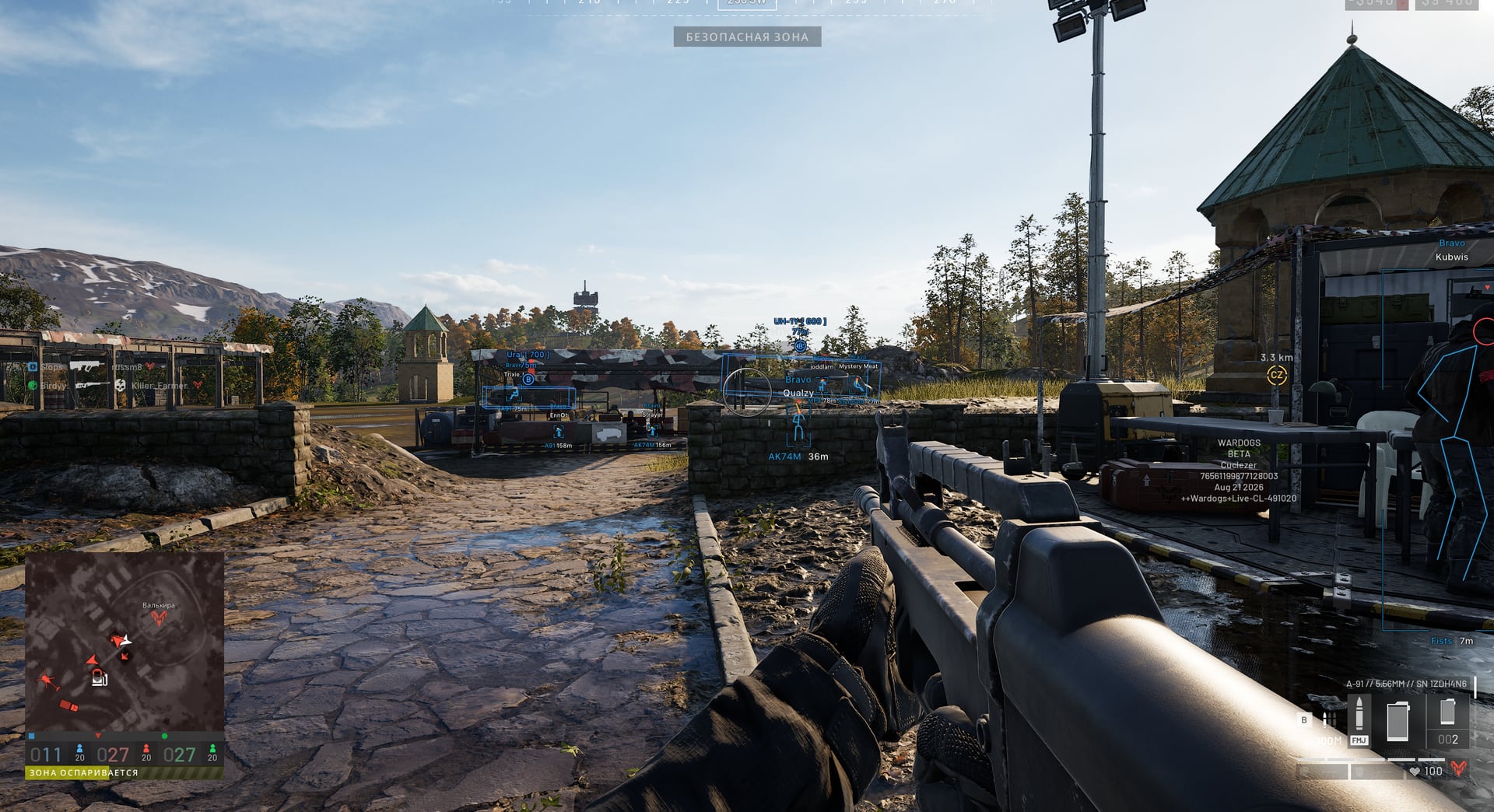
Play video 1
Select an image to view it larger.
Arcane for WARDOGS
Arcane — private WARDOGS cheat with Aimbot and ESP
Global keys — work worldwide.
Payment with a Binance card may be available for selected products. Contact us privately before buying to check availability and agree the details.
Arcane for WARDOGS combines pSilent and Humanize aimbot modes, player and world ESP, weapon-stability controls and a shared-config system. Choose targets and bones, adjust FOV and smoothing, display names, teams, weapons, distance, dropped items and vehicles, or enable No Recoil, No Spread, No Sway and Fullbright. The auto-update module removes the need to install updates manually after game patches.
New features include a separate SPH-2 Artillery helper, updated Mortar helper and Look alert for enemies looking at you. Viewline, offscreen label layout and performance have also been improved.
The supplied developer release notes state UNDETECTED. Status can change; check the current product status before launch. Third-party software carries an account-restriction risk.
System Requirements
Features
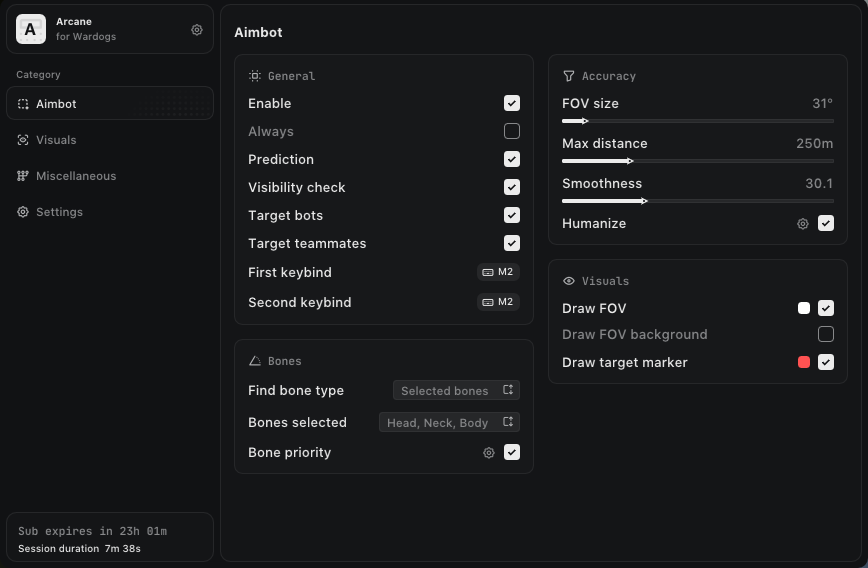
Aimbot
- Enable
- Activation key (Keybind)
- Force aim key (Force aim keybind)
- Target movement prediction (Prediction)
- Type: (Vector, pSilent, Silent)
- Mode: (Always, While held)
- Targets: (Players, Bots, Allies, Knocked)
- Bone selection: (Selected, Nearest, Random) (Find bone type)
- Bones: (Head, Neck, Chest, Pelvis...)
- Bone priority
- Bone lock (Bone freeze)
- Aim zone size (FOV Size)
- Dead zone
- Adaptive aim zone (Adaptive FOV)
- Show aim zone (Draw FOV)
- Aim zone background (Draw FOV Background)
- Show target marker (Draw target marker)
- Target switch delay
- Bone switch delay
- Aim smoothness (Smoothness)
- Human-like aiming simulation (Humanize)
- Hit chance
- Visibility check
- Maximum distance (Max distance)
Item ESP
- Supplies: (Supply crate, Construction material pallet...) (Supply)
- Dropped items: (Item, Backpack)
- 3D box (3D Box)
- Transparency
- Show on radar
- Show name
- Show distance
- Marker on radar edge
- Maximum distance (Max distance)
Radar
- Enable
- Targets: (Players, Knocked, Allies, Bots...)
- Vehicles: (Enemy, Allied)
- Loot
- Rotate with view direction
- Show field-of-view cone (Show FOV cone)
- Distance rings
- Scale rim markers by distance
- View direction (Look position)
Off-Screen Indicators
- Enable
- Style: (Size, Position, Transparency)
- Targets: (Players, Knocked, Bots)
- Visibility check
- Maximum distance (Max distance)
View Settings
- Brightens the scene (Fullbright)
- Configures display flags (Show flags)
- Adjusts gamma (Gamma)
- Changes the field of view (FOV Changer)
- Provides enhanced zoom (Super zoom)
- Removes the zoom limit (No zoom limit)
- Adjusts the weapon offset (Weapon offset)
- Enables free camera movement (Free camera)
Combat Mode
- Activation key (Keybind)
- Hide players (Hide Player)
- Hide corpses (Hide Corpse)
- Hide world items (Hide World item)
- Hide vehicles (Hide Vehicle)
- Hide buildings (Hide Building)
- Hide projectiles (Hide Projectile)
- Hide radar (Hide Radar)
- Hide in-game radar (Hide Game radar)
- Hide off-screen indicators (Hide Offscreen)
- Hide mortar helper (Hide Mortar helper)
- Hide aim zone (Hide Aim FOV)
- Hide crosshair (Hide Crosshair)
- Hide grenade warnings (Hide Grenade warning)
- Hide glow (Hide Glow)
- Hide look alerts (Hide Look alert)
Player ESP
- Box: (Normal, Corner) (Bounding box)
- Box fill: (Solid, Gradient) (Fill box)
- Skeleton: (Head circle, Thickness)
- View line: (Start color, End color)
- Line to enemy: (Color, Position)
- Health: (Text, Bar) (Health bar)
- Glow: (Style, Colors)
- Mortar operator: (Color, Distance)
- Nicknames
- Show knocked players (Draw knockeds)
- Show corpses (Draw corpse)
- Visibility check: (RayCast)
- Fade near crosshair
Vehicle ESP
- Categories: (Ground vehicles, Aircraft) (Category)
- 3D box (3D Box)
- Transparency
- Show health
- Show distance
- Maximum distance (Max distance)
Building ESP
- Buildings: (Mortar, Mistral, Phalanx...)
- Fortifications: (Door, Gate, Bunker...)
- 3D box (3D Box)
- Transparency
- Show on radar
- Show name
- Show distance
- Marker on radar edge
- Maximum distance (Max distance)
Grenade, Mine, and Projectile ESP
- Throwables: (Grenade, Smoke grenade, C4...)
- Mines: (Claymore, Anti-tank mine)
- Projectiles: (Mortar shell, Phalanx projectile...)
- Grenade warning: (Warning text, Blast radius)
- Show on radar
- Show name
- Show distance
- Marker on radar edge
- Maximum distance (Max distance)
In-Game Map Radar
- Enable
- Targets: (Players, Knocked, Bots)
- On minimap
- On tactical map
- Show distance
- Visibility check
- Mortar operator
Weapon Modifications
- No recoil (No Recoil)
- No spread
- No sway
- Unlimited breath hold (Infinity breath)
- No weapon collision
- Always hit the critical spot (Always crit spot)
- Crosshair: (Enable, Style, Size, Thickness)
Helpers and Warnings
- Mortar helper: (Prediction, Crosshair, Details, Target marker, Auto-aim)
- Artillery helper: (Crosshair, Details, Target marker, Auto-aim, Automatic mini-game)
- Shell trajectory: (Mortar, Artillery)
- Look alert: (List window, Text size, Arrows, Radar, Visibility check)
Menu Settings
- Menu key (Menu keybind)
- Unload key (Unload keybind)
- Interface scale (DPI Scale)
- Vertical synchronization (VSync)
- Interface theme (Theme)
- Watermark
- Menu language (Language)
Menu Screenshots
What's new in this cheat
5
New features, meaningful improvements and important fixes for this product.
AIM and Item ESP fixes
- Fixed an issue with AIM functionality in transport mode
- Fixed a rare crash and wrong aim when switching weapons or when a vehicle is destroyed while aiming
- Fixed item names showing as tags (WEPN_030 instead of FAL) when the item was seen before the game loaded its names
- Fixed item names disappearing for every item during long sessions
- Fixed some items never getting their real name
Aimbot, visibility check, and vehicle-part improvements
- Fixed prediction on sniper rifles.
- “Random bone” with “Visibility check” enabled now selects from all visible bones.
- Triggerbot now uses the weapon’s real shot line, with zeroing.
- Added “Damaged parts”: engine, fuel tank, tracks, wheels, rotors, and radar with their health in %. Only damaged parts are shown.
- Fixed walls turning “transparent” in long matches: players behind them were shown as visible until the map changed.
Nickname display issue fixed
- Fixed an issue that prevented nicknames from being displayed
ESP fix from the Havoc helicopter gunner’s seat
Archived announcement. The date records the changes; the exact build date is unknown.
- Fixed the ESP from the gunner's seat in the Havoc helicopter
Glow reworked and extended to world objects
Archived announcement. The date records the changes; the exact build date is unknown.
- Added the "Mode" setting to Glow. Mode 1 is the old Glow with its 7 styles. Mode 2 is a new Glow with a sharp outline and a soft edge around the player's body.
- Mode 2 has 6 coloring options: Visibility, Static, Health, Distance, Rainbow, and Pulse. Visibility gives visible and hidden body parts their own colors; Health changes from green to red as the player loses health; Distance changes from red up close to light blue by 150 m; Pulse applies Visibility colors with a breathing effect.
- Added a "Glow" option for vehicles, buildings, fortifications, dropped items, backpacks, explosives, projectiles, and world objects.
Customer Reviews
All reviewsFrequently Asked Questions
What features are included in Arcane?
What payment methods are accepted?
How to contact support?
Payment is confirmed, but the product is missing. How long should I wait?
I have a key. Where are the download and instructions?
After payment you will receive detailed instructions on activation, launch and use of the software.
Instructions will be sent to the email address specified before payment.
You will also find a download link and necessary components for the software.
Cheat community
Cheat updates, detection status and help from other players — in our Telegram and Discord.