Avalanche for DayZ
Private Avalanche cheat for DayZ
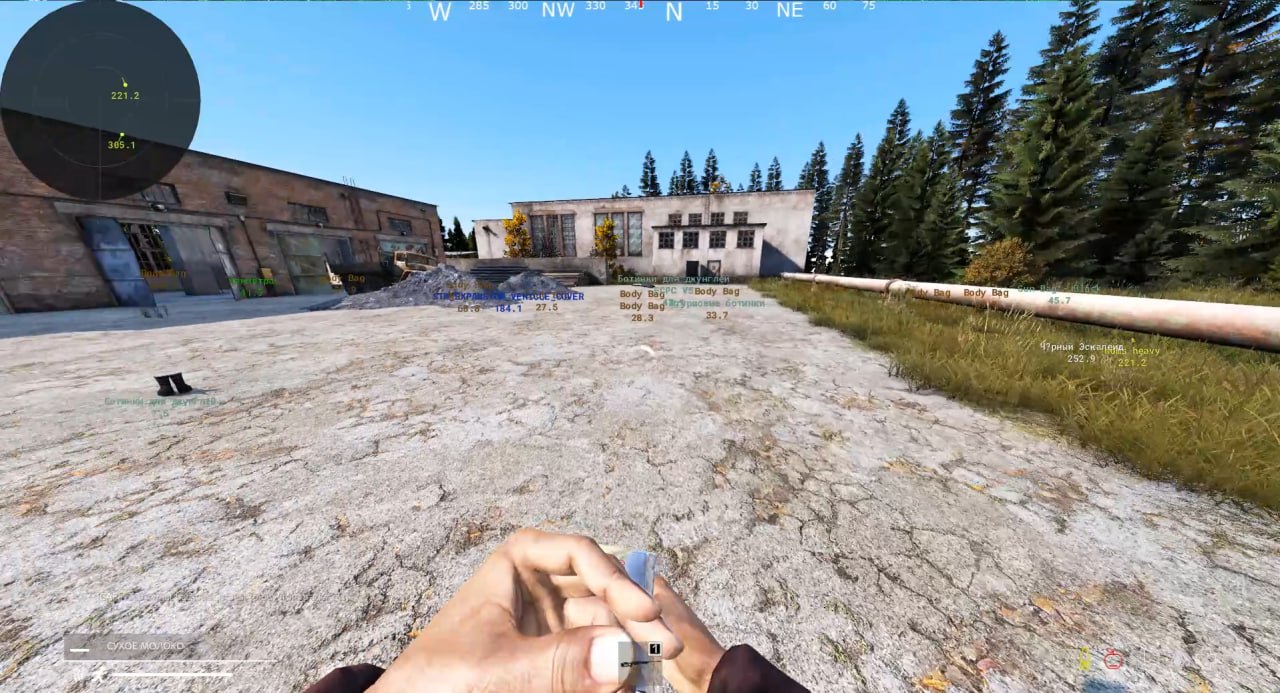
Avalanche is a private DayZ cheat with a complete toolkit: ESP for players, zombies, vehicles, animals and corpses, detailed loot ESP with a quality filter and 20+ item categories, a precise aimbot with an adjustable FOV, a standalone radar and a custom crosshair. Its key advantage — the visuals are not visible on screenshots or screen recordings, so you can stream and record demos freely. The menu is available in English and Russian (switch with F2), and configs are shared as a single line of text via the clipboard. Works on all versions of Windows 10/11, Intel and AMD CPUs, any GPU. A spoofer is optional and sold as a separate subscription. Plans: 1, 7 and 30 days.
System Requirements
🔔 Cheat statuses update automatically from our Telegram bot via developer notifications — follow the news there. Many cheats update themselves after game changes, so a “Checking” status does not mean the cheat is broken — it is just uncertainty until confirmed. Not sure? Ask in the site chat or on our Contacts page.
Global keys — work worldwide.
Payment with a Binance card may be available for selected products. Contact us privately before buying to check availability and agree the details.
Features
ESP — Player / Zombie / Entity
- Players — skeleton, name, box, distance
- Zombies — skeleton, box, distance
- Vehicles — distance
- Animals
- Corpses
AIMBOT
- Precise aimbot with an adjustable FOV circle
- Aimbot target highlight
- Combat Mode Key
MISC
- Custom crosshair (multiple types)
- Grass removal
- Always Day
- Text Mode
CONFIG & GENERAL
- Save / load configs via clipboard — a config is shared as a single line of text
- Reset to default settings
- Unload the cheat from the game
- Menu on F1, RU/EN menu language switch on F2
- No re-inject needed when restarting the game
- Visuals are not visible on screenshots or screen recordings
LOOT ESP
- Distance to every item
- Min quality filter + quality value display
- Weapons, ammo, magazines, attachments, grenades
- Food, medical items, clothing, tools
- Containers, crates, repair items, generators, vehicle parts
- Melee weapons, seeds, sewing kits, building materials, tents, survival items
RADAR
- Standalone radar: size, scale, max distance
- Target triangles + view direction
- Distance text on the radar
- Move the radar with the mouse while the menu is open
COLORS
- Full color customization: outline, aimbot target, FOV, crosshair, teammate / admin / enemy
- Separate color for every loot category
Customer Reviews
All reviewsFrequently Asked Questions
What features are included in Avalanche?
What payment methods are accepted?
How to contact support?
Payment is confirmed, but the product is missing. How long should I wait?
I have a key. Where are the download and instructions?
After payment you will receive detailed instructions on activation, launch and use of the software.
Instructions will be sent to the email address specified before payment.
You will also find a download link and necessary components for the software.
Cheat community
Cheat updates, detection status and help from other players — in our Telegram and Discord.