BYSTER for Mistfall Hunter
Buy BYSTER cheat for Mistfall Hunter — aimbot and ESP
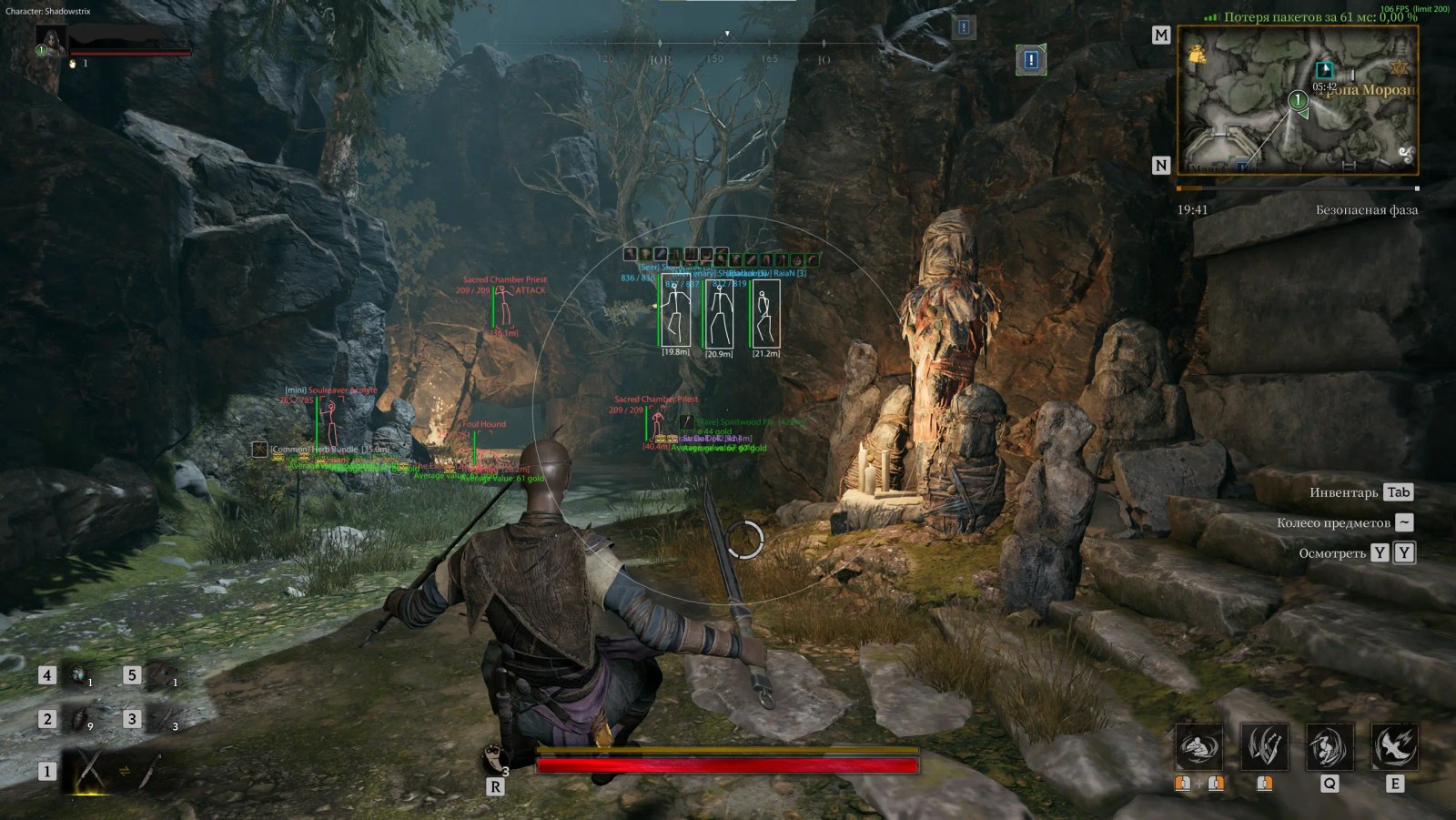
BYSTER for Mistfall Hunter is a private overlay cheat for the dark fantasy extraction game. The aimbot locks onto targets, aims at the head, body or nearest bone, ignores teammates and predicts movement with weapon-based correction while filtering out strafes and jumps; every class from Mercenary to Withered Knight gets its own aiming profile. Player ESP draws boxes, skeletons, HP bars, class tags, distance and armor icons with rarity borders, while mob ESP marks bosses, elites and mini-bosses and warns you of incoming attacks.
The loot layer covers everything: items with icons, value and rarity filters all the way up to Holy and Prismatic, treasures by category with average value and key-locked chest detection, enemy ability cooldowns and DoomTrap detection. Battle mode hides the clutter with a single key; there is an FOV changer, an FPS limit and a click-through overlay with automatic game window detection, and the menu automatically switches between English, Russian and Chinese localization.
System Requirements
Global keys — work worldwide.
If your bank card doesn't work with our payment system, you can pay using a Binance Gift Card (USDT).
This method has a fixed +10% service fee. Promo codes and discounts cannot be applied.
- Contact us to confirm that this payment method is available for the product you want
- Buy a Binance Gift Card (USDT) for the required amount on any marketplace in your country (Paxful, Binance, or local resellers) — using any payment method convenient for you
- Send the gift card code to us — and we'll activate your purchase and deliver the product
USDT (TRC-20) is also available as a payment option at checkout — without the extra fee.
Features
AIMBOT
- Enable — Enable the aimbot
- Aim Keybind — Aim key
- Target Lock — Lock onto the target
- Ignore Teammates — Ignore teammates
- Target Highlight — Highlight the target
- Target Highlight Color — Target highlight color
- Aim FOV Circle — Aim FOV circle
- FOV Circle Color — FOV circle color
- Head Aim — Aim at the head
- Body Aim — Aim at the body
- Nearest Bone Aim — Aim at the nearest bone
- Aim Smoothness — Aim smoothness
- Aim Distance — Aim distance
- Aim FOV — Aim FOV
- Weapon-Based Prediction — Weapon-based movement prediction
- Prediction Scale — Prediction scale
- Strafe Prediction Filtering — Filter prediction while strafing
- Jump Prediction Filtering — Filter prediction while jumping
- Mercenary Profile — Mercenary class profile
- Sorcerer Profile — Sorcerer class profile
- Blackarrow Profile — Blackarrow class profile
- Shadowstrix Profile — Shadowstrix class profile
- Seer Profile — Seer class profile
- Withered Knight Profile — Withered Knight class profile
- Local Character Detection — Local character detection
- Local Character Indicator — Local character indicator
LOOT ESP
- Enable — Enable loot ESP
- Localized Item Names — Localized item names
- Lootable Box Detection — Lootable box detection
- Item Icons — Item icons
- Item Icon Size — Item icon size
- Item Icon Opacity — Item icon opacity
- Item Quantity — Stack quantity
- Item Distance — Distance to the item
- Item Rarity — Item rarity
- Item Value — Item value
- Stack Value — Stack value
- Value Color — Value color
- Rarity Filters — Rarity filters
- Rarity Colors — Rarity colors
- Damaged Filter — Damaged items filter
- Common Filter — Common items filter
- Rare Filter — Rare items filter
- Excellent Filter — Excellent items filter
- Epic Filter — Epic items filter
- Legendary Filter — Legendary items filter
- Holy Filter — Holy items filter
- Prismatic Filter — Prismatic items filter
- Loot ESP Range — Loot ESP range
ABILITIES ESP
- Enable — Enable ability ESP
- Ability Names — Ability names
- Ability Icons — Ability icons
- Ability Cooldowns — Ability cooldowns
- Unknown Cooldown State — Unknown cooldown state
- Combat Skills Filter — Combat skills filter
- Ability List Layout — List layout
- Ability Bar Layout — Bar layout
- Ready Ability Color — Ready ability color
- Cooldown Ability Color — Cooldown ability color
- Ability Background — Ability background
- Ability Background Color — Ability background color
- Ability Icon Size — Ability icon size
- Teammate Ability Filter — Teammate ability filter
- 25-Meter Ability Range — Show abilities within 25 meters
MISC
- FOV Changer — Change the field of view
- Battle Mode — Battle mode
- Battle Mode Keybind — Battle mode key
- Hide Items in Battle Mode — Hide items in battle mode
- Hide Treasures in Battle Mode — Hide treasures in battle mode
- Hide Dead Actors in Battle Mode — Hide dead actors in battle mode
- VSync — Vertical sync
- FPS Limit — FPS limit
- FPS Counter — FPS counter
- Refresh Rate Indicator — Refresh rate indicator
- ESP Text Size — ESP text size
- Automatic English Localization — Automatic English localization
- Automatic Russian Localization — Automatic Russian localization
- Automatic Chinese Localization — Automatic Chinese localization
- Embedded Icons — Embedded icons
- Embedded Localization Data — Embedded localization data
- Automatic Game Detection — Automatic game detection
- Automatic Game Window Detection — Automatic game window detection
- Overlay Window Tracking — Overlay window tracking
- Click-Through Overlay — Click-through overlay
PLAYERS ESP
- Enable — Enable player ESP
- Bot ESP — Bot ESP
- Name — Name
- Class Tag — Class tag
- Team ID — Team ID
- Distance — Distance
- Full Box — Full box
- Corner Box — Corner box
- HP Bar — HP bar
- Skeleton — Skeleton
- Dead Players — Dead players
- Hide Teammates — Hide teammates
- Armor Icons — Armor icons
- Armor Rarity Borders — Armor rarity borders
- Armor Icon Size — Armor icon size
- Armor Icon Opacity — Armor icon opacity
- Player ESP Colors — Player ESP colors
- Target Box Highlight — Target box highlight
- Target Skeleton Highlight — Target skeleton highlight
- Player ESP Range — Player ESP range
MOBS ESP
- Enable — Enable mob ESP
- Localized Mob Names — Localized mob names
- Distance — Distance
- Full Box — Full box
- Corner Box — Corner box
- HP Bar — HP bar
- Skeleton — Skeleton
- Dead Mobs — Dead mobs
- Boss Tier — Boss tier tag
- Elite Tier — Elite tier tag
- Mini-Boss Tier — Mini-boss tier tag
- Attack Warning — Attack warning
- Hermit Sprites Detection — Hermit Sprites detection
- Hermit Sprites Color — Hermit Sprites color
- Mob ESP Colors — Mob ESP colors
- Target Box Highlight — Target box highlight
- Target Skeleton Highlight — Target skeleton highlight
- Mob ESP Range — Mob ESP range
TREASURES ESP
- Enable — Enable treasure ESP
- Localized Treasure Names — Localized treasure names
- Treasure Icons — Treasure icons
- Treasure Icon Size — Treasure icon size
- Treasure Icon Opacity — Treasure icon opacity
- Treasure Distance — Distance to the treasure
- Hide Opened Treasures — Hide opened treasures
- Opened Treasure Tint — Opened treasure tint
- Key-Locked Chest Detection — Key-locked chest detection
- Closed Chest Prefix — Closed chest prefix
- Average Treasure Value — Average treasure value
- Average Value Color — Average value color
- Chest Filter — Chest filter
- Ore Pile Filter — Ore pile filter
- Nature Filter — Nature filter
- Container Filter — Container filter
- Equipment Filter — Equipment filter
- Ritual Filter — Ritual filter
- Forge Filter — Forge filter
- Shipwreck Filter — Shipwreck filter
- The Exiled Filter — The Exiled filter
- Other Treasure Filter — Other treasures filter
- Treasure Category Colors — Treasure category colors
- Treasure ESP Range — Treasure ESP range
PROPS ESP
- Enable — Enable prop ESP
- DoomTrap Detection — DoomTrap detection
- DoomTrap Marker — DoomTrap marker
- DoomTrap Color — DoomTrap color
- Prop Distance — Distance to the prop
- Prop ESP Range — Prop ESP range
What's new in this cheat
Recent software updates — from the freshest to older ones.
-
BYSTER — cheat for Mistfall Hunter
A second cheat in the Mistfall Hunter section — BYSTER. An aimbot with target lock, profiles for all six classes and weapon-based movement prediction, player and mob ESP with boss tags and attack warnings, loot and treasures with icons, value and rarity filters up to Holy and Prismatic, enemy ability cooldowns, DoomTrap detection, a battle mode and a click-through overlay with automatic menu localization (EN/RU/ZH). Plans: 1 / 7 / 30 days. Product page in all 17 locales.
Frequently Asked Questions
Is it safe to use BYSTER?
How to install and launch BYSTER?
Does BYSTER work after a Mistfall Hunter update?
What features are included in BYSTER?
What payment methods are accepted?
How to contact support?
After payment you will receive detailed instructions on activation, launch and use of the software.
Instructions will be sent to the email address specified before payment.
You will also find a download link and necessary components for the software.
Cheat community
Cheat updates, detection status and help from other players — in our Telegram and Discord.