CourierScript for SQUAD
CourierScript for Squad — ESP, Enemy Indicators, Snapline, AIM
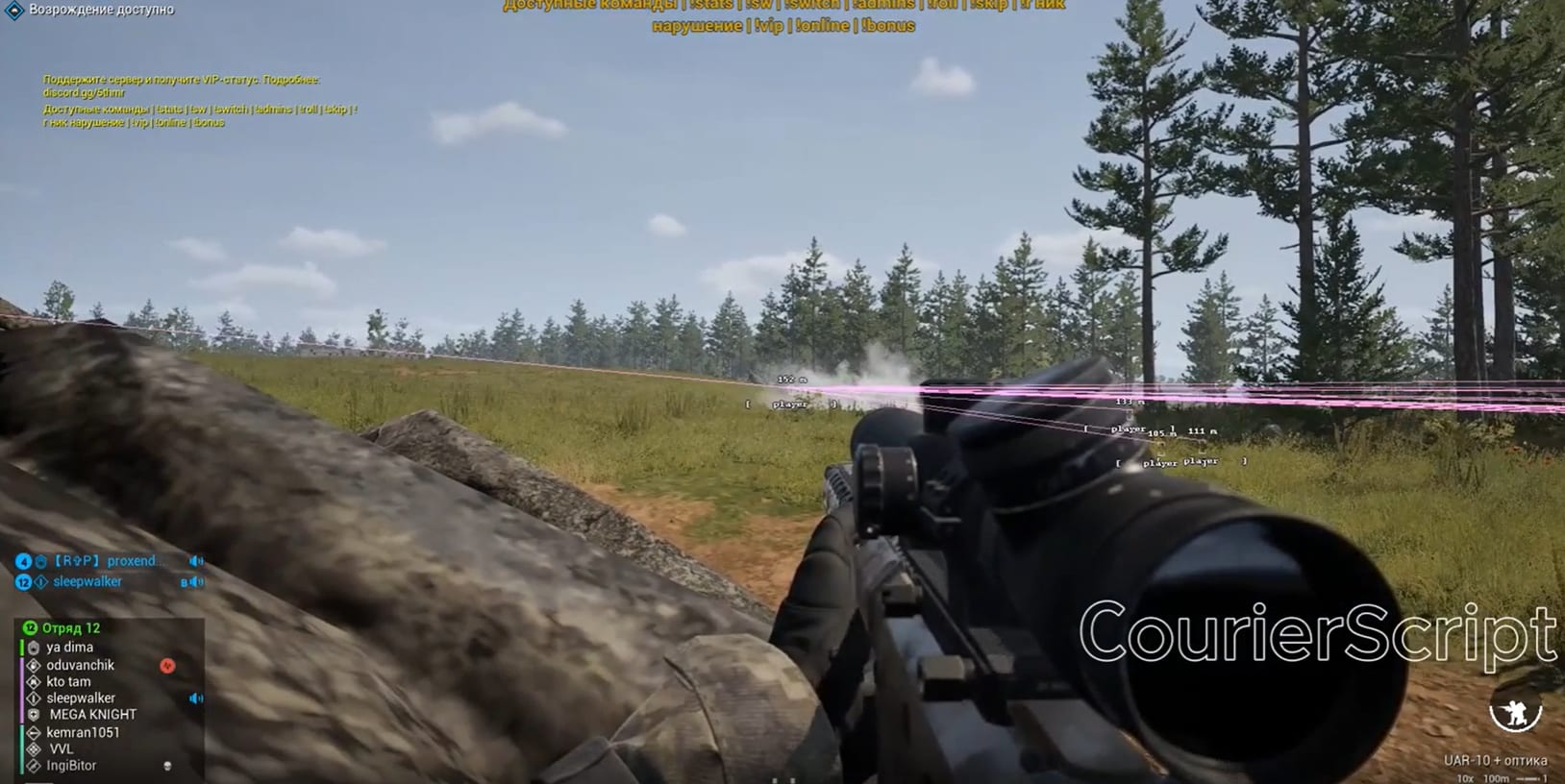
CourierScript for Squad is an external cheat for a tactical shooter where fights happen at hundreds of meters and information matters more than reaction time. It runs from a USB flash drive, installs nothing into the system and needs no BIOS changes.
WHAT THE CHEAT GIVES YOU
The corner box outlines enemies at any range. In Squad, with its huge open maps and realistic camouflage, an infantryman lying in grass is invisible to the eye — the box finds him anyway.
Distance display matters especially here: Squad has real ballistics and bullet drop, and knowing the exact range to a target translates directly into the right sight adjustment. The snapline draws a line to the enemy so you do not lose the target between rushes.
The enemy indicator and nearest-target highlighting warn you about who is closest — in a game where one flanking burst wipes a whole squad, that is the most valuable warning there is. The near-target crosshair shows an aiming point next to the closest enemy, while hot spot highlights enemy clusters — effectively telling you where the opposing squad is dug in.
The "players only" filter removes vehicles, objects and structures from the screen, leaving people only — on dense maps that brings readability back.
AIM helps bring the crosshair onto the target while staying smooth and unobtrusive.
INSTALLATION
Close Squad completely and disable your antivirus for the installation. Activate the key, download the loader, move it to a USB flash drive and run it as administrator. Remove the drive right after the loader starts, wait for it to finish, press OK and launch Squad. The settings menu opens with F1.
SYSTEM REQUIREMENTS
Windows 10 and 11 up to and including build 26H2. Any Intel or AMD processor. A USB flash drive is required. No BIOS manipulation needed.
AFTER PURCHASE
You receive an activation key and access to the loader. Installation instructions are included. Contact support with any installation or configuration questions.
System Requirements
🔔 Cheat statuses update automatically from our Telegram bot via developer notifications — follow the news there. Many cheats update themselves after game changes, so a “Checking” status does not mean the cheat is broken — it is just uncertainty until confirmed. Not sure? Ask in the site chat or on our Contacts page.
Global keys — work worldwide.
Payment with a Binance card may be available for selected products. Contact us privately before buying to check availability and agree the details.
Features
Features
- AIM
- Corner Box
- Distance
- Snapline
- Near Target Crosshair
- Enemy Indicator
- Nearest Target
- Hot Spot
- Show only players
Customer Reviews
All reviewsFrequently Asked Questions
Is it safe to use CourierScript?
How to install and launch CourierScript?
Does CourierScript work after a SQUAD update?
What features are included in CourierScript?
What payment methods are accepted?
How to contact support?
After payment you will receive detailed instructions on activation, launch and use of the software.
Instructions will be sent to the email address specified before payment.
You will also find a download link and necessary components for the software.
Cheat community
Cheat updates, detection status and help from other players — in our Telegram and Discord.