Eclipse External for Valorant
Eclipse External — private external cheat for Valorant: aimbot and ESP
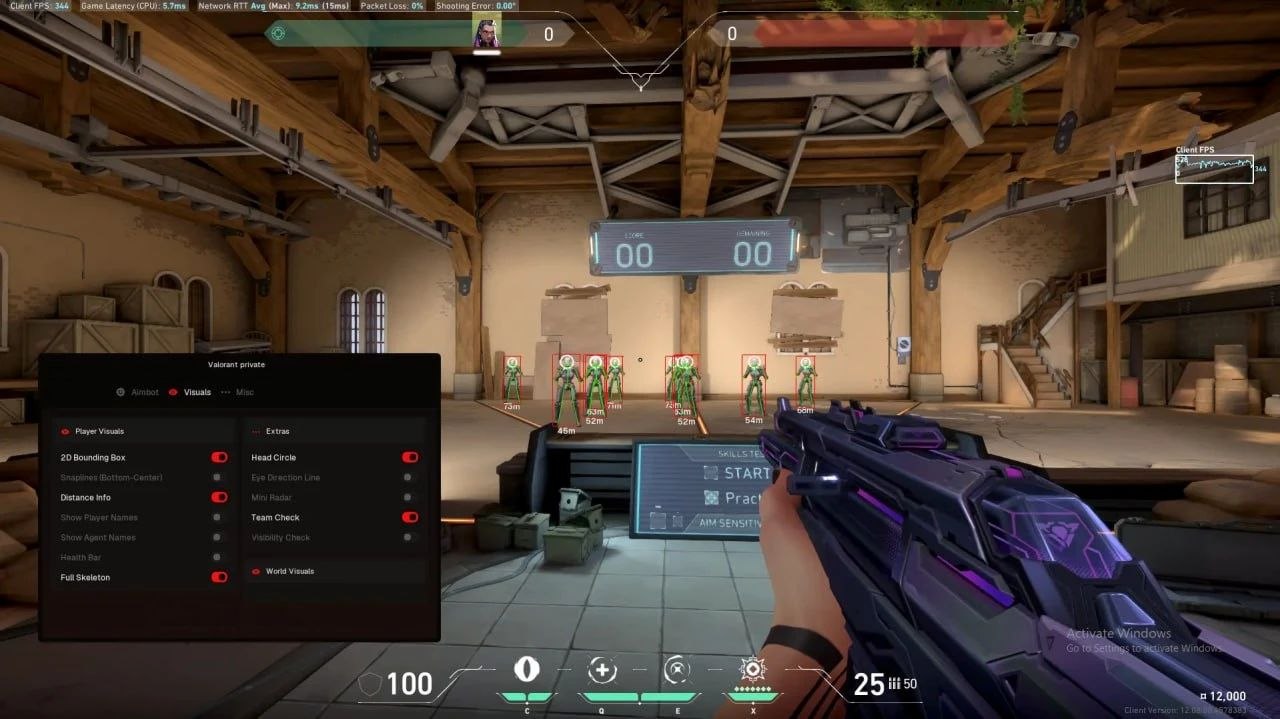
Eclipse External is a private external cheat for Valorant: a precise aimbot and full ESP in a single menu. It runs on top of the game and is launched through a loader with a personal key bound to your hardware (HWID Lock). The menu is in English, opens with the Insert key and is split into the Aimbot, Visuals and Misc tabs.
The aimbot works both on real opponents and on training bots. You can configure the activation key, target selection (closest enemy or a target inside the FOV), the visible check, aim speed, smoothing and stickiness, the working distance and the bone — head, neck or body. The FOV radius is set with a slider, and the border of the circle can be drawn on screen so you always see the capture zone.
The visual part shows opponents through walls: a skeleton with adjustable line thickness and a 2D box in the regular or corner style. Next to the target it prints the distance, health, a bot tag, the held weapon and the nickname. The visible check, rendering distance and distance display are configured separately, and element colours are changed through colourful palettes.
If the menu opens but the features do not work — and there was no game update — press END: the cheat unloads and the loader opens again, after which you can repeat the launch.
System Requirements
🔔 Cheat statuses update automatically from our Telegram bot via developer notifications — follow the news there. Many cheats update themselves after game changes, so a “Checking” status does not mean the cheat is broken — it is just uncertainty until confirmed. Not sure? Ask in the site chat or on our Contacts page.
Global keys — work worldwide.
Payment with a Binance card may be available for selected products. Contact us privately before buying to check availability and agree the details.
Features
Aimbot
- Target Enemies / training bot
- Aim Key selector
- Aim to closest enemy or FOV
- Visible Check
- Aim speed
- Draw FOV Border
- FOV Radius
- Bone (Head, Neck, Body)
- Smooth & stickiness ratio
- Distance
Visuals (ESP)
- Enemy ESP (Skeleton ESP, Box ESP)
- Skeleton Thickness
- Box 2D (Box, Corner)
- Enemy Information (Distance, Health, Bot)
- Held Weapon
- Visible Check
- Distance / Nickname
- Rendering Distance
- Show Distance
- Colorful palettes
* The feature list may be updated by the developer — follow the current version.
What's new in this cheat
Recent software updates — from the freshest to older ones.
-
Eclipse External — a new external cheat for Valorant
Added a new product, Eclipse External for Valorant — a separate external build, unrelated to the Eclipse already listed on the site. Aimbot: targeting enemies and training bots, activation key selector, aim to the closest enemy or to a target inside the FOV, visible check, aim speed, FOV border drawing and FOV radius, bone selection (head, neck, body), smoothing and stickiness, working distance. Visuals: enemy ESP (skeleton and boxes), skeleton thickness, 2D box in normal and corner styles, enemy information (distance, health, bot tag), held weapon, visible check, distance and nickname, rendering distance, distance display, colourful palettes. The menu is in English and opens with the Insert key, the key is bound via HWID Lock, and Windows 10 (all versions) and Windows 11 are supported. Plans of 1 / 7 / 30 days. The page is published in all 17 locales.
Customer Reviews
All reviewsFrequently Asked Questions
What features are included in Eclipse External?
What payment methods are accepted?
How to contact support?
After payment you will receive detailed instructions on activation, launch and use of the software.
Instructions will be sent to the email address specified before payment.
You will also find a download link and necessary components for the software.
Cheat community
Cheat updates, detection status and help from other players — in our Telegram and Discord.