FOCUS Diablo IV
FOCUS — Diablo IV
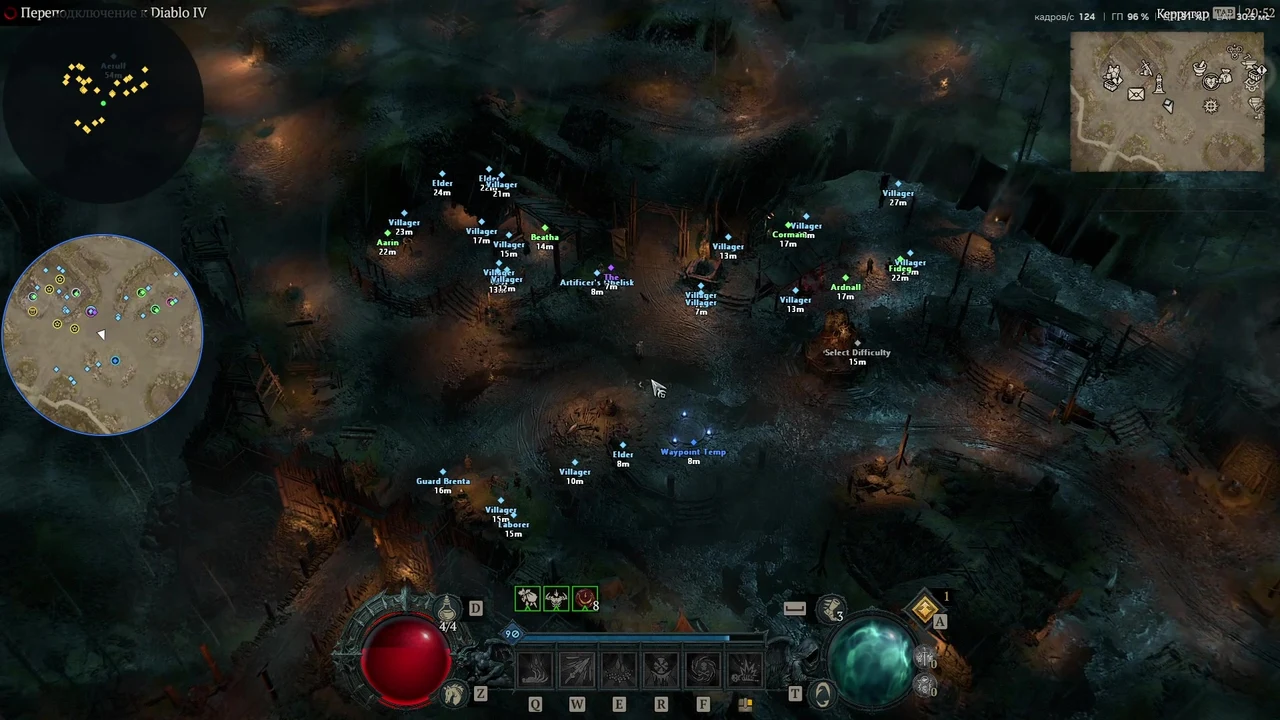
FOCUS for Diablo IV is a PC cheat combining monster and object ESP with a full map, minimap and radar. Choose the information you need, from enemy health and loot to Altars of Lilith, waypoints and dungeons.
Configure skill rotation using distance, resource and health conditions, set a movement target on the map and select dungeons for auto farming. The Pit has level selection and death-based adjustment, with separate loot filters, junk selling and equipment repair settings.
After payment, open the receiving link in your order. The IVSOFTE page provides your selected license and instructions. Reopening the link returns the same license.
System Requirements
🔔 Cheat statuses update automatically from our Telegram bot via developer notifications — follow the news there. Many cheats update themselves after game changes, so a “Checking” status does not mean the cheat is broken — it is just uncertainty until confirmed. Not sure? Ask in the site chat or on our Contacts page.
Global keys — work worldwide.
Payment with a Binance card may be available for selected products. Contact us privately before buying to check availability and agree the details.
Features
Visuals — mobs
- Enable monster visuals and choose their color. (Display)
- Separate name and distance toggles. (Name and distance)
- Health bar and numeric health value. (Health)
Full map
Map key and adjustable opacity. (Key and opacity)
Labels, player marker, regions, event timers and detailed map. (Map layers)
Dungeons, campaign and side-quest dungeons, boss lairs and cellars. (Dungeons)
Waypoints, towns, strongholds, world bosses, Altars of Lilith and Tenets of Akarat. (Points of interest)
Show stashes and wardrobes. (Services)
Radar
- Monsters, players, NPCs and items with individual colors. (Objects)
- Show names and distances. (Labels)
- Range, radar size, opacity and text size. (Settings)
Skill rotation
Activation key, key mode and delay between skill presses. (Rotation controls)
Hold position using a configurable key. (Hold position)
Configure skill-slot and basic-skill keys. (Skill keys)
Enemy range, minimum resource for spender skills and health threshold for defensive skills. (Skill conditions)
Auto farm
Activation key, objective completion and engagement range. (Dungeon clearing)
Low-health stop, auto potion, evade, auto revive and exit after a chosen number of deaths. (Survival)
Full auto farm with Pit tier selection, tier range and adaptation to deaths. (The Pit farming)
Sell junk, learn tempering manuals and repair gear. (Gear)
Pick up gear with a quality filter, materials, gems and gold. Open chests and interact with ore, herbs and corpses. (Loot collection)
Select dungeons with Ctrl + click on the full map, clear the selection and configure dungeon changes. (Dungeon selection)
Skill rotation based on enemy range, path settings and door interaction. (Combat and path)
Visuals — objects
- Chests, items, corpses, caches and breakable objects. (Loot)
- Ore and herbs. (Resources)
- Vendors, NPCs and players. (People)
- Shrines, Altars of Lilith, waypoints, portals, dungeons, cellars and doors. (Places)
- Individual toggles and colors for object categories. (Colors and filters)
Minimap
Activation key, shape selection and rotation with the camera. (Controls)
Adjust map size and visible range. (Size and range)
Opacity, text size, points of interest and player marker. (Appearance)
Monsters, chests, items, corpses, caches, breakables, ore, herbs, shrines, Altars of Lilith and waypoints. (Object filters)
Misc
Activation key and camera distance setting. (Camera zoom out)
Rotation key and adjustable speed. (Camera rotation)
Remove fog and adjust brightness. (World)
Use a potion below a chosen health threshold, with a configurable key. (Auto potion)
Sort items with Common, Magic, Rare and Legendary filters. (Junk sorting)
Navigation
Activation key and target selection. Double-click the full map to set a point. (Move to a point)
Path point spacing, wall margin and mob avoidance. (Path)
Show the path, choose its color and display it on screen. (Path display)
Keys for movement, door interaction, mounting and spurring the mount. (Doors and mount)
Customer Reviews
All reviewsFrequently Asked Questions
What features are included in FOCUS Diablo IV?
What payment methods are accepted?
How to contact support?
Payment is confirmed, but the product is missing. How long should I wait?
I have a key. Where are the download and instructions?
Select an access period and pay for your order. Your key and instructions will appear on the IVSOFTE delivery page after payment verification. Reopening the link retrieves the same license.
Cheat community
Cheat updates, detection status and help from other players — in our Telegram and Discord.