Ghost Fortnite FULL
Ghost Fortnite FULL — Aimbot, ESP, Radar and Loot
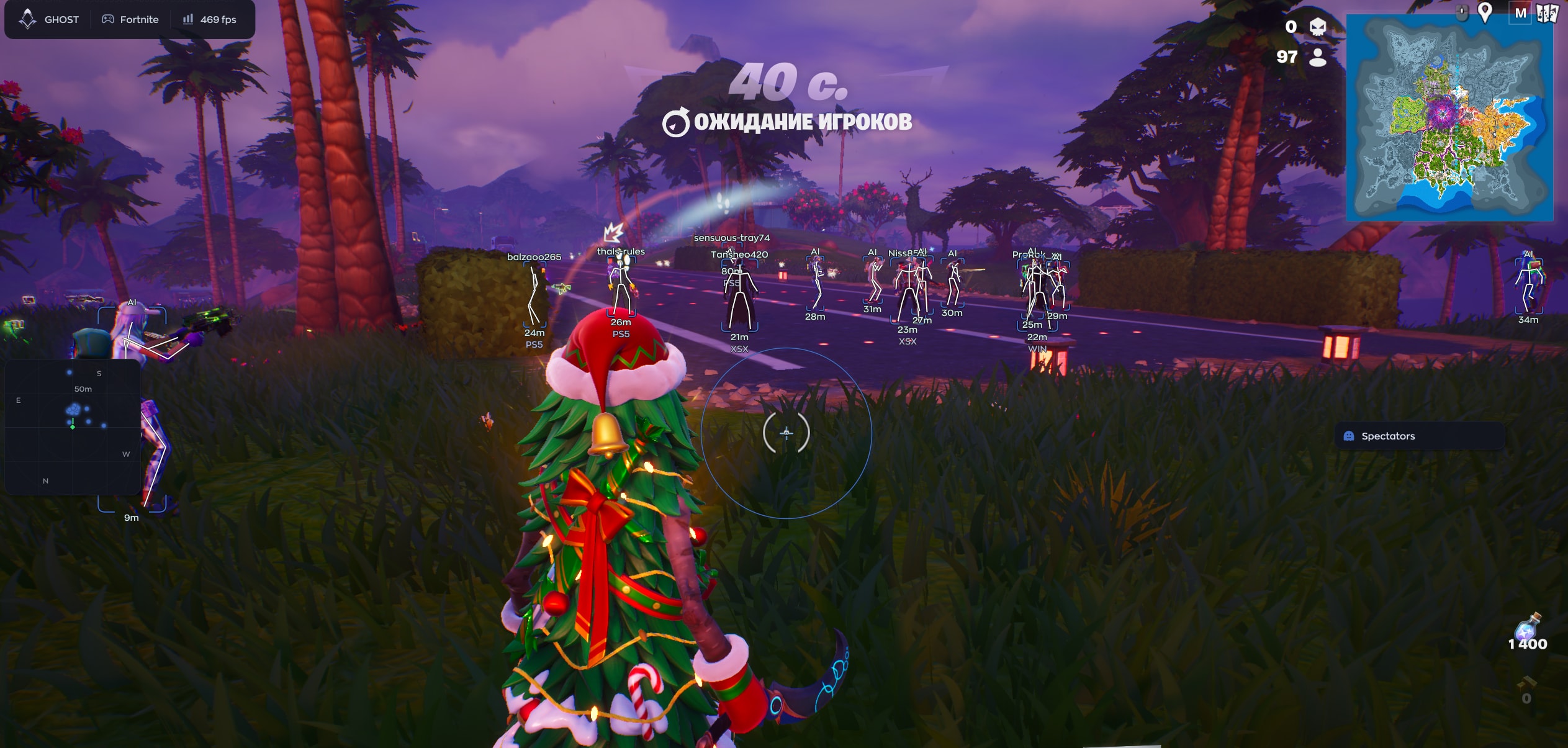
Ghost Fortnite FULL combines an aimbot with Humanize settings, player ESP, radar and loot filters. Choose player platform and rank indicators, adjust aiming and save configurations. The built-in AI Assistant answers questions about settings.
System Requirements
🔔 Cheat statuses update automatically from our Telegram bot via developer notifications — follow the news there. Many cheats update themselves after game changes, so a “Checking” status does not mean the cheat is broken — it is just uncertainty until confirmed. Not sure? Ask in the site chat or on our Contacts page.
Global keys — work worldwide.
Payment with a Binance card may be available for selected products. Contact us privately before buying to check availability and agree the details.
Features
Aimbot
- Enable — Turns the aimbot feature on or off.
- Field of View (FOV) — The radius within which the aimbot will "lock onto" a target.
- Smooth — The smoothness of the aim movement.
- Visible Check — Checks whether the target is visible.
- Target Lock — Keeps the crosshair locked onto the selected target, even as it moves.
- Hitbox — Selection of the target area (hit zone).
- Target Priority — Determines which target to prioritize.
Extra indicators
- SnapLine — A line extending from the bottom of the screen toward an enemy.
- Offscreen Arrows — Arrows indicating the direction of enemies located outside your field of view.
- Preview — A preview window showing how the visuals will appear on a player.
Radar
- Enable — Turn on the radar.
- Draw Outline — Draw the radar outline.
- Draw Background — Draw the radar background.
- Point Style — Style for displaying points.
- Size — Size of the radar.
- Max Distance — Maximum distance for displaying objects on the radar.
- Point Size — Size of the points on the radar.
- Zoom — Radar zoom level.
- Compass Bar — Enable the compass (directional bar) within the radar.
Configurations
- Config System — List of saved configurations
- Create / Delete — Create or delete a configuration.
- Save / Load — Save or load settings.
- Export / Import — Export and import settings (for sharing with other users).
Performance
- VSync — Vertical synchronization.
- High Performance — High-performance mode.
- DPI Scale — Scale the interface according to screen resolution.
AI Assistant
- AI Assistant — a chat window with a built-in AI that answers questions about cheat settings.
Aim humanization
- Enable — Turns the humanization feature on.
- Jitter — Adds slight, random deviations (shaking) to the crosshair.
- Deadzone — A "dead" area where the aimbot does not react to mouse movement.
- Reaction Min / Max — The minimum and maximum reaction time.
- Max Speed — The maximum speed at which the camera can turn.
Player ESP
- Enable — Turn the feature on.
- Visible Check — Display information only for visible enemies.
- Box — Draw a rectangle (box) around an enemy.
- Skeleton — Display an enemy's skeleton.
- Name — Show a player's nickname.
- Distance — Show the distance to an enemy in meters.
- Platform — Show the platform the enemy is playing on (PC, console, etc.).
- Rank — Show a player's rank/level.
Loot
- Enable — Enable loot highlighting.
- Weapons — Highlight weapons.
- Ammo — Highlight ammo.
- Shields — Highlight shields (green/blue potions).
- Healing — Highlight medkits and bandages.
- Throwables — Highlight grenades and throwable items.
- Consumables — Highlight consumables (fish, bananas, etc.).
- Traps/Utility — Highlight traps and utility items.
- Other — Highlight other items.
Interface
- Watermark — Display a cheat watermark on the screen.
- Keybind Indicator — Show an indicator for pressed keys.
- Shadow Text — Add a shadow to text.
- Hide From Capture — Hide the cheat menu during screen recording, streaming, or when taking screenshots.
- Battle Mode — Disable unnecessary features during combat.
- Crosshair — Built-in crosshair.
- Menu Key — Key used to open the menu (default is "Menu").
- Spectator List — List of spectators (those watching you).
Customer Reviews
All reviewsFrequently Asked Questions
What features are included in Ghost Fortnite FULL?
What payment methods are accepted?
How to contact support?
Payment is confirmed, but the product is missing. How long should I wait?
I have a key. Where are the download and instructions?
After payment you will receive detailed instructions on activation, launch and use of the software.
Instructions will be sent to the email address specified before payment.
You will also find a download link and necessary components for the software.
Cheat community
Cheat updates, detection status and help from other players — in our Telegram and Discord.