Arcane for THE FINALS
Arcane is the best private cheat for The Finals
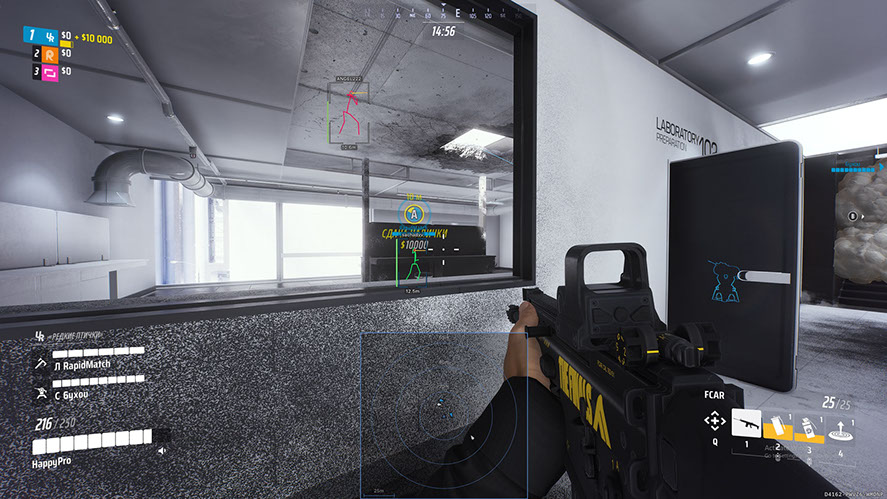
Arcane is an advanced private cheat for The Finals that gives the player a complete advantage in every match. It combines powerful functionality and secure implementation, so the risk of blocking is minimal even with long-term use. Installation is simple and does not require technical knowledge - just launch the cheat and enter the game.
Arcane is designed for stable and smooth operation without lags or errors. The program does not conflict with the system, loads quickly and allows you to instantly activate the necessary functions. This makes it an ideal choice for both beginners and experienced players who value reliability and accuracy.
System Requirements
Global keys — work worldwide.
Payment with a Binance card may be available for selected products. Contact us privately before buying to check availability and agree the details.
Features
General
- Supported game version: Steam;
- Supported game mode: Windowed / Borderless;
- Supported CPU: Intel and AMD;
- Supported GPU: Nvidia and AMD;
- Minimal RAM: 12 GB;
- Supported OS: Windows 10-11 (26H1, 26H2) x64;
- Supported builds: everything from 1903 to last one;
- Video or Screenshot Invisibility Support: None;
ESP Players
- Bounding box - Boxing 2D (Box, In the corners)
- Fill box - Box background (Static, Gradient)
- Skeleton - Skeleton: (Draw a circle at the head, Fill the circle at the head, Thickness)
- Line to enemy - Lines to players: (Color, Position)
- Health bar - Health bar: (Static, Health based, Gradient)
- View line - Line of sight
- Name - Nick
- Distance - Distance
- Draw BOTs - Draw bots
- Draw teammates - Draw team members
- Visibility check - Visibility check
- Bot transparency - Bot transparency
- Max distance - Maximum distance
SETTINGS
- Menu keybind - Menu opening key
- Unload keybind - Key to completely unload the menu
- DPI Scale - UI size
- FPS Limit - FPS limit
- Theme - Theme: (Dark, Light)
- Watermark - Watermark
- Language - Language: (EN, RU, CN)
AIMBOT
- Enable - Activate
- Always - Always
- Visibility check - Visibility check
- Draw FOV Border - Draw a circle FOV
- Draw FOV Background - Draw the FOV circle background
- First keybind - First aim key
- Second keybind - Second aim key
- Targets - Goal: (Players, Bots, Team, Knocked)
- Find bone type - Bone search type: (Selected bone, Near bone, Random bone)
- Bone - Bone: (Head, Neck, Chest, Pelvis...)
- FOV Size - FOV circle size
- Smoothness - Smoothness
- Max distance - Maximum distance
Radar
- Enable - Activate
- Show distance - Show distance
- Zoom - Increase
- Size - X/Y size
- Distance transparency - Transparency distance
- Color outline - Stroke color
- Color background - Background color
Entities
- Show player - Show players
- Show AI - Show bots
- Show team - Show team members
What's new in this cheat
2
New features, meaningful improvements and important fixes for this product.
Silent aimbot mode added
Archived announcement. The date records the changes; the exact build date is unknown.
- Added Silent aimbot mode.
Visible Check Fix
Archived announcement. The date records the changes; the exact build date is unknown.
- The visible check has been fixed.
Customer Reviews
All reviewsFrequently Asked Questions
What features are included in Arcane?
What payment methods are accepted?
How to contact support?
Payment is confirmed, but the product is missing. How long should I wait?
I have a key. Where are the download and instructions?
After payment you will receive detailed instructions on activation, launch and use of the software.
Instructions will be sent to the email address specified before payment.
You will also find a download link and necessary components for the software.
Cheat community
Cheat updates, detection status and help from other players — in our Telegram and Discord.