Web Radar for DayZ
Buy a working private Web Radar for the game DayZ

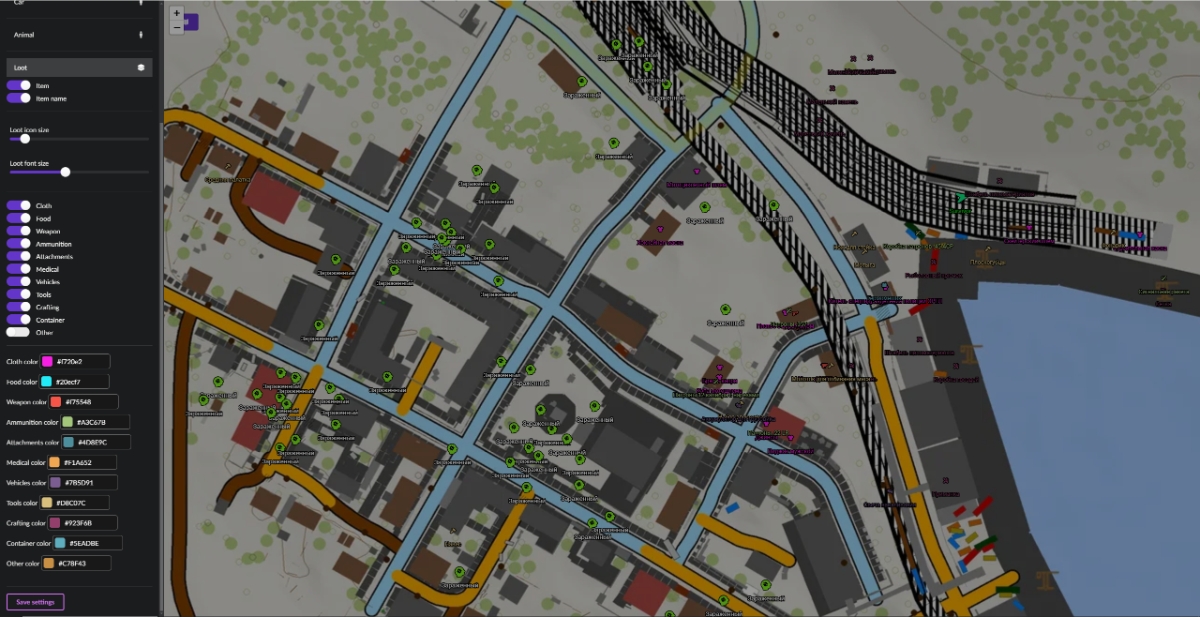
Web Radar for DayZ — a private radar that does not inject into game memory. It lets you see all game data: player positions, zombies, vehicles, animals, and loot on an interactive map. Share the radar with friends via link — they don't need to buy a subscription. Item and loot names are displayed in the game's language.
Full situational awareness: from clothing to weapons, from medicine to vehicles — everything is on the map. Gather resources, track enemies, and survive the wasteland with confidence.
System Requirements
Global keys — work worldwide.
Payment with a Binance card may be available for selected products. Contact us privately before buying to check availability and agree the details.
Features
Map Selection
- Chernarus, Livonia, Sakhal, Alteria, Anastara
- Arsteinen, Banov, Bitterroot, Chiemsee, Deadfall
- Deerisle, Esseker, Iztek, Hashima Islands, Melkart
- Namalsk, NH Chernobyl, NukeZZone, Onforin
- PNW, Pripyat, ROS, Rostow, Takistan
- Valning, Vela, Vis Island, Yipirit
Zombies
- Enable zombie display on the map
- Enable zombie name display
- Hide dead zombies
- Customize zombie icon size
- Customize zombie font size
- Customize zombie icon color
- Customize zombie font color
- Customize dead zombie icon and font color
Animals
- Enable animal display on the map
- Enable animal name display
- Hide dead animals
- Customize animal icon size
- Customize animal font size
- Customize animal icon color
- Customize animal font color
- Customize dead animal icon and font color
Settings
- Save menu settings
Players
- Enable player display on the map
- Enable player name display
- Hide dead players
- Automatically move the map following the local player
- Map zoom size for automatic movement
- Customize player icon size
- Customize player text font size
- Customize player icon color
- Customize player font color
- Customize local player icon color
- Customize local player font color
- Customize dead player icon and font color
Vehicles
- Enable vehicle display on the map
- Enable vehicle name display
- Hide destroyed vehicles
- Customize vehicle icon size
- Customize vehicle font size
- Customize vehicle icon color
- Customize vehicle font color
- Customize destroyed vehicle icon and font color
Loot
- Enable loot display on the map
- Enable loot name display
- Customize loot icon size
- Customize loot font size
- Clothing — display and color customization
- Food — display and color customization
- Weapons — display and color customization
- Ammo — display and color customization
- Attachments — display and color customization
- Medicine — display and color customization
- Car parts — display and color customization
- Tools — display and color customization
- Crafting items — display and color customization
- Containers, boxes — display and color customization
- Mod items (miscellaneous loot) — display and color customization
Frequently Asked Questions
What features are included in Web Radar?
What payment methods are accepted?
How to contact support?
After payment you will receive detailed instructions on activation, launch and use of the software.
Instructions will be sent to the email address specified before payment.
You will also find a download link and necessary components for the software.
Cheat community
Cheat updates, detection status and help from other players — in our Telegram and Discord.