[ON] Aimbot [ON] ESP [ON] WH
Telegram Discord Product Status IVSOFTE Pass Duck Hunt Instructions FAQ
More PUBG cheats

Memez PUBG

Buy Memez PUBG — Web Radar for PUBG on a Separate Device
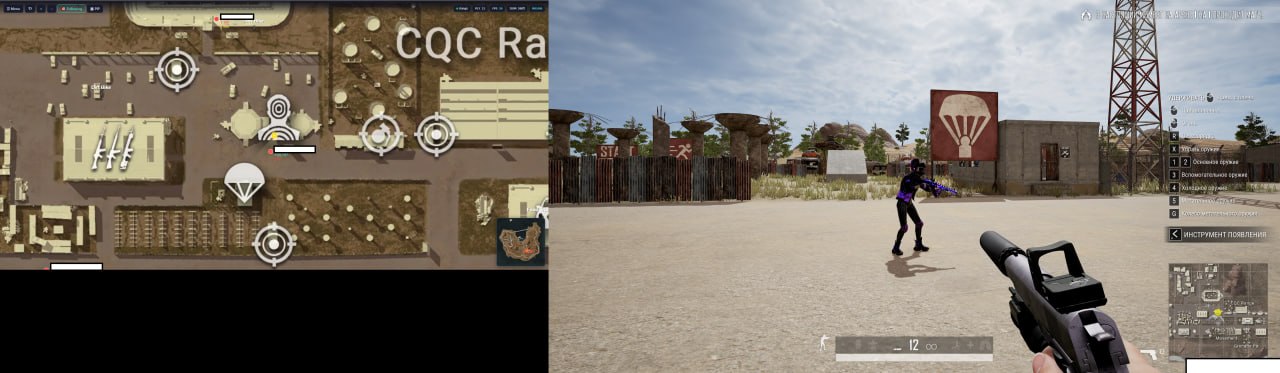
Memez PUBG is a web radar for PUBG: players, loot, and vehicles on a live map in your browser. Open the radar on a separate device (phone, tablet, or second PC) for a tactical edge without an in-game overlay.

Important: do not run the radar on the same machine as the game, even with two monitors — the game may capture the screen for review.

One subscription — one device (vendor restriction to prevent key sharing).

System Requirements

Operating systems
Windows 10 (22H2), Windows 11 (21H2–25H2) Pro
Processors
Intel / AMD
BIOS and settings
Enable Hyper-V: Win+R → type optionalfeatures → Enter → enable “Hyper-V Platform” (expand nested options) → OK. Then in an elevated CMD: bcdedit /set hypervisorlaunchtype auto
Additional
Uninstall third-party anti-cheats and AV: Faceit, GameGuard, AnticheatExpert, Vanguard, Kaspersky, 360 Total Security, Avast. Install VC++ x86 download, x64 download; DirectX.
Launcher Defender
The loader often requires Windows Defender fully turned off (the usual toggles are not enough). Download Defender Control v2.1, unpack, run Dcontrol, click Disable — the indicator must turn red. If the ZIP won’t download, disable Defender items and SmartScreen first.
Launcher Run
Download the loader from loader.colortune.ru. Enter your activation key in the console → Enter. A reboot may be required — after reboot, enter the key again. Wait for WAITING FOR PUBG. Keep the browser with the radar open beforehand. Start the cheat before launching the game.
Troubleshooting
  • Synchronise time after entering the key — Date & time settings → Sync now.
  • WdFilter.sys — confirm Dcontrol shows red (step above).
  • Connection error / DLL error — run the loader with a VPN.
  • Other issues — contact store support.
Bios
In BIOS, enable virtualization: Intel — Intel Virtualization and Intel VT-d; AMD — AMD-V, SVM, or Virtualization Technology.

Global keys — work worldwide.

1 day$2Buy
7 days$13Buy
30 days$25Buy
Can't pay with your card?

If your bank card doesn't work with our payment system, you can pay using a Binance Gift Card (USDT).

This method has a fixed +10% service fee. Promo codes and discounts cannot be applied.

  1. Contact us to confirm that this payment method is available for the product you want
  2. Buy a Binance Gift Card (USDT) for the required amount on any marketplace in your country (Paxful, Binance, or local resellers) — using any payment method convenient for you
  3. Send the gift card code to us — and we'll activate your purchase and deliver the product

USDT (TRC-20) is also available as a payment option at checkout — without the extra fee.

Guarantees
Secure Payment
Fast Support
Instant Delivery

Features

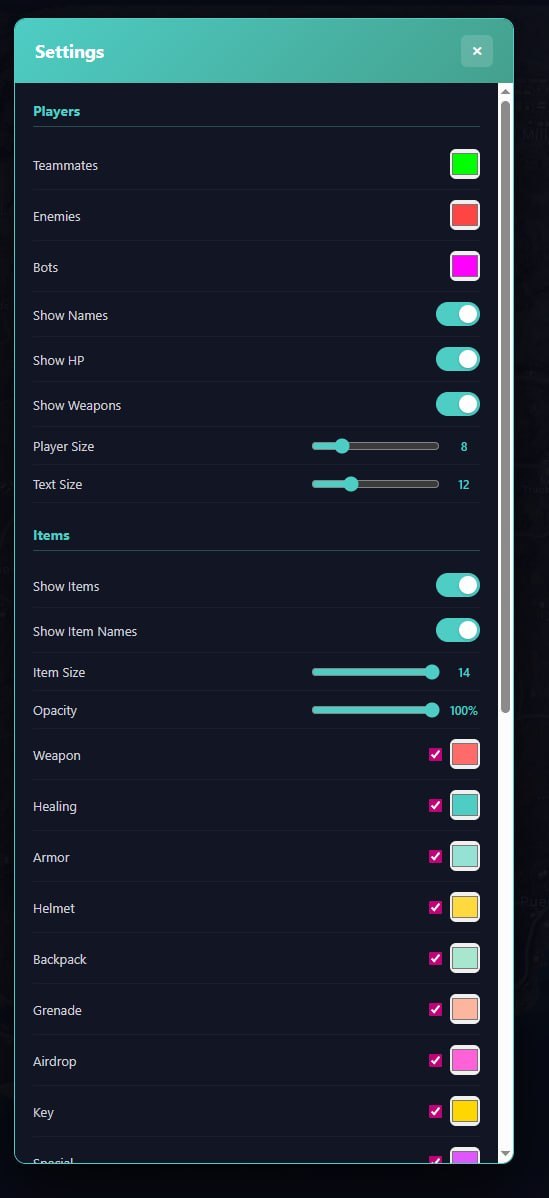
Players

  • Display teammates
  • Display enemies
  • Display bots
  • Player nicknames
  • Player health (HP)
  • Weapons in players' hands
  • Customizable player icon size
  • Customizable text size

Vehicles

  • Vehicle display on map
  • Vehicle names
  • Customizable color and icon size

Items

  • Weapons
  • Healing items (first aid kits, bandages, etc.)
  • Body armor
  • Helmets
  • Backpacks
  • Grenades
  • Airdrops
  • Keys and keycards
  • Special items
  • Miscellaneous items
  • Customizable icon size and opacity

Display

  • Coordinate grid
  • Minimap
  • Hotkeys (Zoom In/Out, Reset View, Follow)

Menu Screenshots
Customer Reviews

All reviews

Frequently Asked Questions

Is it safe to use Buy Memez PUBG — Web Radar for PUBG on a Separate Device?
Yes, Buy Memez PUBG — Web Radar for PUBG on a Separate Device is designed with safety in mind. We use advanced anti-cheat bypass methods and regularly update the software. However, no 100% ban-free guarantee exists — we recommend using a separate account.
How to install and launch Buy Memez PUBG — Web Radar for PUBG on a Separate Device?
After purchase, you'll receive a link to oplata.info with instructions, a download link, and an activation key. Follow the step-by-step guide — installation usually takes 2-5 minutes.
Does Buy Memez PUBG — Web Radar for PUBG on a Separate Device work after a PUBG update?
We promptly update Buy Memez PUBG — Web Radar for PUBG on a Separate Device after every PUBG patch. Updates are usually released within 1-48 hours. During updates, your subscription is frozen — you don't lose any paid time.
What features are included in Buy Memez PUBG — Web Radar for PUBG on a Separate Device?
The feature set of Buy Memez PUBG — Web Radar for PUBG on a Separate Device depends on the selected plan. Typically available: Aimbot, ESP/Wallhack, Radar, and more. The full feature list is shown in the product description above.
What payment methods are accepted?
We accept payments via oplata.info (bank cards, e-wallets, cryptocurrency) and EliteSeller (for selected products). See the Payment page for details.
How to contact support?
Message the admin on Telegram (@undetect), in the Telegram chat, on Discord, or via email at ivsofte@gmail.com. Working hours: 10:00 – 00:00 (UTC+3).
All questions & answers

After payment you will receive detailed instructions on activation, launch and use of the software.

Instructions will be sent to the email address specified before payment.

You will also find a download link and necessary components for the software.