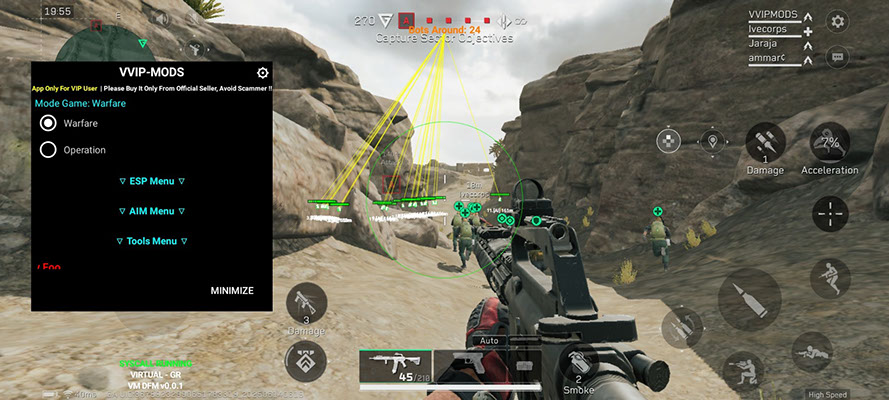
Delta Force Mobile is TiMi’s mobile shooter, and it packs two very different modes into one client: large-scale Warfare with vehicles and objectives, and Operations — extraction, where you enter with your own gear and risk losing it. Software is chosen differently for each, and that is the first thing to understand before buying.
Protection: the same principles as Tencent ACE
The mobile branch belongs to TiMi, a studio inside Tencent, and the anti-cheat follows familiar logic:
- Client integrity checks. The game compares its build against a reference; modified APKs and repacked clients are the fastest route to a block.
- Virtual space detection. App clones, sandboxes and “parallel space” tools are recognized separately from the cheat: the environment is caught first, the software second.
- Server-side statistics. Headshot ratio, flick speed, knowing positions before contact — computed on the server, whatever the injection does.
- Mobile is softer than PC, same rules. On PC, Delta Force runs the GTI anti-cheat, known for aggressive ban waves and heavy system requirements; mobile is calmer, but do not count on leniency.
The PC version is a different segment and a different level of risk: Delta Force for PC. Mobile statuses are on the Delta Force Mobile page.
What cheats give you
Visuals (ESP)
Enemy highlighting through walls with a box, distance and status, plus loot and vehicle display. Visuals solve the core problem of a mobile shooter — the small screen: what you catch in peripheral vision on a monitor is lost on a phone.
Aim assistance
An aimbot with a target point — head or body. On touch controls even gentle assistance changes the game more than on PC, because baseline accuracy is lower. That is also why such modules stand out in statistics.
Operating mode
A layer that matters more than half the feature list: a safe menu mode, injection into the original client instead of a modified APK, no dependency on extra apps.
The difference between Warfare and Operations
This is the key point when choosing settings.
Operations (extraction). You enter a raid with your own gear, and every death costs money. The price of a mistake is doubled: lost loot plus a ban on an account built raid by raid. So information wins over shooting — loot ESP, enemy data, knowing who is alive and where the extraction point sits. An aimbot gives less here than avoiding a fight in time.
Warfare. Matches are fast, respawns are free, nothing is lost. Value shifts toward reaction speed and holding objectives — visuals as a flank warning, careful aim assistance up close. Aggressive settings survive longer because the pace is high and the map is chaotic.
What the catalog carries
- VVIP for Delta Force Android — the versatile option, supporting both Warfare and Operations. It splits into an ESP menu and an Aim menu, installs simply and needs no additional apps — a real plus, because every extra app in an Android install chain is one more detection surface. 3 days 465 ₽, 7 days 1050 ₽, 30 days 2320 ₽.
- Zolo for Delta Force Mobile — a custom menu with a safe mode, ESP through walls and an aimbot targeting head or body. It works with the global version and injects into the original client rather than replacing it with a repack. The most flexible ladder in the segment: 24 hours 1.5$, 3 days 4$, 7 days 7$, 14 days 10$, 30 days 14$, 60 days 18$.
In short: VVIP covers both modes and installs simply; Zolo offers a safe mode, injection into the original client and a 1.5$ day to check compatibility.
How to play without a ban
- Test by the day, not the month. Compatibility with a specific phone model and firmware is the main variable on Android. Zolo’s 24-hour tier exists for exactly that.
- Do not install modified APKs. Injection into the original client is a calmer scenario than a repacked game build.
- Play Operations on visuals. Loot ESP and enemy information give more in extraction than aim assistance and generate almost no statistics. An aimbot here is usually surplus risk.
- Keep aim assistance gentle in Warfare. Body over head, small FOV, no instant flicks — dozens of people see you in the kill cam every session.
- Do not clear every raid perfectly. A flawless extraction rate is the most obvious trigger for a manual review.
- Keep a separate account. Your main one holds gear accumulated over many raids; a ban takes it too.
Bottom line
Here, choosing settings matters more than choosing a product. In Operations, bet on information: ESP, loot, positions, a calm exit from the raid. In Warfare you can afford more, but only as much as you are willing to risk the account for. The catalog carries two options: VVIP with both modes and a simple install, and Zolo with a safe mode and tiers from a day to 60 days. Start short, confirm compatibility, then buy long.
Dominate Delta Force Mobile with our software
Statuses update automatically; ambiguous cases are reviewed manually. Sales may be paused during extended updates.