Play video 1
Select an image to view it larger.
Cheat Ancient for Black Ops 7
Private Cheat Ancient for Call of Duty Black Ops 7
Purchase is processed on partner site ancientick.com
Sales temporarily paused
Purchase is processed on partner site ancientick.com
Ancient cheat for Call of Duty Black Ops 7 is one of the most stable and advanced private software for the game, created with a focus on reliability, high accuracy, and minimal ban risk. The program is regularly updated by the developer, adapts to changes in the game, and remains as safe as possible when used correctly. Simple installation and a user-friendly interface allow even first-time users of private cheats to launch the software easily.
Ancient is perfect for players who want a confident edge in firefights, as well as for those seeking maximum control over the battlefield. Flexible AIM settings, extended ESP functions, advanced radar, and powerful loot ESP provide comfortable gameplay at any level.
System Requirements
Features
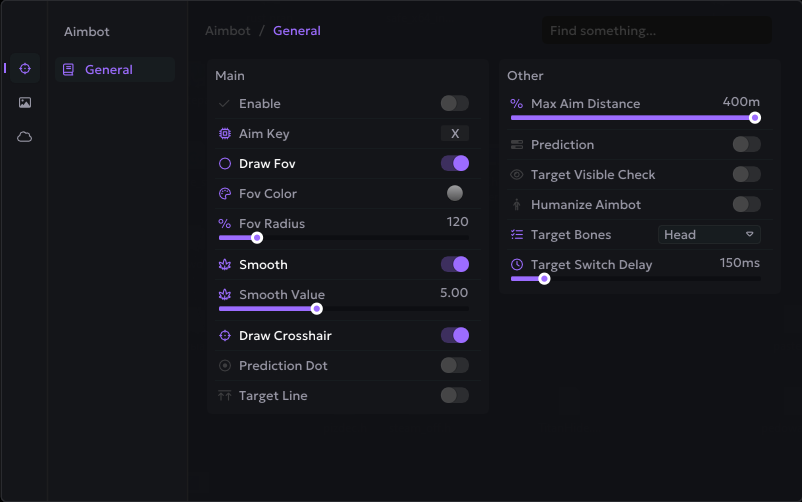
AIMBOT (Automatic targeting)
- Allows you to accurately and smoothly target enemies.
- Enable/disable
- Purpose of the activation key
- Setting the target acquisition radius (FOV)
- Displaying the targeting circle and crosshairs
- Smoothness
- Setting up bones for aiming: head, neck, chest, arms, pelvis
- Checking target visibility
- Motion prediction
- Switching delay between targets
- Emulation of natural behavior (Humanize Aimbot)
- Additionally
Players
- Boxes (corner and regular) with color for visible/invisible
- Bot tags
- Distance to target
- Health bar
- Level, number of kills, team ID
- Nickname
- Skeleton
- Active weapon
- Display of allies and defeated
- Show only visible ones
- Display range: 10 to 1000 m
Battle Mode
- Quickly activate combat mode using a key
Displaying items (Loot ESP)
Display of useful objects: armor, ammo, weapons, crates, tactical/lethal items, money, medicine, perks and more
Setting categories, item name, distance (up to 1000 m) and color
Interface settings
- FPS display
- Setting the overlay refresh rate
Configurations
- Adding, loading, deleting and exporting configs
Radar
- Turning on the radar
- Setting the scale and maximum display distance
Off Arrows (off-screen arrows)
- Off-screen enemy indicators
- Shapes: arc or triangle
- Adjusting color and distance
Customer Reviews
All reviewsFrequently Asked Questions
What features are included in Ancient?
What payment methods are accepted?
How to contact support?
Payment is confirmed, but the product is missing. How long should I wait?
I have a key. Where are the download and instructions?
After payment you will receive detailed instructions on activation, launch and use of the software.
Instructions will be sent to the email address specified before payment.
You will also find a download link and necessary components for the software.