Arcane for ARK: Survival Ascended
Buy Working Private Cheat Arcane for ARK Survival Ascended
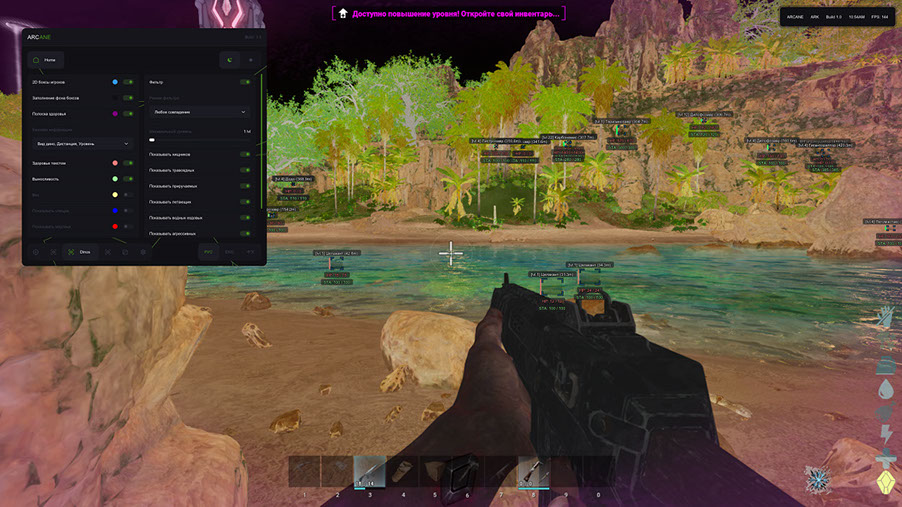
The Arcane cheat for ARK Survival Ascended is a great solution for those who want to be the best on the battlefield. Dominate over opponents and dinosaurs. The software receives all necessary regular updates. Works with minimal ban risk. We are always ready to help and answer any questions.
System Requirements
Global keys — work worldwide.
Payment with a Binance card may be available for selected products. Contact us privately before buying to check availability and agree the details.
Features
AIMBOT
- Target - Target (Players, Dinosaurs)
- Keybind - Key
- Mode - Mode (Switch, Hold)
- Prediction - Prediction
- Humanization - Humanization
- Draw FOV Radius - Drawing the radius of the field of view
- Priority - Priority (Screen Center, Distance)
- Smooth - Smoothness
- Max Distance - Maximum distance
MISC
- Dino Upscaler - Dinosaur Enlarger
- Disable Shadow - Disable shadow (Select shadow style)
- FOV Changer - Field of view changer
- Zoom Hack - Hacking Zoom
- No Camera Shake - No camera shake
- No Recoil - No recoil
- No Spread - No spread
- Rapid Fire - Rapid shooting
- Crosshair - Sight
- Out of Arrows - No Arrows
Dino Filter
- Filter Mode - Filter mode (Match all, Match any)
- Minimal Level - Minimum level
- Show Carnivore - Show predators
- Show Herbivore - Show herbivore
- Show Tameable - Show tameable
- Show Flying - Show flying
- Show Water Rideable - Show water rideables
- Show Aggro - Show aggressive
- Show Alpha - Show alpha
- Show Boss - Show bosses
Items ESP
- Show Category - Show category
- Show Distance - Show distance
- Battle Mode - Battle mode
- Rendering Distance - Rendering distance
Category
- Clothes - Clothes
- Resources - Resources
- Weapons - Weapons
- Structures - Structures
- Consumables - Consumables
- Ammo - Ammo
- Artifacts - Artifacts
- Skins - Skins
CONFIG
- Create Config - Create a configuration
- Delete Config - Delete configuration
- Save Config - Save configuration
- Load Config - Load configuration
ESP Players
- Box 2D - 2D Box (Box, Corner)
- Box Filled - Filled box (Static, Gradient)
- Health Bar - Health Bar (Static, Health Based, Gradient)
- Health Text - Health text
- Nickname - Nickname
- Distance - Distance
- Level - Level
- Item In Hands - Item in hands
- Show Ammo Count - Show the amount of ammunition
- Skeleton - Skeleton
- Show Dead - Show the dead
- Show Sleeping - Show sleeping people
- Line - Line
- Rendering Distance - Rendering distance
Dino ESP
- Box 2D - 2D Box (Box, Corner)
- Box Filled - Filled box (Static, Gradient)
- Health Bar - Health Bar (Static, Health Based, Gradient)
- Dino Species - Dinosaur Species
- Distance - Distance
- Level - Level
- Health Text - Health text
- Stamina - Stamina
- Weight - Weight
- Show Sleeping - Show sleeping people
- Show Dead - Show the dead
- Rendering Distance - Rendering distance
SETTINGS
- Enable Particles - Enable particles
- Accent Color - Accent color
- Theme - Theme (Light, Dark)
- Language - Language (Russian, English, Chinese)
- VSync - Vertical Sync
- Show FPS - Show FPS
- DPI Scale - DPI Scale
- Watermark Position - Watermark position
- Notify Position - Notification position
Objects
- Supply Crate - Supply Crate
- Sleeping Bag - Sleeping bag
- Simple Bed - Simple bed
- Tek Bed
- Small Storage - Small storage
- Large Storage - Large storage
- Huge Storage - Huge storage
- Tek Storage - Tek storage
- Dedicated Storage - Specialized storage
- Ammo Container - Ammunition container
- Tek Generator - Tek generator
- Cryo Fridge - Cryo refrigerator
- Turret - Turret
What's new in this cheat
3
New features, meaningful improvements and important fixes for this product.
New Aimbot Settings and Activation Options
- Separate aimbot settings for Players and Dinos
- Added activation mode (On hold, Always) and Force aim key
- Added "In scope" activation
New Aimbot, ESP, Glow, and Structures features
- Added aim modes (Memory, Silent).
- Added ESP preview with drag-and-drop layout.
- New creature filter (Wild, Tamed, Awake, Unconscious, Carnivore, Herbivore, Ground, Flying, Male, Female, Adult, Baby, Tamable, Untameable, Aggro, Passive).
- Added a new Glow section for Players and Dinos.
- Added a new Structures section replacing the old object list.
ESP fixes for boxes and skeletons
Archived announcement. The date records the changes; the exact build date is unknown.
- Boxes ESP was fixed.
- Skeleton ESP was fixed.
Customer Reviews
All reviewsFrequently Asked Questions
What features are included in Arcane?
What payment methods are accepted?
How to contact support?
Payment is confirmed, but the product is missing. How long should I wait?
I have a key. Where are the download and instructions?
After payment you will receive detailed instructions on activation, launch and use of the software.
Instructions will be sent to the email address specified before payment.
You will also find a download link and necessary components for the software.
Cheat community
Cheat updates, detection status and help from other players — in our Telegram and Discord.