Select an image to view it larger.
Cheat Phoenix for ARK: Survival Ascended
Buy Phoenix private cheat for ARK Survival Ascended
Global keys — work worldwide.
Payment with a Binance card may be available for selected products. Contact us privately before buying to check availability and agree the details.
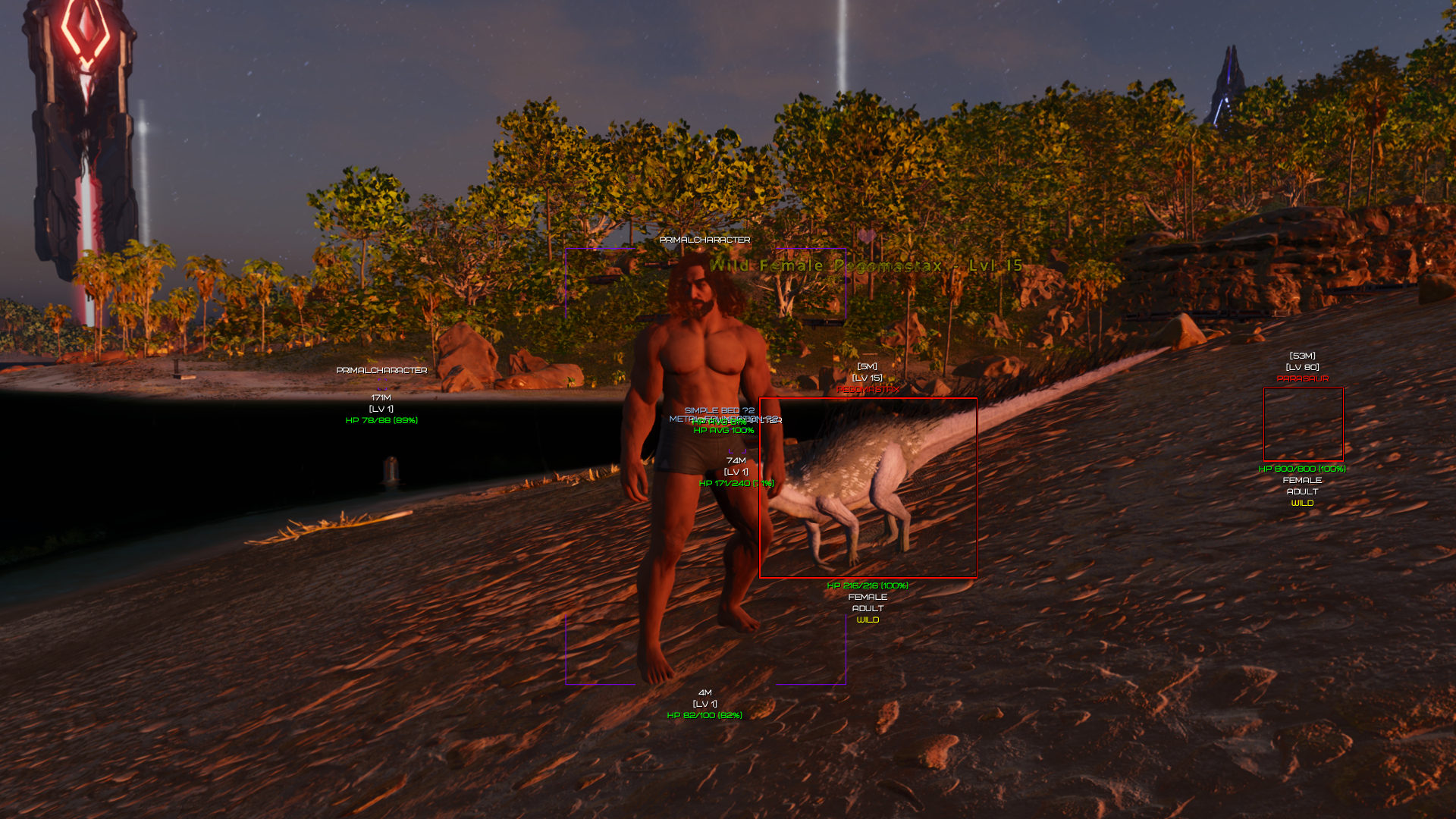
Phoenix is a stable and regularly updated private software for ARK: Survival Ascended, focused on visual control and comfortable gameplay without unnecessary features. The solution is ideal for players who value information and convenience without interfering with shooting.
The core functionality is built around an advanced ESP system. Dino ESP lets you see dinosaurs with full details: level, health, status (wild/tamed), sex, age, and even XP for kill. Flexible filters let you display only the types of creatures you need. Players ESP shows players with boxes, skeletons, level, health, and distance. World ESP helps control structures: showing the owner, durability, and structure types with filtering options.
Additional useful features include: Auto Armor Swap for automatic replacement of broken armor, Full Bright for a clear and readable picture in any conditions, and a custom crosshair. A built-in HWID Spoofer is included for hardware ban bypass. Phoenix is a convenient and safe internal solution for full situational awareness in ARK SA.
System Requirements
What statuses mean
🔔 Cheat statuses update automatically from our Telegram bot via developer notifications — follow the news there. Many cheats update themselves after game changes, so a “Checking” status does not mean the cheat is broken — it is just uncertainty until confirmed. Not sure? Ask in the site chat or on our Contacts page.
Features
Dinos ESP
- Enable Dino ESP — toggle dinosaur ESP on/off
- Render Distance — set maximum display distance
- Draw Boxes — boxes around dinosaurs (Full 2D / Corner / 3D)
- Show Name — dinosaur name
- Show Distance — distance to dinosaur
- Show Level — dinosaur level
- Show Sex — dinosaur sex (Male/Female)
- Show Health — current health
- Show Tamed Status — status: Tamed / Wild
- Show Baby Status — status: Baby / Adult
- Show XP For Kill — experience for kill
- Show Flying Tag — (Flying) tag for flying dinos
- Show Sleeping Tag — (Sleeping) tag for sleeping dinos
- Filter Only Tamed — show only tamed
- Filter Only Wild — show only wild
- Filter Only Babies — show only babies
- Filter Only Adults — show only adults
- Filter Only Flying — show only flying
- Filter Only Corrupted — show only corrupted
- Color Normal / Corrupted / Sleeping — color customization
Other Features
- Auto Armor Swap — instant broken armor replacement
- Full Bright — constant full lighting
- Crosshair — custom crosshair in the center of screen
- Built-in Spoofer — HWID Spoofer for hardware ban bypass
Players ESP
- Enable Players ESP — toggle player ESP
- Render Distance — maximum render distance
- Draw Boxes — boxes around players (Full 2D / Corner / 3D)
- Show Name — player name
- Show Distance — distance to player
- Show Skeleton — player skeleton
- Show Level — player level
- Show Health — player health
- Color — display color customization
World ESP
- Enable Structures ESP — toggle structure ESP
- Render Distance — maximum render distance for structures
- Show Name — structure name
- Show Distance — distance to structure
- Show Owner — owner name
- Show Health — structure durability/health
- Filter Only Foundations — foundations only
- Filter Only Floors — floors only
- Filter Only Doorframes — doorframes only
- Filter Only Beds — beds only
- Filter Only Teleporters — teleporters only
- Filter Only Traps — traps only
- Color — color customization for all structures
What's new in this cheat
1
New features, meaningful improvements and important fixes for this product.
ESP improvements and new targeting features
Archived announcement. The date records the changes; the exact build date is unknown.
- Added dino ESP boxes (2D / Corner / 3D), filters, rider / owner tags, and a torpor bar.
- Added player, structure, and loot ESP plus a mini-radar.
- Added aimbot (FOV / smooth, for players and dinos).
- Fixed ESP data: levels, health, torpor, tamed/wild, and W2S camera POV.
- Added support for the game's language in ESP.
Customer Reviews
All reviewsFrequently Asked Questions
What features are included in Phoenix?
What payment methods are accepted?
How to contact support?
Payment is confirmed, but the product is missing. How long should I wait?
I have a key. Where are the download and instructions?
After payment you will receive detailed instructions on activation, launch and use of the software.
Instructions will be sent to the email address specified before payment.
You will also find a download link and necessary components for the software.
Cheat community
Cheat updates, detection status and help from other players — in our Telegram and Discord.