Play video 2

Select an image to view it larger.
Cheat Arcane for SCUM
Buy Effective Private Cheat Arcane for SCUM
Global keys — work worldwide.
Payment with a Binance card may be available for selected products. Contact us privately before buying to check availability and agree the details.
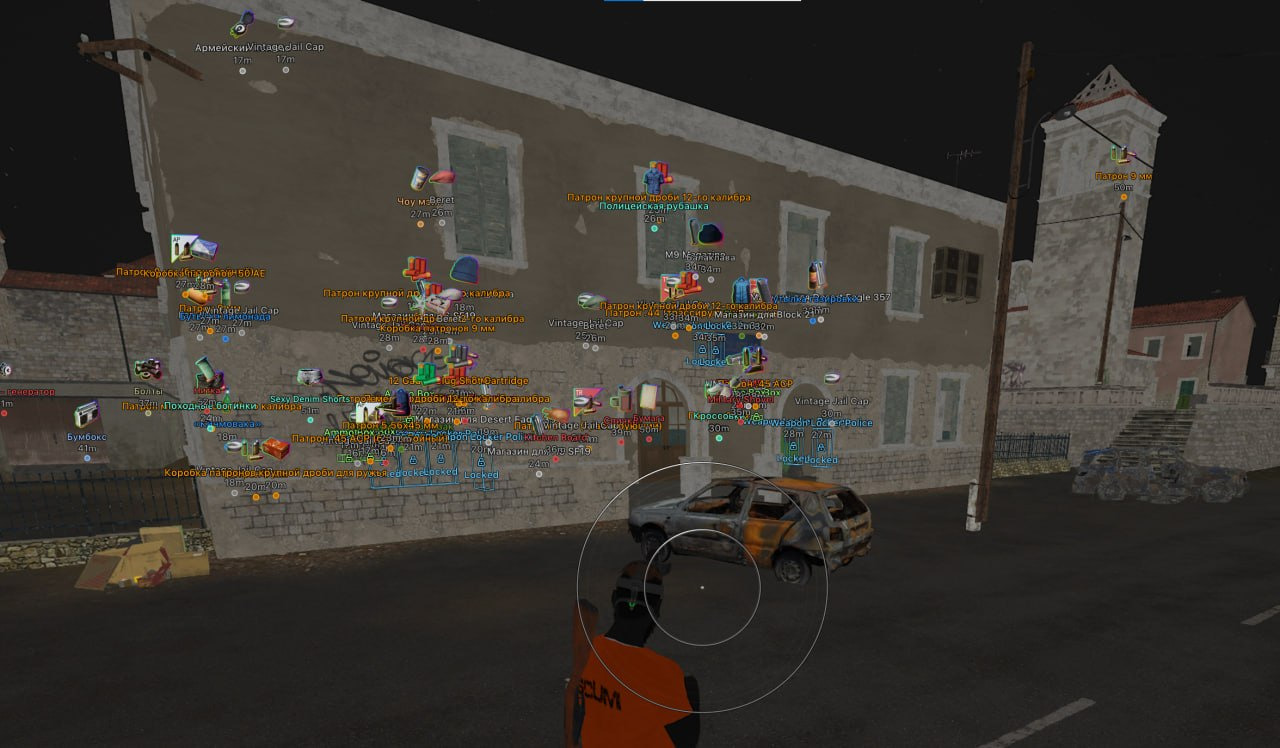
Arcane for SCUM adds item pictures with durability and rarity display, crafting resources, electronics, traps and key cards. Picture and outline settings control how loot appears on screen.
Autokill automatically attacks the nearest selected target with a melee weapon or bare hands. Activation modes, distance, hit size, visibility checks, target points, priorities and markers are configurable. Chests and vehicles gain picture display options; Tractor, Cruiser, Sidecar Bike and RIS are included.
No Melee Stamina, Speedhack activation modes and separate Battle mode filters expand the controls. Stability after game updates and Auto Lockpick key release have been improved. The supplied developer announcement states UNDETECTED.
System Requirements
Features
General updates
- New visibility check system: Ray Cast
- Lockpicking fixed
- Support for new animals from the latest game update
- Improved stability after game updates
- Auto Lockpick — the key no longer stays held after the lock opens
Aimbot (2)
- Max distance - Maximum distance
- Force Aim Keybind — while held, targets enemies regardless of visibility checks
- Prediction — target movement prediction
- Show Target Bone — display the selected target bone
- Prediction Point — display the predicted aim point
- Target priority: closest by distance or closest to screen center
Players ESP (2)
- Max distance - Maximum distance
- Show Drone - Show drones
- Show NPC - Show NPC
- Show Ammo Count — display the player's ammunition count
- In Vehicle / Turret — display the player's vehicle or turret status
- Steam ID — display the player's Steam ID
- Player inventory — display carried items
- Indicator when a player is aiming at you
Zombies ESP (2)
- Visibility check - Visibility check: (Visible color, Invisible color, Show on skeletons)
- Max distance - Maximum distance
Sentry ESP
- Bounding box - Boxing 2D: (Box, In the corners)
- Fill box - Box background: (Static, Gradient)
- Skeleton - Skeletons: (Thickness)
- Name - Name
- Distance - Distance
- View line - Line of sight
- Line to enemy - Line to the player
- Visibility check - Visibility check: (Visible color, Invisible color, Show on skeletons)
- Max distance - Maximum distance
Predators
- Wolf - Wolf
- Bear - Bear
Herbivores
- Boar - Boar
- Deer - Deer
- Donkey - Donkey
- Horse - Horse
- Goat - Goat
- Rabbit - Rabbit
Items ESP (2)
- Rarity filter and rarity display
- Crafting resources: Bolts, Duct tape, Nails, Metal scrap, Gun powder and more
- Electronics and miscellaneous items: Radio, Phone, Metal detector, Generator and more
- Traps: Show trigger, Armed only
- Key cards
Combat equipment
- Weapons - Weapons
- Bows - Bows
- Grenades - Grenades
- Attachments - Devices
- Ammo - Ammo
- Melee - Melee
Vehicles ESP (2)
- Battery information
- Engine information
- Durability information
- Trunk weight
- Vehicle pictures: Icon, Picture, Text + Picture
- New vehicles: Tractor, Cruiser, Sidecar Bike, RIS
Water transport
- Barba
- Wooden Motorboat
- Small Improvised Raft
- Big Improvised Raft
- SUP
- Color water
Air transport
- Kinglet Duster
- Color air
Misc
- Battle mode - Battle mode (disables unnecessary ESP to concentrate on the gameplay)
- Crosshair - Static cursor
- Out of Arrows - Arrows outside the screen
- 3D Box - 3D boxes for all entity types
Lockpicking
- Show Position - Show lockpick position
- Auto Lockpick - Automatic lockpick — lockpicking fixed
Configurations
- Create - Create
- Get shared - Get shared access (the ability to download your friend's configuration using a unique key)
- Launch - Launch
- Save - Save
- Edit name - Change name
- Share - Share
- Remove - Remove
Weapon
- No Spread — disable weapon spread
- No Recoil — reworked; recoil is completely removed
- Rapid Fire — rapid firing
- Disable weapon sway while moving
- Disable firing animations
- Unlimited Ammo
Chests ESP
- Chest display
- 3D boxes for chests
- Indicator showing whether a chest is inside a base
- Lock type
- Content weight
- Owner ID
- Access level
- Chest display: Icon, Text, Picture, Text + Picture
Lockers
- Lockers in a separate section
- Separate maximum distance setting for lockers
- Open / Closed lock status
- Locker boxes
- Hide looted lockers
- Locker types: Weapon Storage, Medical, Hazmat, Valuable Loot
Killbox ESP
- Killbox display inside bunkers
- Killbox distance
- Killbox label
- Timer Panel
- Killbox notifications
- C4 objects inside Killbox
- Zombie Spawn Points inside Killbox
- Doors inside Killbox
Server events
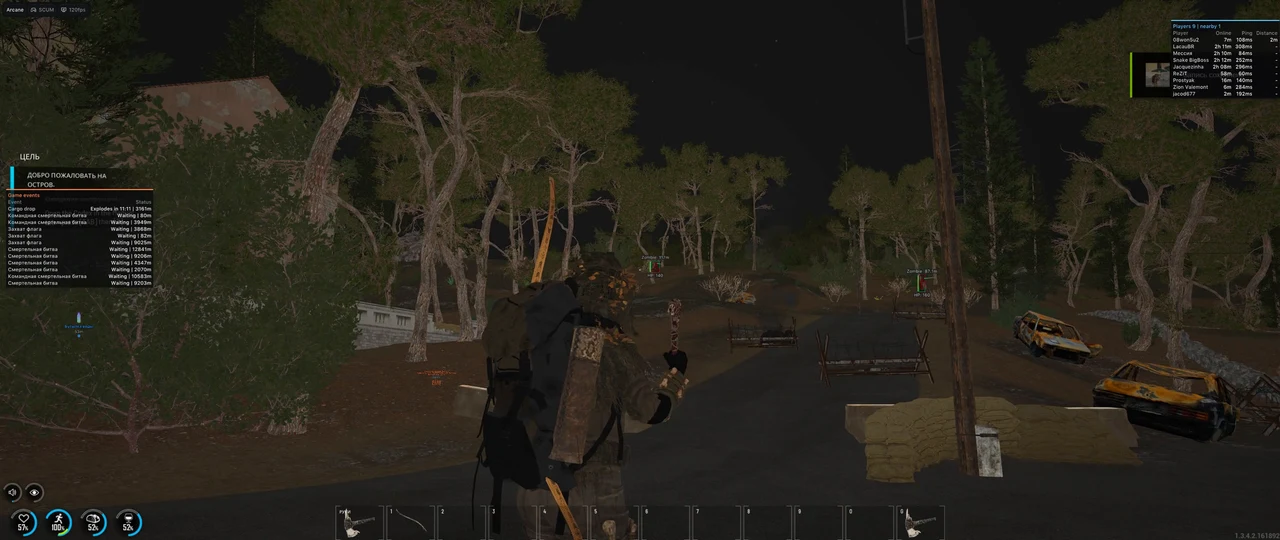
- On-screen server events: Capture the Flag, Deathmatch and other events
Autokill (1)
- Automatically attack the nearest target with a melee weapon or bare hands
- Activation: Always, On Hold, Toggle
- Distance setting
- Hit size setting
- Targets: Players, Friends, NPC, Zombies, Animals
- Visibility check
- Target point: Chest, Head, Pelvis
- Target priority: Closest by distance, Closest to screen center
- Target marker: Line to target, Label
Aimbot (1)
- Target selection: Players, Friends, NPC, Zombie, Razor, Animal, Sentry
- Type - Type: (Vector, Silent)
- Bone Selection - Bone selection: (Head, Neck, Body, Belly)
- Keybind - Key
- Draw FOV Border - Draw a circle FOV
- Draw FOV Background - Draw the FOV circle background
- FOV Size - FOV circle size
- Smooth - Smoothness
- Visibility check - Visibility check
Players ESP (1)
- Bounding box - Boxing 2D: (Box, In the corners)
- Fill box - Box background: (Static, Gradient)
- Skeleton - Skeletons: (Thickness)
- Nickname - Nicky
- Held item - Held item
- Distance - Distance
- View line - Line of sight
- Line to enemy - Line to the player
- Visibility check - Visibility check: (Visible color, Invisible color, Show on skeletons)
Zombies ESP (1)
- Bounding box - Boxing 2D: (Box, In the corners)
- Fill box - Box background: (Static, Gradient)
- Health Bar - Health Bar: (Static, Health Based, Gradient)
- Skeleton - Skeletons: (Thickness)
- Health Text - Health text
- Name - Name
- Distance - Distance
- View line - Line of sight
- Line to enemy - Line to the player
Animal ESP
- Health - Health
- Distance - Distance
- Max distance - Maximum distance
- Support for new animals added in the latest game update
Birds
- Crow - Crow
- Seagull - Seagull
- Chicken - Chicken
Items ESP (1)
- Type - Type
- Distance - Distance
- Max distance - Maximum distance
- Item pictures: Text, Picture, Text + Picture
- Picture type: Silhouette, Image
- Picture settings: Size, Opacity, Outline
- Outline: Contour / Box, Static / Rainbow, Thickness
- Item durability in the name and on the picture
- Durability fill direction on pictures: Bottom up, Top down, Right to left
Consumables
- Medicine - Medicines
- Food - Food
- Drink - Drinks
Gear
- Helmet - Helmet
- Vest - Vest
- Backpack - Backpack
- Clothes - Clothes
Vehicles ESP (1)
- Category - Category
- Distance - Distance
- Max distance - Maximum distance
- 3D boxes for vehicles
- Vehicle front-side display
- Indicator when someone is inside the vehicle
- Hide destroyed vehicles
- Turret boxes
- Fuel information
Ground transport
- Wolfs Wagen
- Laika
- Rager
- Dirt Bike
- Mountain Bike
- City Bicycle
- Wheel Barrow
- Improvised Wheel Barrow
- Color ground
World ESP
- Key Cards - Access cards for killbox / bunker
- Bomb Defuse - Bomb defuse marks
- Hack Card Reader - Hack card reader marks
Settings
- Menu key - Menu activation key
- Unload key - Menu unload key
- DPI Scale - UI size
- VSync - Vertical synchronization (best used in conjunction with in-game)
- Theme - Theme (Dark, Light)
- Watermark - Watermark
- Language - Language (EN, RU, CH)
Local player
- Ammo panel — number of rounds in the current magazine
- Disable screen effects: Bleeding, Flash effects and other visual effects
- FOV Changer — change the field of view
- No Clip — free movement mode
- Disable zombie damage
- Speed Hack — movement acceleration
- No Melee Stamina
- Speedhack activation: Always, On Hold, Toggle
World
- Disable grass
- Disable bushes and trees
- Always Day — permanent daytime
Cargo ESP
- Cargo ESP in a separate section
- Separate maximum distance setting for Cargo
- Cargo boxes
- Notifications when Cargo spawns
- Weapon crates inside Cargo with Open / Closed status
Bases ESP
- Player bases in a new section
- Base distance
- Base material
- Base storage information
- Flags
- Doors
- Storage objects
- Beds
- Weak Points
Bunkers ESP
- Bunker infrastructure in a separate section
- Code panels with the current code
- Power-status colors: Powered / Unpowered
- Power Panels
- Fuse Locations
Players list
- List of all players on the server
- Nickname
- Join time
- Ping
- Distance if the player is in range
Autokill (2)
- Attack speed and auto attack are always at maximum
Battle mode
- Hide each object type separately
- Hide Razor, Drones and Dropships
- Hide loot by group: Weapons, Ammo, Gear, Food & Medicine, Crafting, Traps, Other items
- Hide Chests, Key cards, Lockers and Cargo
- Hide Bases, Bunkers, Killbox, Bird flocks and Event markers
What's new in this cheat
5
New features, meaningful improvements and important fixes for this product.
New Item and Chest ESP Functions
- Added item pictures (Text, Picture, Text + Picture).
- Added item durability (in name, on picture).
- Added rarity filter and rarity display.
- Added crafting resources (Bolts, Duct tape, Nails, Metal scrap, Gun powder and more).
- Added chest pictures (Icon, Text, Picture, Text + Picture).
-
Arcane SCUM
- Improved stability after game updates
- Item pictures: Text, Picture, Text + Picture
- Chest display: Icon, Text, Picture, Text + Picture
- Vehicle pictures: Icon, Picture, Text + Picture
- Automatically attack the nearest target with a melee weapon or bare hands
- No Melee Stamina
- Hide each object type separately
-
Ray Cast · Auto Lockpick
Archived announcement. The date records the changes; the exact build date is unknown.
- New visibility check system: Ray Cast; Lockpicking fixed; Support for new animals from the latest game update
- Force Aim Keybind — while held, targets enemies regardless of visibility checks; Prediction — target movement prediction; Show Target Bone — display the selected target bone; Prediction Point — display the predicted aim point
New Arcane Functions for SCUM
Archived announcement. The date records the changes; the exact build date is unknown.
- Added an ammo panel showing the number of rounds in the current magazine
- Added an option to disable screen effects (Bleeding, Flash effects, Other visual effects)
- Added "FOV Changer"
- Added "No Clip" (free movement mode)
- Added "Rapid Fire"
pSilent Aimbot Added and Item Name Display Fixed
Archived announcement. The date records the changes; the exact build date is unknown.
- Added pSilent aimbot.
- Fixed Item Names displaying. Item names are once again displayed in the game's local language.
Customer Reviews
All reviewsFrequently Asked Questions
What features are included in Arcane?
What payment methods are accepted?
How to contact support?
Payment is confirmed, but the product is missing. How long should I wait?
I have a key. Where are the download and instructions?
After payment you will receive detailed instructions on activation, launch and use of the software.
Instructions will be sent to the email address specified before payment.
You will also find a download link and necessary components for the software.
Cheat community
Cheat updates, detection status and help from other players — in our Telegram and Discord.