Phoenix (Satano) for SCUM
Wh-Satano SCUM — Private ESP Cheat for SCUM with Aimbot, Teleport and Lock Picking
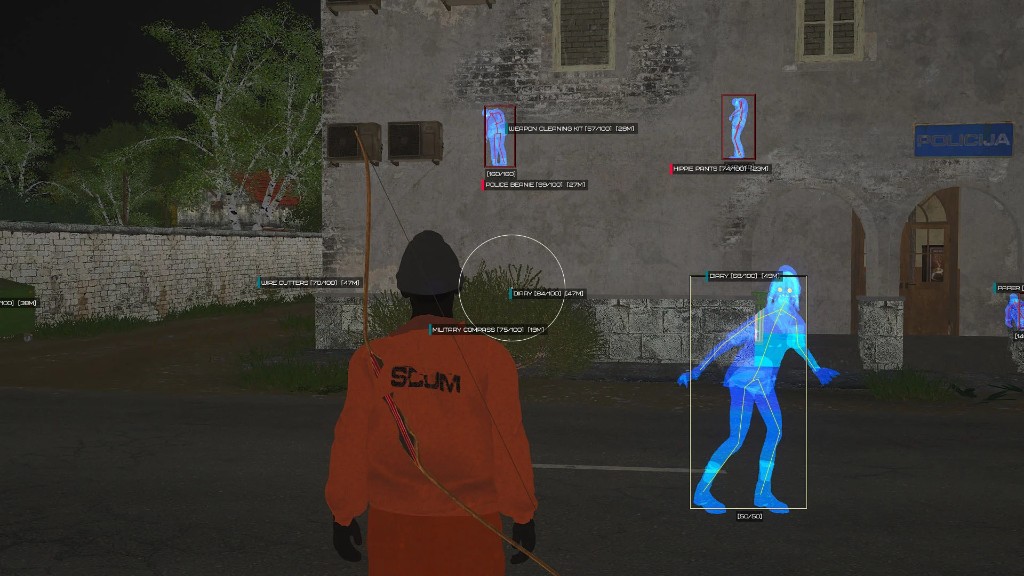
Wh-Satano SCUM — a private ESP cheat of our own production for SCUM. During development, the game's specifics were taken into account and a unique anti-cheat bypass method was applied. The focus is on security and playing as long as possible without getting banned.
The core is ESP (Wallhack) with flexible settings: player, zombie, loot and other object display. In addition to ESP, a Silent Aimbot is available with FOV adjustment, bone selection and activation key, as well as useful features — loot and player teleportation, automatic lock picking, bomb defusing, fall damage disabling and collision bypass. The product is regularly updated with new features planned for the future.
System Requirements
🔔 Cheat statuses update automatically from our Telegram bot via developer notifications — follow the news there. Many cheats update themselves after game changes, so a “Checking” status does not mean the cheat is broken — it is just uncertainty until confirmed. Not sure? Ask in the site chat or on our Contacts page.
Global keys — work worldwide.
Payment with a Binance card may be available for selected products. Contact us privately before buying to check availability and agree the details.
Features
Players ESP
- Enabled — enable player display
- Visible Check — different colors for visible and hidden players
- Boxes (2D, Corner, Filled) — boxes (2D boxes, corners, filled background)
- Skeleton — skeleton rendering
- Health ESP (Text, Bar) — player HP display
- Item in Hands — item in player's hands
- Distance — distance to players in meters
- Show Local Player — ESP on your own character
- Names — player nicknames
- Chams — bright player model coloring
Aimbot (Silent)
- Enabled — enable aimbot
- Field of View (FOV) — aimbot working area size
- Draw FOV — display aimbot area as a circle
- Aimbot Key — key selection for aimbot
- Targets (Players, Zombies) — target selection
- Bone — body part selection (Head, Neck, Elbow, Body, Pelvis, Knee)
- Mode (Always, On Key) — working mode: always or on key press
- No Recoil — disable weapon recoil
- High Damage — critical damage on hit
- No Weapon Damage — weapon doesn't wear out
Zombies ESP
- Enabled — enable zombie display
- Visible Check — different display for zombies behind walls and in line of sight
- Boxes (2D, Corner, Filled) — WH as boxes (several types)
- Skeleton — wallhack as skeletons
- Health ESP (Text, Bar) — zombie HP
- Distance — distance to zombies in meters
- Zombie Chams (Ghost, Wireframe) — chams for zombie display
Loot & World ESP
- Chests — loot chests
- Clothes — clothing
- Food — food items
- Weapon — firearms and melee weapons
- Ammunition — firearm ammo
- Equipment — various gear
- Show Items Health — item durability
- Robots, Vehicles — robots and transport
- Distance, Max Distance — distance and ESP range for loot
- Localization — item names based on your game localization
Misc
- Fullbright Mode — increased brightness, see in the dark without light
- Developer Mode — highlight all game objects
- Custom Colors for ESP — custom ESP color settings
- CFG System (Save, Load) — save and load cheat settings
- Language (Russian, English) — menu available in 2 languages
- No Fall Damage — disable fall damage
- Disable Collision — pass through walls and obstacles
- Loot Teleport — teleport items to your hands
- Teleport — teleport to any point on the map
- Lock Picking — automatic lock picking
- Auto Bomb Defusing — automatic bomb defusing
- Auto Card Reader — instant door opening during mini-game
Customer Reviews
All reviewsFrequently Asked Questions
What features are included in Phoenix (Satano)?
What payment methods are accepted?
How to contact support?
After payment you will receive detailed instructions on activation, launch and use of the software.
Instructions will be sent to the email address specified before payment.
You will also find a download link and necessary components for the software.
Cheat community
Cheat updates, detection status and help from other players — in our Telegram and Discord.