Rust Web Radar
Rust Web Radar — browser radar, works on phone, shareable with your team
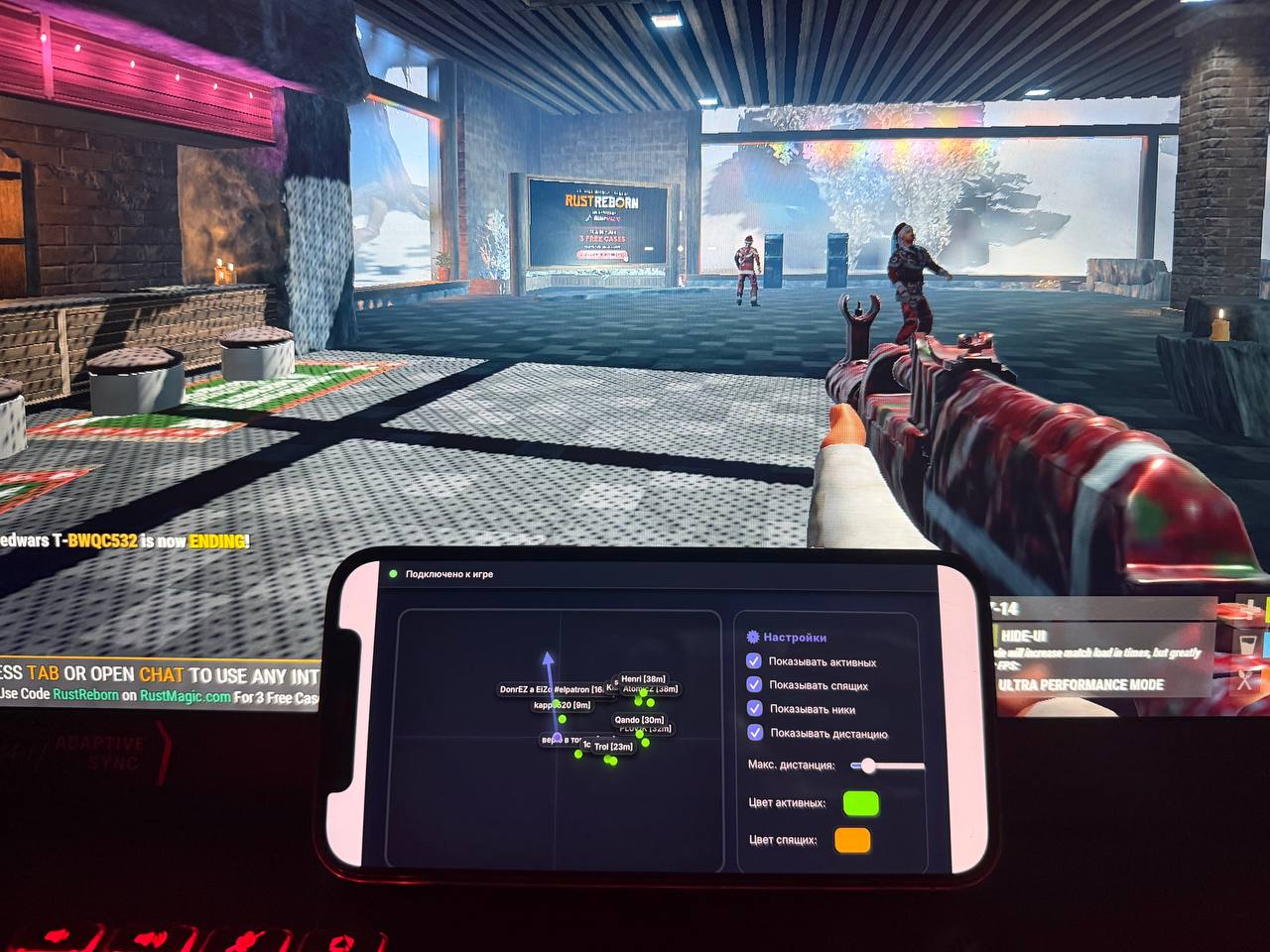
Rust Web Radar is a web radar for Rust. Instead of an overlay on top of the game you get a regular browser link: open it on a phone, tablet or second monitor. Nothing appears on the Rust screen itself — the game image stays clean.
WHAT THE RADAR GIVES YOU
The radar shows active and sleeping players around you. Each one comes with a name and distance, so you immediately know who is nearby and who to worry about. Colors for different statuses are configurable, so active and sleeping players never blend together visually.
Display distance is selectable: narrow the radius when you only need close-range awareness, or widen it to see approaches to your base well in advance.
THE REAL ADVANTAGE IS THE LINK
The radar can be shared. Send the link to your teammates and the whole squad sees the same picture — while the software runs only on your machine. For team Rust that changes the mechanics of play: one person can scout while the rest farm or build.
The second scenario is a second screen. A radar on your phone next to the keyboard or on a second monitor does not get in the way and costs no FPS, because it is rendered by the browser and not on top of Rust.
INSTALLATION
Activate the key and download the loader. Move the loader to a USB flash drive, run it as administrator and wait for it to load. Press OK and launch Rust, removing the flash drive right after the loader starts. As soon as you enter Rust you will hear a sound signal and a browser with the radar will open — that link can be shared or opened on your phone.
SYSTEM REQUIREMENTS
Windows 10 and 11 up to and including build 26H2. A web browser is required. A USB flash drive is needed to run the loader. No BIOS manipulation needed.
AFTER PURCHASE
You receive an activation key and access to the loader. Launch instructions are included. Contact support with any launch questions.
System Requirements
🔔 Cheat statuses update automatically from our Telegram bot via developer notifications — follow the news there. Many cheats update themselves after game changes, so a “Checking” status does not mean the cheat is broken — it is just uncertainty until confirmed. Not sure? Ask in the site chat or on our Contacts page.
Global keys — work worldwide.
Payment with a Binance card may be available for selected products. Contact us privately before buying to check availability and agree the details.
Features
Features
- Shows active and sleeping players
- Displays names and distance to a player
- Configurable colors for different statuses
- Selectable display distance
- Share the radar with friends
- Opens on a phone or second monitor
Customer Reviews
All reviewsFrequently Asked Questions
Is it safe to use Rust Web Radar?
How to install and launch Rust Web Radar?
Does Rust Web Radar work after a Rust update?
What features are included in Rust Web Radar?
What payment methods are accepted?
How to contact support?
After payment you will receive detailed instructions on activation, launch and use of the software.
Instructions will be sent to the email address specified before payment.
You will also find a download link and necessary components for the software.
Cheat community
Cheat updates, detection status and help from other players — in our Telegram and Discord.