RustBox for Rust
RustBox — Admin Box for Rust, player boxes with no menu and nothing to configure
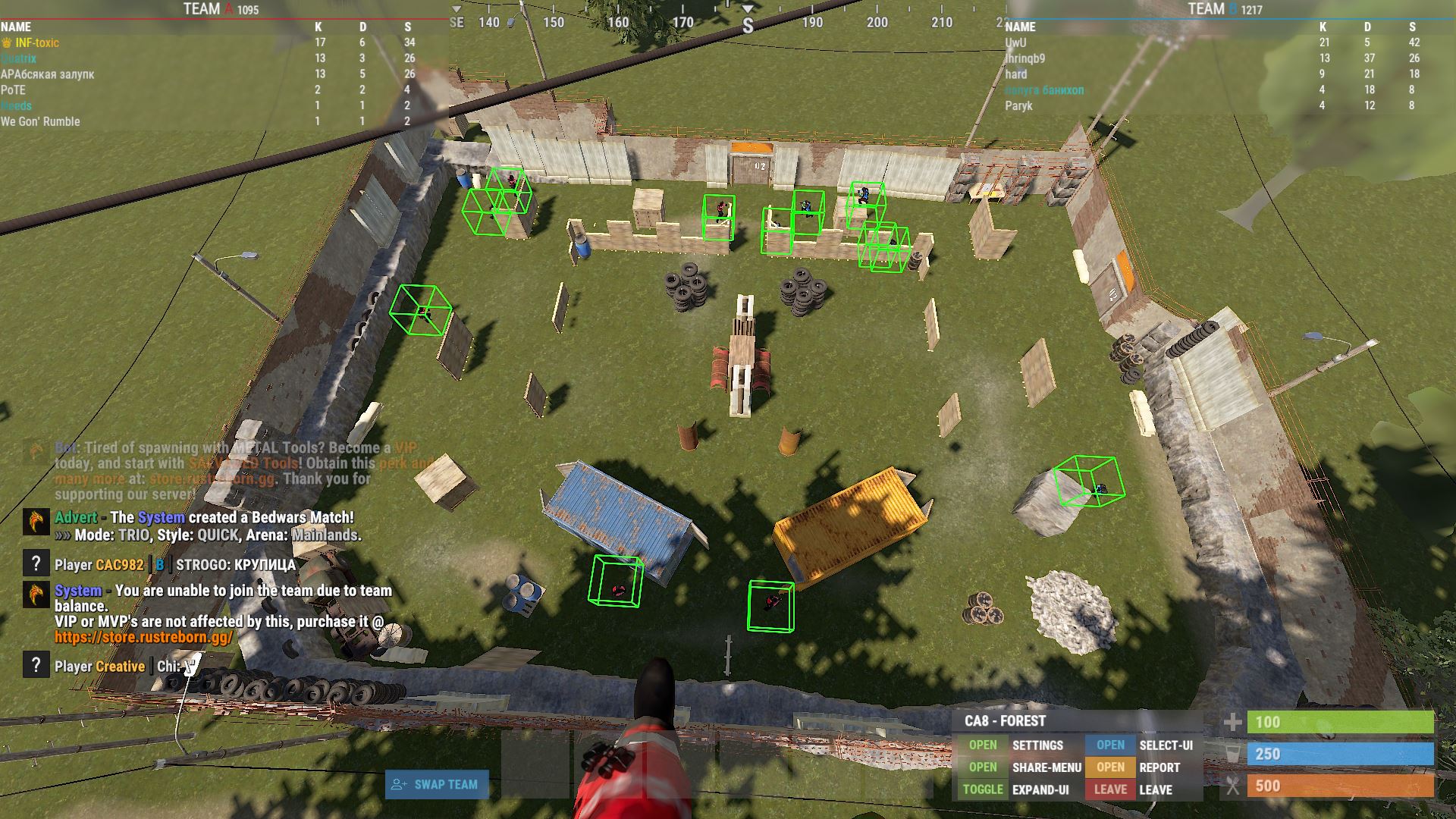
RustBox is an extremely simple external tool for Rust: Admin Box and admin tooling. No menu, no settings, no aimbot: run the loader, join the game, enable one option in the Rust settings — and player boxes appear on screen.
WHAT THE TOOL GIVES YOU
Players are outlined with boxes drawn over the game — the same class of tooling server moderators and administrators use for observation. It switches on with a single option in the Rust settings, with nothing else to do.
The absence of an interface is a deliberate choice. There is no menu, no watermark and no counters on screen: only boxes over the game. There is nothing to configure and nothing to break with a wrong setting.
This format fits two jobs. The first is moderation and observation on your own server, when you need to see what a player is doing without handing out admin rights. The second is quick reconnaissance during a short session, when a full cheat is overkill but you still need to know what is going on.
The 12-hour and 3-day plans are built exactly for that: one session, one raid, one evening. No need to overpay for a month.
INSTALLATION
Close Rust completely and disable your antivirus for the installation. Activate the key, download the loader, move it to a USB flash drive and run it as administrator. Wait for it to load, press OK, remove the flash drive and launch Rust. Join a server and enable the option: Game Settings → In Development → Occlusion Culling.
SYSTEM REQUIREMENTS
Windows 10 and 11 up to and including build 26H2. Any Intel or AMD processor. A USB flash drive is required. No BIOS manipulation needed.
AFTER PURCHASE
You receive an activation key and access to the loader. Installation instructions are included. Contact support with any installation questions.
System Requirements
🔔 Cheat statuses update automatically from our Telegram bot via developer notifications — follow the news there. Many cheats update themselves after game changes, so a “Checking” status does not mean the cheat is broken — it is just uncertainty until confirmed. Not sure? Ask in the site chat or on our Contacts page.
Global keys — work worldwide.
Payment with a Binance card may be available for selected products. Contact us privately before buying to check availability and agree the details.
Features
Features
- Admin Box
- Admin tools
- Box / Tools for moderators and advanced tasks
Customer Reviews
All reviewsFrequently Asked Questions
Is it safe to use RustBox?
How to install and launch RustBox?
Does RustBox work after a Rust update?
What features are included in RustBox?
What payment methods are accepted?
How to contact support?
After payment you will receive detailed instructions on activation, launch and use of the software.
Instructions will be sent to the email address specified before payment.
You will also find a download link and necessary components for the software.
Cheat community
Cheat updates, detection status and help from other players — in our Telegram and Discord.