Arcane for Dead by Daylight
Buy a working private cheat Arcane for the game Dead by Daylight

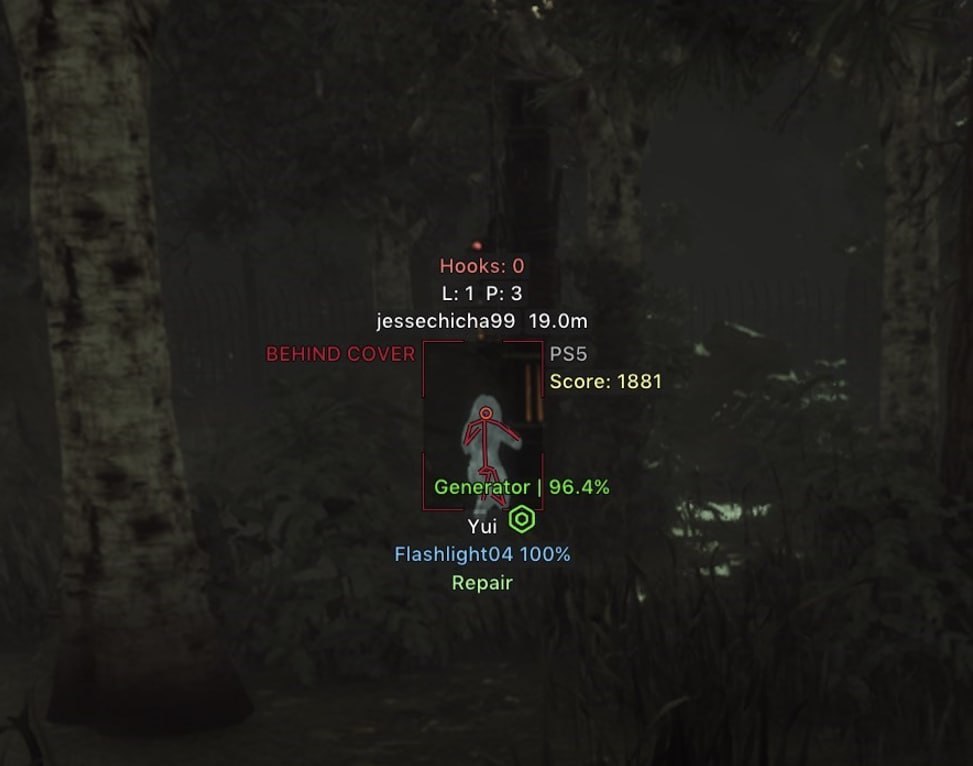
Arcane for Dead by Daylight combines role-specific aiming with survivor, killer, minion and object ESP. Glow, Radar and Lobby provide additional display and lobby controls.
The supplied update adds prediction and Adaptive FOV, draggable ESP labels, perk and action information, object filters, skill-check settings, killer and survivor tools, camera modes and lighting controls. The feature list below includes these additions and the previously listed settings.
System Requirements
Global keys — work worldwide.
Payment with a Binance card may be available for selected products. Contact us privately before buying to check availability and agree the details.
Features
Aimbot
- Keybind - Activation key
- Draw FOV Border - Draw a circle FOV (draws only when you play as killer)
- Draw FOV Background (draw the background of the FOV circle)
- FOV Size - FOV circle size
- Smooth - Smoothness
- Separate aim settings for Global, Killer and Survivor
- Force aim key
- Lock target
- Shift to head
- Visibility check
- Max distance
- Target switch delay
- Humanization system
- Target choice: Players, Bots, Teammates
- Target selection: Closest to crosshair, Closest by distance
- Bone selection: Selected bones, Closest bone, Random bone
- Target bones: Head, Neck, Body, Pelvis, arms and legs
- Activation: On hold, Always
- Prediction
- Prediction cross
- Adaptive FOV
Killer ESP
- Bounding box - Boxing 2D (Box, In the corners)
- Fill box - Box background (Static, Gradient)
- Skeleton - Skeleii (Thickness)
- Nickname - Nicky
- Character level - Character level
- Prestige level - Prestige level
- Character name - Character name
- Distance - Distance to the player
- View line - Line of sight
- Line to enemy - Line to the player
- 3D box
- Visibility check: RayCast, Perfect
- Visible and invisible colors
- Head circle
- Filled head circle with its own color
- ESP style: No background, With background
- ESP preview with draggable labels
- Perks
- Power
- Power add-ons
- Bloodlust
- Current action
- Blindness
- Power: Nurse blinks
- Carried survivor
- Platform
- Score
- Behind cover / visible
- Killer sees you warning
- Killer sees you: killer FOV, max distance and size
Object categories
- Meat Hook - Hook
- Pallet - Pallet
- Window
- Closet - Wardrobe
- Chest - Box
- Totem - Totem
- Trap - Trap
- Hatch
- Escape Door - Exit
- Dropped items
- Breakable walls
- Killer power objects
- Event objects
Radar
- Radar
- Distance rings
- FOV cone
- Zoom
- Size
- Transparency
- Scale by distance
- Survivors: Max distance and Show on rim
- Killer: Max distance and Show on rim
- Items: Max distance and Show on rim
- Survivor color based on health
- Off-screen arrows (moved to Radar)
- Off-screen Range
- Off-screen Size
- Off-screen survivor color based on health
- Off-screen killer color based on distance
Skill checks
- Enable - Activate
- Perfect Chance - Perfect Chance
- Good Chance - Good chance
- Auto Wiggle - Automatic wiggle
- Press delay min / max
- Failed check to Great
- Skillcheck indicator
Killer
- No Attack Cooldown
- Infinite Lunge
- Lunge range
- Attack cooldown
- 360 turns (Billy, Chucky)
- Kill aura
- Spinbot
Visuals
- Fullbright
- Lighting: Brightness
- Lighting: Fixed exposure
- No post-processing
- No screen effect
- Scratch mark
- Fake killers
- Flashlight color
- Red stain color
Settings
- Menu key - Menu activation key
- Unload key - Menu unload key
- DPI Scale - UI size
- VSync - Vertical synchronization (best used in conjunction with in-game)
- Theme - Theme (Dark, Light)
- Watermark - Watermark
- Language - Language (EN, RU, CH)
Survivor ESP
- Bounding box - Boxing 2D (Box, In the corners)
- Fill box - Box background (Static, Gradient)
- Skeleton - Skeleii (Thickness)
- Nickname - Nicky
- Health state - State of health
- Character level - Character level
- Prestige level - Prestige level
- Character name - Character name
- Distance - Distance to the player
- View line - Line of sight
- Line to enemy - Line to the player
- 3D box
- Visibility check: RayCast, Perfect
- Visible and invisible colors
- Head circle
- Filled head circle with its own color
- Skeleton: Same as box color
- ESP style: No background, With background
- ESP preview with draggable labels
- Perks
- Item and charge
- Add-ons
- Hook counter
- State
- Current action
- Platform
- Score
- Behind cover / visible
Minions ESP
- Minions: Zombies, Guards, Victor, Snug
- Box
- Skeleton
- Name
- Distance
- Max distance
- State
- Target
Objects ESP
- Show State - Show state
- Show Distance - Show distance
- Max distance for each object
- Pallet: Hide fallen
- Meat Hook: Hide fully hooked
- Chest: Hide opened
- Chest: Hide empty
- Chest: Item inside
- Hatch: Show hidden
- Hatch: Hide force closed
- Escape door: Hide closed
- All / None buttons
Generators
- Show generator - Generator
- Disable on battle-mode - Disable generator rendering in battle mode
- Show percentage
- Hide repaired
Glow
- Outline for survivors and killer
- Color modes: ESP color, Static, Rainbow, Visibility
- Fill
- Thickness
- Opacity
- Size
- Max distance
- Object glow: Generators
- Object glow: Hooks
- Object glow: Pallets
- Object glow: Windows
- Object glow: Closets
- Object glow: Chests
- Object glow: Totems
- Object glow: Traps
- Object glow: Hatch
- Object glow: Exit gates
- Object glow: Dropped items
- Object glow: Breakable walls
- Object glow: Killer power objects
- Object glow: Event objects
- All / None buttons
Lobby
- Lobby ESP: character name
- Lobby ESP: perks
- Lobby ESP: item / power and add-ons
- Lobby ESP: offering
- Show yourself
- Auto search with its own delay
- Auto ready with its own delay
- Auto leave after match with its own delay
- Leave lobby key
- Work in background
- Auto dodge by minimum prestige
- Auto dodge by chosen survivor or killer perks
Survivor
- Auto-pallet
- Auto Dead Hard with its own key
- Auto Dead Hard trigger distance
- Auto Head On with its own key
- Auto Head On distance
Camera
- Free camera with its own key
- Free camera speed
- Third person as killer
- First person as survivor
- Remove black bar
Miscellaneous
- Battle mode - Battle mode (disables unnecessary ESP to concentrate on the gameplay)
- Crosshair - Static cursor
- FOV Changer - Changing the viewing angle
Configurations
- Create - Create
- Get shared - Get shared access (the ability to download your friend's configuration using a unique key)
- Launch - Launch
- Save - Save
- Edit name - Change name
- Share - Share
- Remove - Remove
What's new in this cheat
3
New features, meaningful improvements and important fixes for this product.
-
Arcane — Dead by Daylight
- Separate role-based aiming, prediction, humanization and Adaptive FOV.
- Expanded survivor and killer ESP, draggable labels, perks, states and visibility checks.
- New Minions ESP, Glow, Radar and Lobby tabs; additional object filters.
- New skill-check, killer and survivor tools, camera modes and visual settings.
New Glow, Radar and Lobby features plus Killer and Survivor functions
- Added a new Glow tab with outlines for survivors and the killer
- Added a new Radar tab with radar and off-screen arrows
- Added a new Lobby tab
- Added No Attack Cooldown
- Added Auto Dead Hard with its own key and trigger distance
Auto-update module and Skillcheck helper improvements
Archived announcement. The date records the changes; the exact build date is unknown.
- Improved auto-update module
- Skillcheck helper reworked
Customer Reviews
All reviewsFrequently Asked Questions
What features are included in Arcane?
What payment methods are accepted?
How to contact support?
Payment is confirmed, but the product is missing. How long should I wait?
I have a key. Where are the download and instructions?
After payment you will receive detailed instructions on activation, launch and use of the software.
Instructions will be sent to the email address specified before payment.
You will also find a download link and necessary components for the software.
Cheat community
Cheat updates, detection status and help from other players — in our Telegram and Discord.