Play video 2


Select an image to view it larger.
Cheat Mason for Hell Let Loose
Buy a working private cheat Mason for the game Hell Let Loose
Global keys — work worldwide.
Payment with a Binance card may be available for selected products. Contact us privately before buying to check availability and agree the details.
High-quality private cheat Mason for the game Hell Let Loose. Created by a team of developers proven over the years, with dozens of reliable programs for popular games in their arsenal. Hell Let Loose could not pass by, primarily due to the lack of competition. There are practically no working alternative programs that we could recommend. Equipped with all the necessary features that will guarantee easy victories for you and your team.
System Requirements
What statuses mean
🔔 Cheat statuses update automatically from our Telegram bot via developer notifications — follow the news there. Many cheats update themselves after game changes, so a “Checking” status does not mean the cheat is broken — it is just uncertainty until confirmed. Not sure? Ask in the site chat or on our Contacts page.
Features
AIM ASSIST
- Enabled / Activate aimbot
- Aim key / Set a key for aimbot operation (the selected key must be held down)
- Aim spot / Select body part for aimbot: head / chest
- Aaim radius / Set the radius of the aimbot
MISCELLANEOUS
- Enabled / Activate other functionality
- Fast ADS / Fast aiming
- Remove recoil / Disable recoil
- Remove sway / Disable swaying
GRAPHICAL USER INTERFACE
- Save cpu / Slow down the cheat, reducing the load on the processor
- Show crosshair / Display crosshair in the center of the monitor
- Show aim radius / Display the radius of the aimbot
- Radar position / Setting the radar position (with the "show radar" function enabled in the "visualization" tab)
VISUALISATION
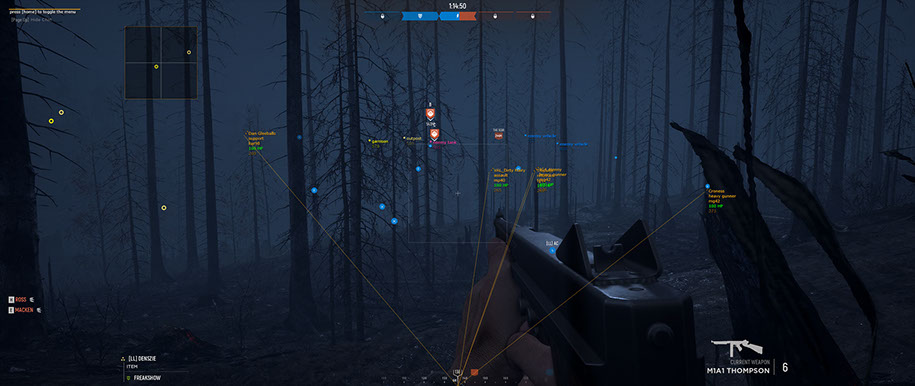
- Enabled / Activate ESP
- Show radar / Display radar
- Show bounding box / Display 2D squares on the enemy
- Show player role / Display the player’s role in the squad
- Show player weapon / Display the name of the weapon in the enemy’s hands
- Show player health / Display the amount of enemy health
- Show grenades / Display grenades
- Show vehicles / Display ground vehicles
- Show enemy tanks / Display enemy tanks
- Show supplies / Display supplies
- Show outposts / Display outposts
- Show garrisons / Display garrisons
- Show artillery / Display artillery
- Show snapline / Display the line to the enemy
- Show distance / Display the distance to the enemy
- Ignore team / Ignore players in the team
- Render distance / Set ESP display distance
Customer Reviews
All reviewsFrequently Asked Questions
What features are included in Mason?
What payment methods are accepted?
How to contact support?
Payment is confirmed, but the product is missing. How long should I wait?
I have a key. Where are the download and instructions?
After payment you will receive detailed instructions on activation, launch and use of the software.
Instructions will be sent to the email address specified before payment.
You will also find a download link and necessary components for the software.
Cheat community
Cheat updates, detection status and help from other players — in our Telegram and Discord.