Mason for Escape from Tarkov
Working private cheat Mason for the game Escape from Tarkov


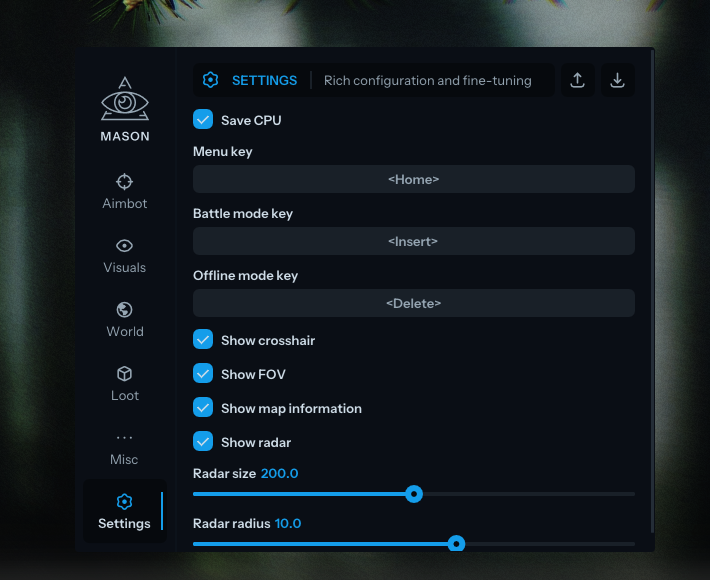
Private cheat Mason for Escape from Tarkov — a feature-rich software with a full set of capabilities: Aimbot, ESP, Loot ESP, radar, thermal vision and much more. The developer promptly updates the product after every game patch.
- Security — modern BattleEye bypass, minimal chance of account ban
- Full functionality — Aimbot with Silent Aim, player and loot ESP, built-in radar, Misc features (No Recoil, Thermal Vision, Noclip Gun)
- Convenient menu — 6 tabs with fine-tuning of each feature, hotkeys, battle and offline modes
- HWID Spoofer — built-in spoofer included as a bonus with the subscription
- Stream-proof — overlay is not visible on screen recordings and screenshots
System Requirements
🔔 Cheat statuses update automatically from our Telegram bot via developer notifications — follow the news there. Many cheats update themselves after game changes, so a “Checking” status does not mean the cheat is broken — it is just uncertainty until confirmed. Not sure? Ask in the site chat or on our Contacts page.
Global keys — work worldwide.
Payment with a Binance card may be available for selected products. Contact us privately before buying to check availability and agree the details.
Features
Aimbot
- Aim enable / Enable aimbot
- Aim spot / Select body part for aimbot targeting
- Aim key / Set aimbot activation key (hold to activate)
- Aim radius / Set aimbot working radius
- Aim height / Adjust aimbot targeting height
- Silent aim / Enable silent aim
- Manipulate left & right / Shift the shot point (e.g. behind a wall)
World
- Show mines / Display mines
- Show grenades / Display grenades
- Show extractions / Display extractions
- Show ammo indicator / Display ammo indicator
Misc
- Misc enable / Enable additional features
- Zoom key / Zoom activation key (works like binoculars)
- Remove visor / Disable visor
- Remove recoil / Disable weapon recoil
- Remove conditions / Disable conditions (headache, broken legs, etc.)
- Thermal vision / Enable thermal vision
- Instant ADS / Instant aiming down sights
- Noclip gun / Gun barrel passes through walls
Visuals
- Visuals enable / Enable visual features
- Show players / Display players
- Show bounding box / Display 2D boxes
- Show skeleton / Display skeleton
- Show health / Display health level
- Show name / Display names
- Show weapon / Display weapons
- Player render distance / Set player display distance
Loot ESP
- Show loot / Display items
- Loot price / Set displayed items price threshold
- Loot render distance / Set items display distance
- Show containers / Display containers
- Show barter loot / Display barter items
- Show ammunition / Display ammunition
- Show provision / Display provisions
- Show special loot / Display special loot
- Show custom loot / Display custom items (custom item filter)
Settings
- Save CPU / Save cheat resource usage
- Menu key / Menu activation key (default: Home)
- Battle mode key / Battle mode key (disables extra visual features)
- Offline mode key / Offline mode activation key
- Show crosshair / Display crosshair in center of screen
- Show FOV / Display FOV circle (aimbot radius)
- Show map information / Display map information
- Show radar / Display radar
- Radar size / Set radar size, Radar radius / Set radar working radius
Customer Reviews
All reviewsFrequently Asked Questions
What features are included in Mason?
What payment methods are accepted?
How to contact support?
After payment you will receive detailed instructions on activation, launch and use of the software.
Instructions will be sent to the email address specified before payment.
You will also find a download link and necessary components for the software.
Cheat community
Cheat updates, detection status and help from other players — in our Telegram and Discord.