Mason の Escape from Tarkov
ゲーム「Escape from Tarkov」のプライベートチートメイソンの作業中
開発者: Mason
Escape from Tarkov のプライベート チート メイソン — Aimbot、ESP、Loot ESP、レーダー、サーマル ビジョンなどのフルセットの機能を備えた機能豊富なソフトウェア。 開発者は、ゲームのパッチが適用されるたびに、ただちに製品を更新します。
- セキュリティ — 最新の BattleEye バイパス、アカウント禁止の可能性を最小限に抑える
- 全機能 — サイレントエイムを備えたエイムボット、プレイヤーと戦利品のESP、内蔵レーダー、その他の機能(反動なし、サーマルビジョン、ノクリップガン)
- 便利なメニュー — 各機能、ホットキー、戦闘モード、オフライン モードを微調整できる 6 つのタブ
- HWID スプーファー — サブスクリプションのボーナスとして組み込まれたスプーファー
- ストリームプルーフ — オーバーレイは画面録画やスクリーンショットには表示されません
無料のインストールとセットアップのサポート — 問題が発生した場合は、テクニカル サポートが開始をお手伝いします。
システム要件
対応ゲームバージョン
Steam / Battlestate Games Launcher
プロセッサ
Intel and AMD
Supported Game Mode
Fullscreen in window
追加要件
Enable VT-x / VT-d (Virtualization) / Enable Hyper-V / Disable Secure Boot
Supported Anti-Cheats
BattleEye
Supported Os Windows
10&11x64, versions (2004 / 20H2 / 21H1 / 21H2 / 22H2 / 23H2 / 24H2 / 25H2 / 26H1). Check your build version using the instructions HERE
Invisibility On Video Or Screenshots
はい
Bios Boot Mode
UEFI. Check which format is used in your system using the instructions HERE
System Disk Partition Format
GPT. Check which format is used in your system using the instructions HERE
Built-In Hwid Spoofer
Yes (in some cases HWID Spoofer may not work, so its operation is optional and not guaranteed 100%)
ゲームの最新パッチ: 2026年7月17日
稼働中 詳細ステータス
🔔 チートの状態は開発者の通知に基づき当社のTelegramボットから自動更新されます — そちらで最新情報をフォローしてください。多くのチートはゲームの変更後に自動更新されるため、「確認中」の状態はチートが動作しないという意味ではなく、確認までの不確実性にすぎません。不安ですか?サイトのチャットで質問するかお問い合わせをご確認ください。
グローバルキー — 世界中で使用可能。
カードで支払えませんか?
銀行カードが当社の決済システムで使えない場合、Binance ギフトカード (USDT) でお支払いいただけます。
この方法には固定 +10% のサービス手数料がかかります。プロモコードや割引は適用できません。
- この支払い方法がご希望の商品に対応しているか、お問い合わせください
- お住まいの国のマーケットプレイス(Paxful、Binance、または現地の販売店)で必要な金額の Binance ギフトカード (USDT) を購入してください — お好みの支払い方法で
- ギフトカードのコードを送信してください — 購入を有効化し、商品をお届けします
USDT (TRC-20) はチェックアウト時にもご利用いただけます — 追加手数料なし。
機能
エイムボット
- エイム有効 / エイムボットを有効にする
- エイムスポット / エイムボットターゲティングの体の部位を選択
- エイムキー / エイムボットアクティベーションキーを設定 (長押ししてアクティベートします)
- 照準半径 / エイムボットの動作半径を設定
- 照準の高さ / エイムボットの照準の高さを調整する
- サイレントエイム / サイレントエイムを有効にする
- 左右の操作 / ショットポイントの移動(壁の後ろなど)
世界
- 地雷を表示 / 地雷を表示
- 手榴弾を表示 / 手榴弾を表示
- 抽出を表示 / 抽出を表示
- 弾薬インジケーターを表示 / 弾薬インジケーターを表示
その他
- その他の有効化 / 追加機能を有効にする
- ズームキー / ズームアクティベーションキー (双眼鏡のように動作します)
- バイザーを削除する / バイザーを無効にする
- 反動を削除 / 武器の反動を無効にする
- 状態の削除 / 状態の無効化 (頭痛、足の骨折など)
- 熱ビジョン / 熱ビジョンを有効にする
- インスタントADS / インスタント照準照準
- ノクリップガン・銃身が壁を貫通
ビジュアル
- ビジュアルで有効にする / ビジュアル機能を有効にする
- 選手を表示 / 選手を表示
- 境界ボックスを表示 / 2D ボックスを表示
- スケルトンを表示 / スケルトンを表示
- 健康状態を表示 / 健康レベルを表示
- 番組名 / 表示名
- 武器を表示 / 武器を表示
- プレーヤーのレンダリング距離 / プレーヤーの表示距離を設定
戦利品ESP
- 戦利品の表示 / アイテムの表示
- 戦利品の価格 / 表示アイテムの価格しきい値を設定
- 戦利品レンダリング距離 / セットアイテム表示距離
- コンテナを表示 / コンテナを表示
- 物々交換の戦利品を表示 / 物々交換アイテムを表示
- 弾薬の表示 / 弾薬の表示
- 表示規定・表示規定
- 特別な戦利品を表示 / 特別な戦利品を表示
- カスタム戦利品の表示 / カスタムアイテムの表示 (カスタムアイテムフィルター)
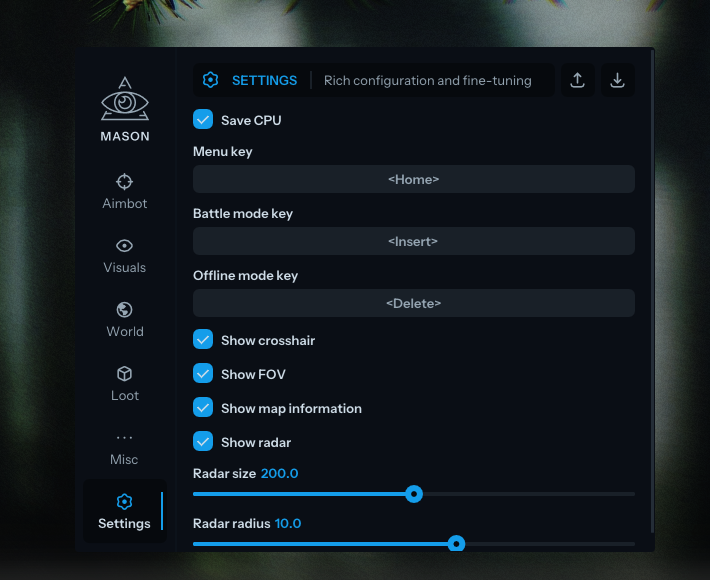
設定
- CPU の節約 / チート リソースの使用量の節約
- メニューキー / メニュー起動キー (デフォルト: ホーム)
- バトルモードキー / バトルモードキー (追加のビジュアル機能を無効にします)
- オフラインモードキー/オフラインモードアクティベーションキー
- 十字線を表示 / 十字線を画面の中央に表示
- FOV を表示 / FOV 円を表示 (エイムボット半径)
- 地図情報を表示 / 地図情報を表示
- レーダーを表示 / レーダーを表示
- レーダー サイズ / レーダー サイズの設定、レーダー半径 / レーダーの作動半径の設定
これはどういう意味?
カスタマーレビュー
すべてのレビューよくある質問
Masonの使用は安全ですか?
はい、Masonはセキュリティを重視して設計されています。高度なアンチチート回避技術を使用し、定期的にソフトウェアを更新しています。ただし100%のBAN防止保証はありません — 別アカウントの使用を推奨します。
Masonのインストールと起動方法は?
購入後、oplata.infoへのリンクが届きます。手順書、ダウンロードリンク、アクティベーションキーが含まれています。ステップバイステップのガイドに従ってください — インストールは通常2〜5分です。
Escape from Tarkovのアップデート後もMasonは動作しますか?
Escape from Tarkovの各パッチ後、Masonを迅速に更新します。更新は通常1〜48時間以内にリリースされます。更新中はサブスクリプションが凍結され、支払い済みの時間は失われません。
Masonにはどんな機能が含まれていますか?
Masonの機能セットは選択プランによって異なります。通常、Aimbot、ESP/Wallhack、Radarなどが利用可能です。機能の完全なリストは上記の商品説明をご覧ください。
どの支払い方法が利用できますか?
oplata.info(銀行カード、電子ウォレット、暗号資産)および一部商品のEliteSellerでのお支払いに対応しています。詳細はお支払いページをご覧ください。
サポートにはどう連絡しますか?
Telegram(@undetect)、Telegramチャット、Discord、またはメール ivsofte@gmail.com で管理者に連絡できます。対応時間:10:00~翌0:00 (UTC+3)。
お支払い後、ソフトウェアのアクティベーション、起動、使用方法の詳細な説明をお届けします。
説明はお支払い前に指定されたメールアドレスに送信されます。
ダウンロードリンクと必要なコンポーネントもそちらでご確認いただけます。
チートコミュニティ
チートのアップデート、検出ステータス、他プレイヤーからのサポート — TelegramとDiscordで。