Fecurity の Escape from Tarkov
ゲーム Escape from Tarkov 用の高品質のプライベート チート Fecurity | アリーナ
ゲーム Escape from Tarkov のプライベート チートを安全に作成するには、さまざまな人気ゲームのプライベート チートの作成に長年の経験を持つ実績のある開発者チームが長年にわたって作成しました。 彼らはシューター『Escape from Tarkov』を無視せず、アンチチートを回避する最新の方法を備えた独自のソフトウェアを作成しました。
Fecurity の主な利点の 1 つは、アカウントがブロックされる可能性が最小限に抑えられることです。 開発者は、プレーヤーがアカウントのブロックの可能性を心配することなくゲームを楽しめるように、チートの高い信頼性と保護を確保しました。
Fecurity には、あなたとあなたのチームが楽に勝利を収めるために必要なものがすべて含まれています。 チート機能のおかげで、スキルを向上させ、効率を高め、対戦相手よりも優位に立つことができます。
チートの使用中に問題が発生した場合、開発チームはいつでも迅速なサポートを提供する準備ができていることに注意してください。 24 時間対応しており、発生する可能性のある問題を解決する準備ができています。
Fecurity は、Escape from Tarkov ゲーム用の信頼性が高く機能的なプライベート チートです。これを使用すると、ゲームの効率が向上し、チームで簡単に勝利を収めることができます。 ただし、責任を持って使用し、ゲームのルールに従ってください。
システム要件
🔔 チートの状態は開発者の通知に基づき当社のTelegramボットから自動更新されます — そちらで最新情報をフォローしてください。多くのチートはゲームの変更後に自動更新されるため、「確認中」の状態はチートが動作しないという意味ではなく、確認までの不確実性にすぎません。不安ですか?サイトのチャットで質問するかお問い合わせをご確認ください。
グローバルキー — 世界中で使用可能。
銀行カードが当社の決済システムで使えない場合、Binance ギフトカード (USDT) でお支払いいただけます。
この方法には固定 +10% のサービス手数料がかかります。プロモコードや割引は適用できません。
- この支払い方法がご希望の商品に対応しているか、お問い合わせください
- お住まいの国のマーケットプレイス(Paxful、Binance、または現地の販売店)で必要な金額の Binance ギフトカード (USDT) を購入してください — お好みの支払い方法で
- ギフトカードのコードを送信してください — 購入を有効化し、商品をお届けします
USDT (TRC-20) はチェックアウト時にもご利用いただけます — 追加手数料なし。
機能
一般
- OBS での録画のバイパス: いいえ。
- アリーナでも活躍します!
- 7 日間と 30 日間のキーは、管理者によって手動で送信されます。顧客ベースが表示されたら、オンライン決済へのキーをアップロードし、自動配信を行います。
- その他の支払い方法
- 上記のリンクを使用して支払いできない場合
- クエストアシスタント
その他
- その他のセクション
- 高速検索。
- 急いで調べてください。
- ファストオープンコンテナ。
- 弾薬の高速ロード/アンロード (マガジンからのカートリッジの高速ロード/アンロード)。
- ダイナミック クロスヘア (武器の方向を示すダイナミック サイト)。
- サーマルビジョン。
- ナイトビジョン (暗視効果)。
- 弾薬パネル(マガジン内のカートリッジ残量の表示とマガジン内のカートリッジの種類の表示を含む)。
- ヒットサウンド。
- FOV をオーバーライドします (視野を変更できます)。
- ジャンプ遅延なし (ジャンプ間の遅延を除去します)。
- ハイジャンプ。
- ジャンプの高さを制御します。
- カスタム ゲーム時間 (0 ~ 24 時間) (ゲーム内の現在の時刻 (0 ~ 24 時間) を変更できます)。
- 三人称と三人称のキーバインド (ボタンを使用して三人称を有効にできます)。
- エクスプロイトセクション
- 壁を通って略奪(壁を通って略奪できるようになります)。
- バイザーを削除します (一部のヘルメットのバイザー効果を削除します)。
- カスタム反動制御 (0 ~ 100%) (武器の反動の大きさを制御できます)。
- リコイルモード(増加-減少)(リコイルの%を追加するか減少させるかを変更できます)。
- 無限のスタミナ。
- 投擲力(投擲武器(手榴弾など)を投げる力)。
- インスタントADS(インスタント照準)。
- 強制スイッチ (実験室の場所にあるすべてのスイッチのロックを解除します)。
- 重量なし (混雑の影響を除去します)。
- 慣性なし (慣性を削除します)。
- 誤動作なし(武器が壊れる可能性があるという事実を削除します)。
- Speedhack (サーバーとの同期が失われるため、今は使用しないでください))。
- その他のセクション
- No-Fog (霧を除去します)。
- 常に射撃します (走ったり、ジャンプしたりしながら射撃することができます)。
- 常に照準を合わせます (走ったり、ジャンプしたりしながら照準を合わせることができます)。
- 体調不良なし(脚を骨折していても走れるが、治療中...)。
エイムボット
- Aimbot の有効化/無効化チェックボックス。
- エイムボット 1 種類 (サイレント)
- Auto-Fire(自動射撃)。
- 自動射撃ターゲット (ボット、フォロワー、ボス)
- Auto-Fire Hitscan Type (自動ショット ヒットスキャン タイプ (最適化に使用))。
- Auto-Fire Hitscan Speed (自動ショット ヒットスキャン速度 (最適化に使用))。
- 制御可能なFOV(カスタマイズ可能なエイムボットトリガーゾーン)。
- FOV を描画します (エイムボットのトリガー ゾーンを表示します)。
- 分散を除去します (ショットガンの分散を除去します)。
- サイレントナイフ(約1.5mゾーンで自動的かつ静かに近接攻撃を使用します)
- 速度&弾道予測(敵プレイヤーの弾道と速度の予測)。
- エイムボットの距離を変更可能。
- 自動発射距離。
- ユニークなヒットスキャンシステム。
戦利品フィルター
- ルートフィルターを有効/無効にします。
- 戦利品の距離は無視します。
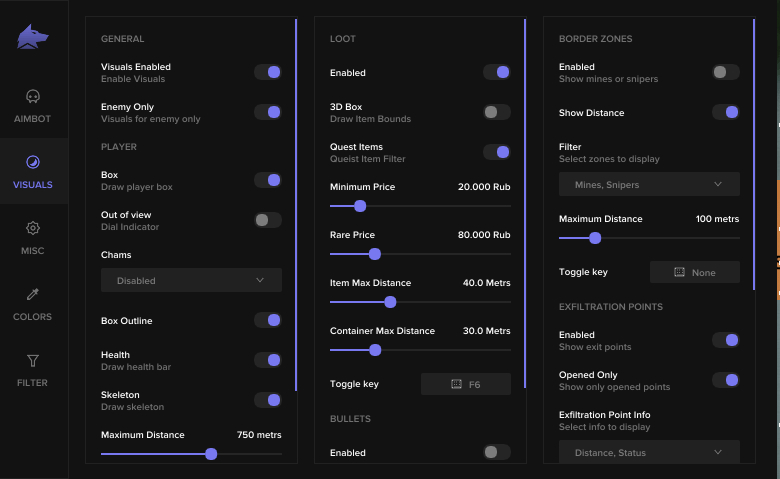
ビジュアル
- 一般セクション
- ビジュアル有効/無効チェックボックス (チートのビジュアル部分をオン/オフにします)。
- 敵のみチェックボックス (有効にすると、味方の ESP が削除されます)。
- プレイヤーセクション
- ボックス (敵/味方プレイヤーの周囲にボックスを描画します)。
- ボックスのアウトライン (ボックスのアウトラインをオン/オフにします)。
- OOF Arrows (視線の外にいるプレイヤーに向かって矢印を表示します)。
- OOF Arrow Radius (OOF 矢印が十字線からどのくらい離れた位置に描画されるか)。
- チャムス
- スケルトン (敵/味方プレイヤーのスケルトンを描画します)。
- 戦利品セクション
- 戦利品 esp 有効化/無効化チェックボックス (戦利品の esp を有効化/無効化)。
- 3D ボックス (戦利品の周囲の 3D ボックス)。
- クエスト アイテム (クエスト アイテムの個別の色 (色は [色] タブで選択できます))。
- 最低価格 (表示される戦利品の最低価格)。
- レア価格(アイテムの色がレアアイテムの色に変わる価格(色は「色」タブで選択できます))。
- アイテムの最大距離 (アイテムが表示される戦利品までの最大距離)。
- Container Max Distance (コンテナが表示される最大距離)。
- アイテム esp キーバインド (戦利品の esp を有効/無効にするボタン)。
- 箇条書きセクション
- バレットトレーサーを有効/無効にします。
- オーナーが選択(弾跡を表示するプレイヤー(自分、敵、チームメイト))を選択します。
- ボーダーゾーンセクション
- 地雷/狙撃兵のESPを有効/無効にします。
- 距離を表示 (地雷/狙撃兵までの距離を表示)。
- フィルター (地雷または狙撃兵の表示を有効/無効にします)。
- 最大距離 (地雷/狙撃兵が表示される距離)。
- ボーダーゾーンのキーバインド (地雷/狙撃兵の ESP を有効/無効にするボタン)。
- 窃盗ポイント セクション
- 特に抽出ポイントを有効/無効にします。
- オープンのみ (オープンされていない出力を削除するフィルター)。
- 流出ポイント情報 (距離、ステータス)
- 流出ポイントのキーバインド (出口ゾーンの ESP を有効/無効にするボタン)。
- 手榴弾セクション
- 特に手榴弾の有効化/無効化。
- 手榴弾情報 (タイマー、距離)
- 最大距離 (投げられた手榴弾を表示するための最大距離)。
- Grenade ESP キーバインド (投げられた手榴弾の ESP を有効/無効にするボタン)。
カスタマーレビュー
すべてのレビューよくある質問
Fecurityの使用は安全ですか?
Fecurityのインストールと起動方法は?
Escape from Tarkovのアップデート後もFecurityは動作しますか?
Fecurityにはどんな機能が含まれていますか?
どの支払い方法が利用できますか?
サポートにはどう連絡しますか?
お支払い後、ソフトウェアのアクティベーション、起動、使用方法の詳細な説明をお届けします。
説明はお支払い前に指定されたメールアドレスに送信されます。
ダウンロードリンクと必要なコンポーネントもそちらでご確認いただけます。
チートコミュニティ
チートのアップデート、検出ステータス、他プレイヤーからのサポート — TelegramとDiscordで。