Fecurity สำหรับ Escape from Tarkov
Fecurity สูตรโกงส่วนตัวคุณภาพสูงสำหรับเกม Escape from Tarkov | อารีน่า
Fecurity สูตรโกงส่วนตัวสำหรับเกม Escape from Tarkov ถูกสร้างขึ้นในช่วงหลายปีที่ผ่านมาโดยทีมนักพัฒนาที่ได้รับการพิสูจน์แล้วและมีประสบการณ์หลายปีในการสร้างสูตรโกงส่วนตัวสำหรับเกมยอดนิยมต่างๆ พวกเขาไม่ได้ยืนห่างจากเกมยิง Escape from Tarkov และสร้างซอฟต์แวร์ที่มีเอกลักษณ์พร้อมวิธีการที่ทันสมัยในการหลีกเลี่ยงการต่อต้านการโกง
ข้อดีหลักประการหนึ่งของ Fecurity คือโอกาสที่บัญชีจะถูกบล็อกน้อยที่สุด ผู้พัฒนาได้รับประกันความน่าเชื่อถือและการป้องกันโปรแกรมโกงในระดับสูง เพื่อให้ผู้เล่นสามารถเพลิดเพลินกับเกมโดยไม่ต้องกังวลว่าบัญชีของพวกเขาจะถูกบล็อก
Fecurity มีทุกสิ่งที่คุณต้องการเพื่อช่วยให้คุณและทีมของคุณได้รับชัยชนะอย่างง่ายดาย ด้วยฟังก์ชันการโกง คุณสามารถพัฒนาทักษะ เพิ่มประสิทธิภาพ และได้เปรียบเหนือคู่ต่อสู้
โปรดทราบว่าหากเกิดปัญหาขณะใช้สูตรโกง ทีมพัฒนาก็พร้อมที่จะช่วยเหลือและให้การสนับสนุนทันที พร้อมให้บริการตลอด 24 ชั่วโมงและพร้อมที่จะแก้ไขปัญหาใดๆ ที่คุณอาจพบ
Fecurity เป็นตัวโกงส่วนตัวที่เชื่อถือได้และใช้งานได้จริงสำหรับเกม Escape from Tarkov ซึ่งจะช่วยให้คุณเพิ่มประสิทธิภาพการเล่นเกมและคว้าชัยชนะอย่างง่ายดายร่วมกับทีมของคุณ แต่อย่าลืมใช้อย่างมีความรับผิดชอบและปฏิบัติตามกฎของเกม
ข้อกำหนดระบบ
🔔 สถานะของโปรแกรมอัปเดตอัตโนมัติจาก บอต Telegram ของเรา ตามการแจ้งเตือนของผู้พัฒนา — ติดตามข่าวได้ที่นั่น โปรแกรมหลายตัวอัปเดตตัวเองหลังเกมเปลี่ยนแปลง ดังนั้นสถานะ «กำลังตรวจสอบ» ไม่ได้แปลว่าใช้งานไม่ได้ เป็นเพียงความไม่แน่นอนจนกว่าจะยืนยัน ไม่แน่ใจ? สอบถามที่ แชทบนเว็บไซต์ หรือดู ติดต่อ
คีย์ Global — ใช้ได้ทั่วโลก
หากบัตรธนาคารของคุณใช้ไม่ได้กับระบบชำระเงินของเรา คุณสามารถชำระเงินด้วย Binance Gift Card (USDT)
วิธีนี้มีค่าบริการคงที่ +10% โค้ดส่วนลดและโปรโมชั่นไม่สามารถใช้ได้
- ติดต่อเราเพื่อยืนยันว่าวิธีการชำระเงินนี้ใช้ได้กับสินค้าที่คุณต้องการ
- ซื้อ Binance Gift Card (USDT) ในจำนวนที่ต้องการจากแพลตฟอร์มในประเทศของคุณ (Paxful, Binance หรือตัวแทนจำหน่ายในท้องถิ่น) — ด้วยวิธีการชำระเงินที่สะดวก
- ส่งรหัสบัตรของขวัญให้เรา — เราจะเปิดใช้งานการซื้อและส่งมอบสินค้า
USDT (TRC-20) ยังมีให้เลือกในหน้าชำระเงิน — ไม่มีค่าธรรมเนียมเพิ่มเติม
คุณสมบัติ
ทั่วไป
- ข้ามการบันทึกใน OBS: ไม่;
- ใช้งานได้ใน ARENA ด้วย!
- ผู้ดูแลระบบจะส่งคีย์เป็นเวลา 7 และ 30 วันด้วยตนเอง เมื่อฐานลูกค้าปรากฏขึ้น เราจะอัปโหลดกุญแจไปยังการชำระเงินออนไลน์และทำการจัดส่งอัตโนมัติ
- วิธีการชำระเงินเพิ่มเติม
- หากคุณไม่สามารถชำระเงินโดยใช้ลิงก์ด้านบนได้
- ผู้ช่วยภารกิจ
เบ็ดเตล็ด
- ส่วนเบ็ดเตล็ด
- ค้นหาอย่างรวดเร็ว
- ตรวจสอบอย่างรวดเร็ว
- เปิดคอนเทนเนอร์อย่างรวดเร็ว
- Fast Load/Unload Ammo (การขนถ่ายกระสุนจากนิตยสารอย่างรวดเร็ว)
- Dynamic Crosshair (ภาพไดนามิกแสดงทิศทางของอาวุธ)
- วิสัยทัศน์ความร้อน
- Night Vision (เอฟเฟกต์การมองเห็นกลางคืน)
- แผงกระสุน (รวมการแสดงกระสุนที่เหลืออยู่ในแม็กกาซีนและการแสดงประเภทกระสุนในแม็กกาซีน)
- ตีเสียง.
- แทนที่ FOV (อนุญาตให้คุณเปลี่ยนขอบเขตการมองเห็น)
- ไม่มีความล่าช้าในการกระโดด (ลบความล่าช้าระหว่างการกระโดด)
- กระโดดสูง.
- ควบคุมว่าจะกระโดดได้สูงแค่ไหน
- เวลาเกมที่กำหนดเอง (0-24 ชม.) (อนุญาตให้คุณเปลี่ยนเวลาปัจจุบันในเกม (0-24 ชม.))
- ปุ่มบุคคลที่สามและบุคคลที่สาม (อนุญาตให้คุณเปิดใช้งานบุคคลที่สามโดยใช้ปุ่ม)
- มาตราการใช้ประโยชน์
- ปล้นผ่านกำแพง (อนุญาตให้คุณปล้นผ่านกำแพง)
- ลบ Visor (ลบเอฟเฟกต์กระบังหน้าบนหมวกกันน็อคบางตัว)
- การควบคุมการหดตัวแบบกำหนดเอง (0-100%) (ช่วยให้คุณควบคุมจำนวนการหดตัวของอาวุธได้)
- โหมดการหดตัว (เพิ่ม-ลด) (ให้คุณเปลี่ยนได้ว่าจะเพิ่มหรือลด % ของการหดตัว)
- ความแข็งแกร่งที่ไม่มีที่สิ้นสุด
- พลังการขว้าง (พลังที่ใช้ในการขว้างอาวุธ (ระเบิด...) จะถูกขว้าง)
- โฆษณาทันที (เล็งทันที)
- Force Switches (ปลดล็อคสวิตช์ทั้งหมดในตำแหน่งห้องปฏิบัติการ)
- ไม่มีน้ำหนัก (ขจัดผลกระทบจากความแออัด)
- ไม่มีความเฉื่อย (ขจัดความเฉื่อย)
- ไม่มีความผิดปกติ (ลบข้อเท็จจริงที่ว่าอาวุธสามารถแตกหักได้)
- Speedhack (อย่าใช้ตอนนี้เพราะจะทำให้คุณยกเลิกการซิงโครไนซ์กับเซิร์ฟเวอร์))
- ส่วนอื่น ๆ
- ไม่มีหมอก (ลบหมอก)
- Always Fire (ให้คุณยิงขณะวิ่ง กระโดด...)
- เล็งเสมอ (ให้คุณเล็งขณะวิ่ง กระโดด...)
- ไม่มีสภาพร่างกาย (ทำให้วิ่งได้ ขาหัก รักษา...)
เอมบอต
- ช่องทำเครื่องหมายเปิด/ปิด Aimbot
- Aimbot ประเภทหนึ่ง (เงียบ)
- ยิงอัตโนมัติ (ยิงอัตโนมัติ)
- เป้าหมายการยิงอัตโนมัติ (บอท ผู้ติดตาม บอส)
- ประเภทการยิง Hitscan อัตโนมัติ (ประเภท Hitscan การยิงอัตโนมัติ (ใช้สำหรับการปรับให้เหมาะสม))
- ความเร็วการสแกนการยิงอัตโนมัติ (ความเร็วการสแกนการยิงอัตโนมัติ (ใช้สำหรับการปรับให้เหมาะสม))
- FOV ที่ควบคุมได้ (โซนทริกเกอร์ Aimbot ที่ปรับแต่งได้)
- วาด FOV (แสดงโซนทริกเกอร์ของ Aimbot)
- ลบการกระจาย (ลบการกระจายของปืนลูกซอง)
- Silent Knife (ใช้การต่อสู้ระยะประชิดโดยอัตโนมัติและเงียบ ๆ ในโซนประมาณ 1.5 ม.)
- การทำนายความเร็วและขีปนาวุธ (การทำนายขีปนาวุธและความเร็วของผู้เล่นศัตรู)
- ระยะทางที่เปลี่ยนแปลงได้ของ Aimbot
- ระยะการยิงอัตโนมัติ
- ระบบฮิตสแกนที่ไม่ซ้ำใคร
ตัวกรองของขวัญ
- เปิด/ปิดตัวกรองไอเทม
- ละเว้นระยะทางปล้น
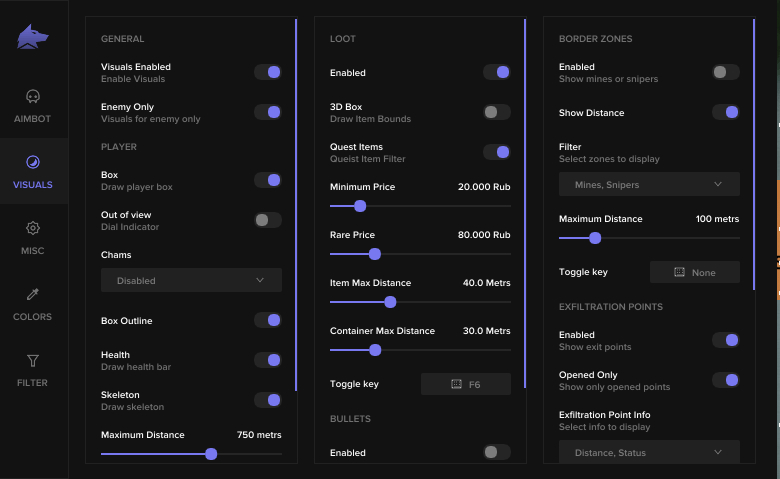
ภาพ
- มาตราทั่วไป
- ช่องทำเครื่องหมายเปิด/ปิดการใช้งานภาพ (เปิด/ปิดส่วนที่มองเห็นได้ของการโกง)
- ช่องทำเครื่องหมายศัตรูเท่านั้น (เมื่อเปิดใช้งาน ลบ ESP บนพันธมิตร)
- ส่วนผู้เล่น
- กล่อง (จั่วกล่องล้อมรอบผู้เล่นศัตรู/พันธมิตร)
- โครงร่างกล่อง (เปิด/ปิดโครงร่างกล่อง)
- ลูกศร OOF (แสดงลูกศรไปยังผู้เล่นที่อยู่นอกแนวสายตา)
- รัศมีลูกศร OOF (ลูกศร OOF จะถูกวาดจากเป้าเล็งไกลแค่ไหน)
- ชามเซส
- โครงกระดูก (วาดโครงกระดูกของผู้เล่นศัตรู/พันธมิตร)
- มาตราปล้นสะดม
- ช่องทำเครื่องหมายเปิด/ปิดการใช้งาน esp ของรางวัล (เปิด/ปิด esp ของรางวัล)
- 3D Box (กล่อง 3D รอบของขวัญ)
- รายการภารกิจ (แยกสีสำหรับรายการภารกิจ (สามารถเลือกสีได้ในแท็บสี))
- ราคาขั้นต่ำ (ราคาขั้นต่ำของของขวัญที่แสดง)
- ราคาหายาก (ราคาที่สินค้าจะเปลี่ยนสีตามสีของสินค้าหายาก (สามารถเลือกสีได้ในแถบสี))
- รายการระยะทางสูงสุด (ระยะทางสูงสุดในการปล้นที่จะแสดง)
- ระยะทางสูงสุดของตู้คอนเทนเนอร์ (ระยะทางสูงสุดที่ตู้คอนเทนเนอร์จะแสดง)
- รายการ esp keybind (ปุ่มสำหรับเปิด/ปิดการใช้งาน esp สำหรับของขวัญ)
- มาตราสัญลักษณ์แสดงหัวข้อย่อย
- เครื่องมือติดตามสัญลักษณ์แสดงหัวข้อย่อยเปิด/ปิด
- เจ้าของเลือก (รวมผู้เล่นที่จะแสดงร่องรอยกระสุน (จากตัวคุณเอง จากศัตรู จากเพื่อนร่วมทีม))
- ส่วนเขตชายแดน
- เปิด/ปิด esp บนทุ่นระเบิด/สไนเปอร์
- แสดงระยะทาง (แสดงระยะทางถึงทุ่นระเบิด/สไนเปอร์)
- ตัวกรอง (เปิด/ปิดการแสดงทุ่นระเบิดหรือสไนเปอร์)
- ระยะทางสูงสุด (ระยะทางที่ทุ่นระเบิด/สไนเปอร์จะแสดง)
- ปุ่มลัดโซนชายแดน (ปุ่มเพื่อเปิด/ปิด ESP สำหรับทุ่นระเบิด/สไนเปอร์)
- ส่วนจุดกรอง
- เปิด/ปิดจุดกรองโดยเฉพาะ
- เปิดเท่านั้น (ตัวกรองที่ลบเอาต์พุตที่ไม่เปิด)
- ข้อมูลจุดกรอง (ระยะทาง สถานะ)
- ปุ่มลัดจุดกรอง (ปุ่มเพื่อเปิด/ปิด ESP สำหรับโซนทางออก)
- มาตราระเบิดมือ
- เปิด/ปิดระเบิดโดยเฉพาะ
- ข้อมูลระเบิดมือ (จับเวลา, ระยะทาง)
- ระยะทางสูงสุด (ระยะทางสูงสุดสำหรับการแสดงระเบิดที่ขว้าง)
- Grenade esp keybind (ปุ่มเพื่อเปิด/ปิด esp สำหรับระเบิดที่ขว้าง)
รีวิวจากลูกค้า
รีวิวทั้งหมดคำถามที่พบบ่อย
ใช้ Fecurity ปลอดภัยไหม?
วิธีติดตั้งและเปิดใช้ Fecurity?
Fecurity ใช้ได้หลังอัปเดต Escape from Tarkov ไหม?
Fecurity มีฟีเจอร์อะไรบ้าง?
รับชำระเงินด้วยวิธีใดบ้าง?
ติดต่อฝ่ายสนับสนุนอย่างไร?
หลังชำระเงิน คุณจะได้รับคำแนะนำละเอียดเกี่ยวกับการเปิดใช้งาน เริ่มต้น และใช้งานซอฟต์แวร์
คำแนะนำจะถูกส่งไปยังอีเมลที่ระบุก่อนชำระเงิน
คุณยังจะพบลิงก์ดาวน์โหลดและส่วนประกอบที่จำเป็น
ชุมชนผู้ใช้ตัวช่วย
อัปเดตตัวช่วย สถานะการตรวจจับ และความช่วยเหลือจากผู้เล่นคนอื่น — ใน Telegram และ Discord ของเรา