Fecurity für Escape from Tarkov
Hochwertiger privater Cheat Fecurity für das Spiel Escape from Tarkov | Arena
Der private Cheat von Fecurity für das Spiel Escape from Tarkov wurde im Laufe der Jahre von einem bewährten Entwicklerteam erstellt, das über langjährige Erfahrung in der Erstellung privater Cheats für verschiedene beliebte Spiele verfügt. Sie blieben dem Shooter Escape from Tarkov nicht fern und entwickelten eine einzigartige Software mit einer modernen Möglichkeit, Anti-Cheat zu umgehen.
Einer der Hauptvorteile von Fecurity ist die minimale Wahrscheinlichkeit einer Kontosperrung. Die Entwickler haben für eine hohe Zuverlässigkeit und Sicherheit des Cheats gesorgt, sodass Spieler das Spiel genießen können, ohne sich Gedanken über eine mögliche Sperrung ihres Kontos machen zu müssen.
Fecurity umfasst alles, was Sie brauchen, um Ihnen und Ihrem Team dabei zu helfen, einfache Erfolge zu erzielen. Dank der Cheat-Funktionalität können Sie Ihre Fähigkeiten verbessern, Ihre Effizienz steigern und sich einen Vorteil gegenüber Ihren Gegnern verschaffen.
Es ist wichtig zu beachten, dass das Entwicklungsteam jederzeit bereit ist, zu helfen und umgehend Unterstützung zu leisten, wenn bei der Verwendung des Cheats Schwierigkeiten auftreten. Sie sind 24 Stunden am Tag erreichbar und bereit, alle Probleme zu lösen, auf die Sie stoßen.
Fecurity ist ein zuverlässiger und funktionaler privater Cheat für das Spiel Escape from Tarkov, der Ihnen dabei hilft, Ihre Spieleffizienz zu steigern und mit Ihrem Team einfache Siege zu erzielen. Aber denken Sie daran, verantwortungsvoll damit umzugehen und die Spielregeln zu befolgen.
Systemanforderungen
🔔 Cheat-Status wird automatisch aus unserem Telegram-Bot nach Entwickler-Benachrichtigungen aktualisiert — folge den News dort. Viele Cheats aktualisieren sich nach Spieländerungen selbst, daher bedeutet der Status „Wird geprüft“ nicht, dass der Cheat defekt ist — es ist nur Ungewissheit bis zur Bestätigung. Nicht sicher? Frag im Website-Chat oder unter Kontakte.
Globale Schlüssel — funktionieren weltweit.
Für ausgewählte Produkte kann die Zahlung mit einer Binance-Karte verfügbar sein. Schreiben Sie uns vor dem Kauf privat, um Verfügbarkeit und Details zu klären.
Funktionen
Allgemein
- Aufnahme in OBS umgehen: Nein;
- Funktioniert auch in ARENA!
- Schlüssel für 7 und 30 Tage werden vom Administrator manuell gesendet. Sobald der Kundenstamm erscheint, laden wir die Schlüssel zur Online-Zahlung hoch und führen die automatische Lieferung durch.
- Weitere Zahlungsmethoden
- Wenn Sie nicht über die oben genannten Links bezahlen können
- Quest-Assistent
VERSCHIEDENES
- Sonstiges Abschnitt
- Schnelle Suche.
- Schnelle Untersuchung.
- Schnell geöffneter Behälter.
- Schnelles Laden/Entladen von Munition (Schnelles Laden/Entladen von Patronen aus Magazinen).
- Dynamisches Fadenkreuz (Dynamisches Visier, das die Richtung der Waffe anzeigt).
- Wärmebild.
- Nachtsicht (Nachtsichteffekt).
- Munitionsanzeige (einschließlich Anzeige der verbleibenden Patronen im Magazin und Anzeige des Patronentyps im Magazin).
- Klicken Sie auf „Ton“.
- FOV überschreiben (Ermöglicht Ihnen, das Sichtfeld zu ändern).
- Keine Sprungverzögerung (Entfernt die Verzögerung zwischen Sprüngen).
- Hochsprung.
- Kontrolle darüber, wie hoch der Sprung sein wird.
- Benutzerdefinierte Spielzeit (0–24 Stunden) (Ermöglicht Ihnen, die aktuelle Zeit im Spiel zu ändern (0–24 Stunden)).
- Dritte Person und Dritte-Person-Tastenkombination (Ermöglicht Ihnen, eine dritte Person über eine Schaltfläche zu aktivieren).
- Exploit-Bereich
- Plündern durch Wände (Ermöglicht das Plündern durch Wände).
- Visier entfernen (Entfernt den Visiereffekt bei einigen Helmen).
- Benutzerdefinierte Rückstoßkontrolle (0–100 %) (Ermöglicht die Steuerung des Rückstoßes der Waffe).
- Rückstoßmodus (erhöhen-verringern) (Ermöglicht Ihnen zu ändern, ob der Prozentsatz des Rückstoßes hinzugefügt oder verringert wird).
- Unendliche Ausdauer.
- Wurfkraft (Die Kraft, mit der Wurfwaffen (Granaten...) geworfen werden).
- Instant ADS (Sofortiges Zielen).
- Schalter erzwingen (Entsperrt alle Schalter am Laborstandort).
- Kein Gewicht (beseitigt den Stauungseffekt).
- Keine Trägheit (Entfernt Trägheit).
- Keine Fehlfunktion (Entfernt die Tatsache, dass die Waffe kaputt gehen kann).
- Speedhack (Jetzt nicht verwenden, da sonst die Synchronisierung mit dem Server aufgehoben wird)).
- Anderer Abschnitt
- No-Fog (Entfernt Nebel).
- Immer schießen (Ermöglicht das Schießen beim Laufen, Springen ...).
- Immer zielen (Ermöglicht das Zielen beim Laufen, Springen usw.).
- Keine körperliche Verfassung (Ermöglicht das Laufen mit gebrochenen Beinen, Behandlung...).
AIMBOT
- Aimbot-Kontrollkästchen aktivieren/deaktivieren.
- Eine Art von Aimbot (Silent)
- Auto-Fire (Automatischer Schuss).
- Automatisches Abfeuern von Zielen (Bots, Follower, Bosse)
- Auto-Fire Hitscan Type (Automatischer Schuss-Hitscan-Typ (wird zur Optimierung verwendet)).
- Auto-Fire Hitscan Speed (Automatische Schuss-Hitscan-Geschwindigkeit (wird zur Optimierung verwendet)).
- Steuerbares FOV (anpassbare Aimbot-Triggerzone).
- FOV zeichnen (Anzeige der Triggerzone des Aimbots).
- Streuung entfernen (Entfernt die Streuung bei Schrotflinten).
- Silent Knife (Verwendet automatisch und lautlos Nahkampf in einer Zone von etwa 1,5 m)
- Geschwindigkeits- und Ballistikvorhersage (Vorhersage der Ballistik und Geschwindigkeit des gegnerischen Spielers).
- Veränderbarer Abstand des Aimbots.
- Auto-Feuer-Distanz.
- Einzigartiges Hitscan-System.
Beutefilter
- Beutefilter aktivieren/deaktivieren.
- Beuteentfernung ignorieren.
BILDER
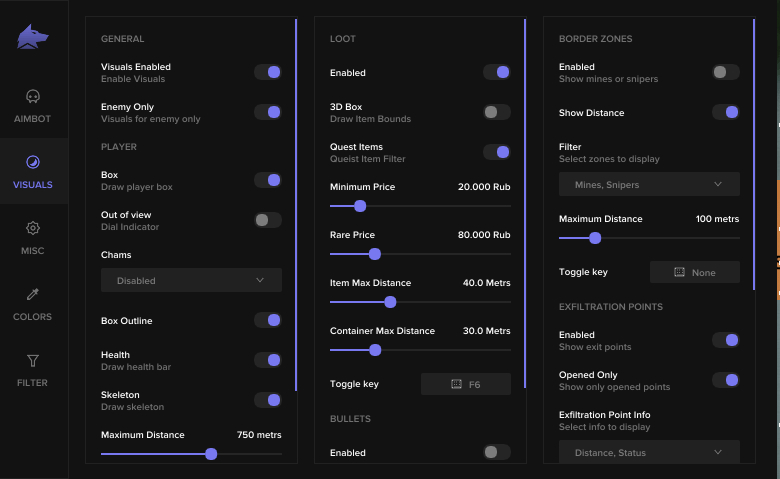
- Allgemeiner Abschnitt
- Kontrollkästchen „Visuelle Elemente aktivieren/deaktivieren“ (Den visuellen Teil des Cheats ein-/ausschalten).
- Kontrollkästchen „Nur Feind“ (Wenn aktiviert, wird ESP von Verbündeten entfernt).
- Spielerbereich
- Boxen (Zeichnet einen Rahmen um gegnerische/verbündete Spieler).
- Box-Umriss (Box-Umriss ein-/ausschalten).
- OOF-Pfeile (Zeigt Pfeile in Richtung Spieler außerhalb der Sichtlinie).
- OOF-Pfeilradius (Wie weit vom Fadenkreuz entfernt werden die OOF-Pfeile gezeichnet).
- Chamses
- Skelett (Zeichnet das Skelett feindlicher/verbündeter Spieler).
- Beutebereich
- Kontrollkästchen Loot ESP aktivieren/deaktivieren (ESP für Loot aktivieren/deaktivieren).
- 3D-Box (3D-Box um die Beute).
- Questgegenstände (Separate Farbe für Questgegenstände (Farbe kann auf der Registerkarte „Farben“ ausgewählt werden)).
- Mindestpreis (Mindestpreis der angezeigten Beute).
- Seltener Preis (Der Preis, zu dem Gegenstände ihre Farbe in die Farbe seltener Gegenstände ändern (Farbe kann auf der Registerkarte „Farben“ ausgewählt werden)).
- Maximale Entfernung des Gegenstands (Maximale Entfernung zur Beute, bei der er angezeigt wird).
- Container Max Distance (Maximaler Abstand, in dem Container angezeigt werden).
- Item-ESP-Tastenkombination (Schaltfläche zum Aktivieren/Deaktivieren von ESP für Beute).
- Abschnitt „Aufzählungszeichen“.
- Bullet Tracer aktivieren/deaktivieren.
- Besitzer wählen (Einbeziehung von Spielern, von denen Schussspuren angezeigt werden (von Ihnen selbst, von Feinden, von Teamkollegen)).
- Abschnitt Grenzzone
- ESP bei Minen/Scharfschützen aktivieren/deaktivieren.
- Entfernung anzeigen (Entfernung zu Minen/Scharfschützen anzeigen).
- Filter (Anzeige von Minen oder Scharfschützen aktivieren/deaktivieren).
- Maximale Entfernung (Entfernung, bei der Minen/Scharfschützen angezeigt werden).
- Grenzzonen-Tastenkombination (Schaltfläche zum Aktivieren/Deaktivieren von ESP für Minen/Scharfschützen).
- Abschnitt Exfiltrationspunkte
- Exfiltrationspunkte aktivieren/deaktivieren, insbesondere
- Nur geöffnet (Filter, der nicht geöffnete Ausgaben entfernt).
- Informationen zum Exfiltrationspunkt (Entfernung, Status)
- Exfiltrationspunkt-Tastenkombination (Schaltfläche zum Aktivieren/Deaktivieren von ESP für Exfiltrationszonen).
- Abschnitt „Granaten“.
- Aktivieren/Deaktivieren von Granaten, insbesondere.
- Granateninfo (Timer, Distanz)
- Maximale Entfernung (Maximale Entfernung zur Anzeige geworfener Granaten).
- Granaten-ESP-Tastenkombination (Schaltfläche zum Aktivieren/Deaktivieren von ESP für geworfene Granaten).
Kundenbewertungen
Alle BewertungenHäufig gestellte Fragen
Welche Funktionen sind in Fecurity enthalten?
Welche Zahlungsmethoden werden akzeptiert?
Wie erreiche ich den Support?
Nach der Zahlung erhalten Sie detaillierte Anleitungen zur Aktivierung, zum Start und zur Nutzung der Software.
Die Anleitung wird an die vor der Zahlung angegebene E-Mail-Adresse gesendet.
Dort finden Sie auch den Download-Link und die notwendigen Komponenten.
Cheat-Community
Cheat-Updates, Erkennungsstatus und Hilfe von anderen Spielern — in unserem Telegram und Discord.