Play video 1
Select an image to view it larger.
Phoenix WARDOGS
Phoenix WARDOGS - aimbot and ESP
Global keys — work worldwide.
The functions are described according to the supplier's materials. Please check product compatibility and current status before purchasing.
Payment with a Binance card may be available for selected products. Contact us privately before buying to check availability and agree the details.
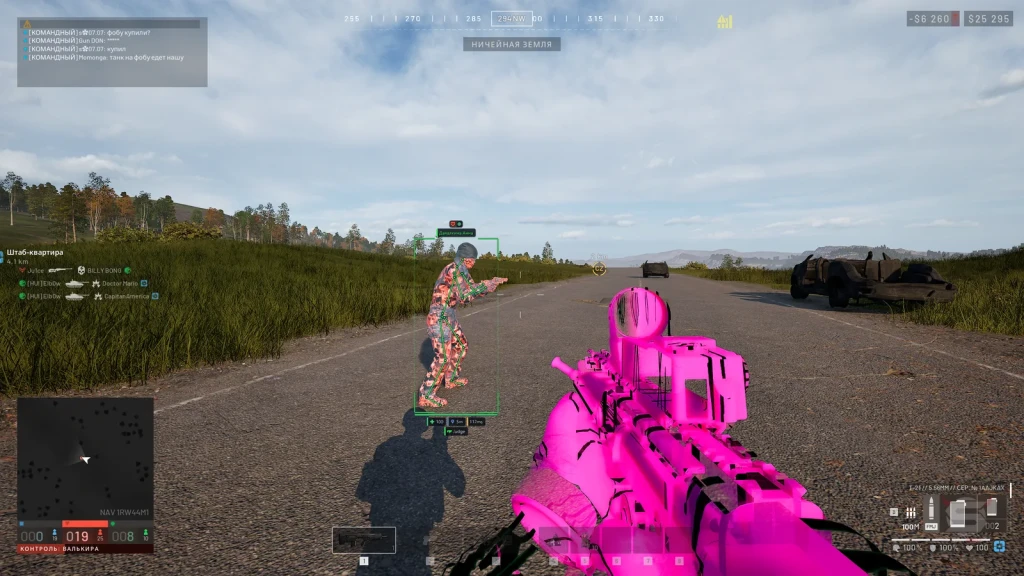
Phoenix for WARDOGS combines aimbot, weapon and artillery settings with ESP of players, vehicles, loot and world objects. Visuals include Chams, Glow, and Radar with a choice of categories and colors.
Camera, Weather, and Image settings allow you to adjust FOV, lighting, and effects. Several configuration profiles are available. A complete list of features and requirements is provided below, based on materials from the supplier.
System Requirements
What statuses mean
🔔 Cheat statuses update automatically from our Telegram bot via developer notifications — follow the news there. Many cheats update themselves after game changes, so a “Checking” status does not mean the cheat is broken — it is just uncertainty until confirmed. Not sure? Ask in the site chat or on our Contacts page.
Features
Aimbot
- Enable – enables or disables the aimbot
- Key – aimbot activation key
- Silent – directs bullets to the target without moving the camera
- Teleport Bullet – transfers the bullet to the target immediately after firing
- Aim Bone – allows you to select a bone to aim at (head, neck, chest, pelvis or closest to the aim)
- Target Priority – target priority by proximity to the sight or distance
- FOV – adjusts the radius of target acquisition around the sight
- Smooth – adjusts the smoothness of hovering
- Max Distance – sets the target acquisition range
- Visible Only – targeting only enemies in the field of view (outside cover)
- Ignore Downed – excludes knocked players from targets
- Friendly Fire - targeting allies
- Sticky Target – holds the selected target when holding down the aimbot button
- Prediction – takes into account target movement and bullet drop to calculate lead
- Recoil Compensation – compensates for weapon recoil and camera movement
- FOV Circle – displays a circle of the target acquisition area
- Aim Point – shows the active aiming point
- Snapline – displays a line to the target from the sight
- Highlight – highlights the selected target and displays labels (TARGET or LOCKED)
- Preview – shows a potential target before aimbot activation
Players ESP
- Box – Displays players as 2D frames, corner frames or 3D boxes
- Health – shows health by number, bar or both at the same time
- Team - Displays squad information and faction emblem as text, icon, or both
- Max Distance – sets the maximum display distance for players
- Skeleton – displays the skeleton of players with adjustable line thickness
- Name – shows player nicknames
- Distance – displays the distance to players
- Weapon – shows the weapon in the player's hands
- Visibility Icon – indicates the player’s visibility with an icon
- Ping – displays the player's network latency
- Vehicle Crew – unites the crew of one vehicle into a common information panel
- Off-Screen Arrows – Shows directional arrows to off-screen players with adjustable radius and size
- Arrow Distance – displays the distance to the player next to the arrow
- Aiming at Me – Highlights players who see you and aim in your direction (even outside ESP range)
- Visible Check – uses different colors for visible players and behind covers
- Teammates – enable display of allies
- Downed – configures the display of downed players (frames, skeleton, nickname, distance, faction, weapon, ping, visibility and arrows)
- Corpse Loot – displays loot on the bodies of dead players separately from regular loot
- Combat Mode – allows you to hide/show unnecessary ESP categories at the touch of a button
- ESP Focus – Limits the full ESP display to a circle around the crosshair or to an area outside of it
- ESP Text – allows you to customize the font, weight, size, shadow, outline and background of captions
Vehicle
- Vehicle Box – displays vehicles in the form of corner frames, 2D boxes or 3D boxes
- Marker – shows the marker on the vehicle
- Name – displays the name of the transport
- Snapline – draws a line from the screen to the vehicle
- Health – shows the strength of the vehicle
- Status – displays the current state of the vehicle
- Fuel – shows fuel level
- Fuel Leak – indicates a vehicle with a damaged fuel tank
- Speed – displays the current speed of the vehicle
- Locked – shows whether the vehicle is locked
- Smoke / Flares Left – displays the remaining smoke agents and heat traps
- Ownership – allows you to filter vehicles by ownership: allied, enemy or neutral
- Faction Mark - shows the emblem and name of the owner's faction
- Colors – allows you to paint vehicles with one color, distinguish between allied, enemy and neutral vehicles, or use faction colors
- Nearby List – displays a list of nearby transport with distance indication
- Auto Flares – automatically launches heat traps on helicopters and planes
- Missile Warning – warns about being captured by a missile and shows the time before its approach
Radar hack
- Radar – displays a round or square radar with adjustable radius, size and transparency
- Rotate – rotates the radar according to the viewing direction
- Grid – displays a coordinate grid
- View Cone – shows the player’s field of view
- Height – denotes players and objects that are higher or lower
- Clamp to Edge – clamps markers of distant objects to the edge of the radar
- Radar Filters – allows you to select the display of enemies, allies, downed players, vehicles and world objects
- Radar Loot - Displays the categories of loot available in Loot ESP, including loot from the bodies of dead players
- Game Map – displays enemies, knocked players and vehicles on the game map
- Map Colors – colors markers on the map according to faction affiliation
Screen Settings
- FOV Changer – allows you to change the camera viewing angle
- Super Zoom – zooms in on the assigned key with the ability to disable the zoom limit
- Freecam – Allows you to move the camera freely using WASD, up and down movement, and speed adjustment
- Third Person – camera in third person mode
- Weapon Offset – allows you to shift the weapon model forward, right and up
- Fullbright – adjusts the brightness of the game environment
- No Fog – turns off fog
- No Suppression – disables visual suppression effects
- No Tinnitus – disables the effect of ringing in the ears
- No Particles – disables particle effects
- No Foliage – disables the display of grass and vegetation
- No Shadows – disables shadows
- No AA – disables image smoothing
- No Decals – disables decals on surfaces
- No Translucency – disables the transparency of surfaces
- FPS Optimize – reduces graphics load by selecting the optimization level (light, medium, strong or maximum)
- Bullet Tracers – displays bullet trajectories as lines on the screen
Weapons
- No Recoil – disables weapon recoil
- No Spread – eliminates shot spread
- Instant Bullet – carries a bullet to a visible enemy in the line of fire
- Instant ADS – instant transition to aiming mode
- No Gun Sway – disables weapon swaying
- No ADS Sway – removes crosshair sway in ADS mode
- Grenade Prediction – displays the expected trajectory of a grenade throw
- Grenade Bounces – Shows grenade bounce points
- Blast Radius – displays the grenade explosion radius
- Victims – targets within the explosion radius
- Auto Calibrate – automatically determines the speed, fuse time and explosion radius of the throw
Artillery
- Mortar L81 – calculates guidance for the L81 mortar
- Howitzer SPH-2 – calculates guidance for the SPH-2 howitzer
- Tank Cannon – shows the expected impact point of a tank cannon shell
- Shot Arc – allows you to select an automatic, flat or mounted projectile trajectory
- Fire Cross – displays the readiness to fire indicator (when the barrel is aimed at the target)
- Info Panel – shows the distance to the target, pointing angle and miss value
- Flight Path – displays the flight path of the projectile
- Impact Point – shows the expected point of impact of the projectile
- Map Pick – allows you to target an enemy or an arbitrary point on the game map
- Ping Aim – points the weapon at a marker set in the game
- Follow Target – tracks the selected enemy or vehicle in motion
- Auto Lay – automatically turns the gun in the direction of the target
- Incoming Shells – warns of shells falling nearby with a red ring and the “STRACKED” notification.
- Emplacement ESP – displays mortars, drone stations and installations with strength information and a filter of allied objects
Loot & World ESP (Environment)
- Loot ESP – displays the names of items with a separate distance setting
- Loot Kinds – allows you to customize the display of weapons, ammo, medicine, armor, items and boxes with individual colors
- World ESP – shows the names and distances to objects in the game world
- Grenade Warning – warns about the danger from grenades
- Grenade Radius – displays explosion radius and lethal zone
- Mines / Claymores – shows mines and claymores with an indication of the trigger radius
- Other Deployables – displays other installable objects
- Drones – Shows drones and controlled devices with danger warnings
- Show Friendly – allows you to display your own mines and drones
- Grenades – marks grenades on the ground
- C4 / Explosives – displays C4 and other explosives
- Objectives – shows game goals and task objects
- Repair / Fuel – displays repair and refueling points
- Radios – marks radios on the map
- Supply Drops – shows supply points
- Helicopters – displays helicopters as game world objects
- Safe Zone – shows the safe zone
Chams (VX)
- Player Chams – paints player models in the selected material and texture through walls
- Wall Mode – display material taking into account visibility or use two layers for visible parts and behind walls
- Style – allows you to select a solid color, frame, tinted material, or material from a list
- Overlay – applies an additional layer with the selected color, frame or material
- Through Walls – displays player models through walls
- Chams Colors – allows you to set separate colors for allies and enemies visible and hidden behind walls
- Glow – adjusts the glow intensity of the material
- Auto Materials – automatically selects materials during a match
- Hand Chams – Applies the selected material to hand models
- Hand Mesh – allows you to select an automatic hand model, one of two model options, or a character mesh
- Rainbow – creates an iridescent color effect on the hands with the option to include weapons
Glow
- Player Glow – highlights the silhouettes of players
- Glow Presets – ready-made glow styles (soft, neon, outline and bright)
- Glow Targets – allows you to select lighting targets (enemies, allies and downed players, with fading over distance)
- Glow Show – configures the display of glow (always, only visible or behind walls)
- Glow Style – allows you to choose a soft glow, neon, outline or fill
- Glow Color – adjusts color by command, visibility, health level or rainbow effect
- Pulse – adds glow pulsation
- World Glow – illuminates game world objects, loot and vehicles
- World Presets – offers object lighting styles (soft, beacons and radar)
- World Style – allows you to choose a halo, ring, light pillar or a combination of halo and pillar
- Object Kinds – allows you to select categories of illuminated objects (grenades, explosives, targets, stations, walkie-talkies, turrets, supplies, aircraft and safe zone)
- Vehicle Frame – displays a glowing frame around the vehicle
- Danger Alert – highlights grenades and explosives closer than 15 meters in red with rapid pulsation
- ESP Colors – allows you to use the same colors for the glow as in the ESP settings
Weather and Effects
- Presets – ready-made weather and visual profiles (clear day, golden hour, moonlit night, storm, neon, toxic, film, noir, sleep and reset)
- World Grade – allows you to adjust the saturation, contrast, gamma, brightness, exposure, shadows and overall hue of the image
- White Balance – adjusts color temperature and balance of green and purple tones
- Tone Zones – allows you to separately adjust the colors of shadows, midtones and highlights
- Lens – adjusts bloom, its threshold and chromatic aberration
- Vignette – darkens the edges of the screen
- Sky – allows you to adjust the color, brightness of the sky and haze
- Clouds – adjusts the density and color of clouds
- Fog – allows you to adjust the density and color of the fog
- Time of Day – adjusts the time of day and the position of the sun
- Light – allows you to adjust the brightness and color of sunlight and sky lighting
- Wind – regulates the strength and speed of the wind
- Rain – allows you to customize the intensity of rain, jets, splashes, color and visual effects of precipitation
- Shot Effects – customizes visual effects at the point of impact, tracers and sparks, including their scale and the number of effects displayed simultaneously
Other features of Phoenix WARDOGS
- Instant Interact – speeds up actions that require holding down a key
- Infinite Stamina – disables stamina consumption
- Auto Reload – automatically performs active reloading of vehicles and artillery
- Build Hit – directs hammer hits to the yellow marker without moving the camera
- Configs – allows you to save and load multiple settings profiles
- Multiple Profiles – supports multiple separate configurations for different sets of settings
Customer Reviews
All reviewsFrequently Asked Questions
What features are included in Phoenix WARDOGS?
What payment methods are accepted?
How to contact support?
Payment is confirmed, but the product is missing. How long should I wait?
I have a key. Where are the download and instructions?
After payment you will receive detailed instructions on activation, launch and use of the software.
Instructions will be sent to the email address specified before payment.
You will also find a download link and necessary components for the software.
Cheat community
Cheat updates, detection status and help from other players — in our Telegram and Discord.