Melonity の Minecraft
Melonity - 100 以上の機能を備えた Minecraft 用のプライベート チート

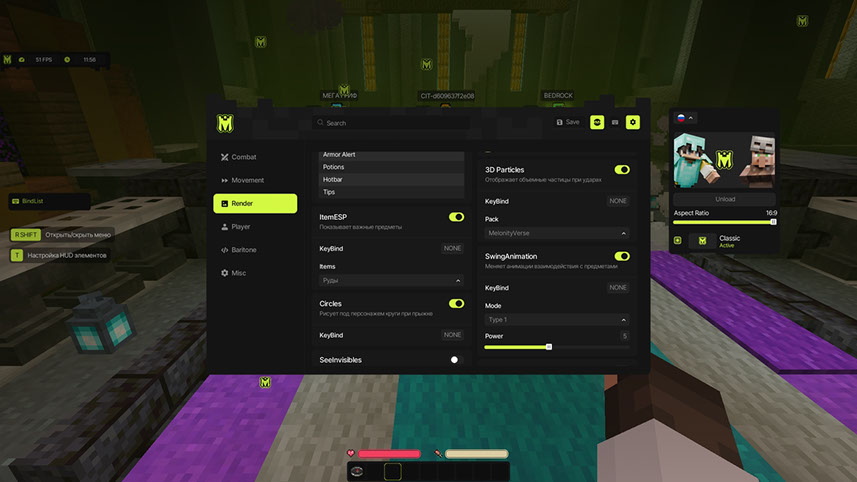
Melonity は、100 を超える機能を備えた Minecraft 用の強力なプライベート チートで、あらゆるサーバー上で完全な優位性を保証します。 チートには、戦闘用の COMBAT、サバイバル用の SURVIVAL、視覚的な改善用の VISUAL、便利なユーティリティ用の UTILITY の 4 つの主要なモジュール カテゴリが含まれています。 Melonity は、FT、RW、HW、Spooky などを含むすべての一般的なサーバーで動作し、安定した動作とゲーム内のアンチチートの安全なバイパスを保証します。 このチートはすべてのゲーム モードをサポートしており、プレイヤーにゲームプレイを向上させる素晴らしい機会を提供します。
システム要件
オペレーティングシステム
Windows 10 / Windows 11
ゲームクライアント
Any launcher
プロセッサ
Intel / AMD
Availability Of Usb Flash Drive
いいえ
Window Mode
Windowed, Frameless, Full Screen
Built-In Spoofer
いいえ
グローバルキー — 世界中で使用可能。
Binanceカードでのお支払い
一部の商品ではBinanceカードで支払える場合があります。購入前に個別メッセージで利用可否と詳細を確認してください。
機能
戦闘
- TriggerBot - ターゲットが視界に現れると自動攻撃
- ElytraAura - エリトラで飛行中の自動攻撃
- AutoCrystal - 黒曜石へのエンドクリスタルの自動配置
- ProjectileHelper - 飛行オブジェクトのターゲット、範囲調整、視覚的な回転
- BowSpammer - 迅速な弓矢スパム
- PearlTarget - エンダーパールを敵の位置に投げます
- AutoDodge - 飛来する発射物を回避します
- ヒットボックス - プレイヤーのヒットボックスを拡張します
- サラウンド - 敵の下にクモの巣を置き、敵の速度を低下させます
- AntiMiss - 空の空中スイングをブロックします。
- NoFriendDamage - フレンドリストのプレイヤーへのダメージをブロックします
- スパイダー - 水バケツを使って壁登りをスピードアップする
- ElytraRecast - 速度向上のためのエリトラ悪用
ユーティリティ
- FreeCam - 無料カメラ (観客モード)
- GuiMove - 開いたインベントリを使用して移動します
- AutoTool - 自動ツール切り替え
- Nuker - 優先順位を付けてブロックを自動採掘します
- AutoWindCharge - 自動風力充電の使用
- AirDropStealer - エアドロップからアイテムを自動収集
- MiddleClickPearl - マウスの中クリック時のパール
- ItemScroller - アイテムの素早い移動
- ItemSwapFix - アイテムの同期
- PotionBot - 自動ポーション醸造
- AutoBuy - オークションでアイテムを自動購入します
- AuctionHelper - 安いロットをハイライトする
- CreeperFarm - クリーパーの自動飼育
- ClanUpgrade - クランの自動アップグレード
- ServerAssist - キーバインドによるサーバー項目のサポート
- AutoAccept - テレポート要求を自動的に受け入れます
- AutoAuth - 自動ログインと認証
- AutoLeave - プレイヤーが近くに現れたら自動的に退出します
- RWJoiner - ReallyWorld に自動参加
- NoServerRotation - サーバー ヘッドの回転をブロックします
- NoJumpDelay - ジャンプ遅延を無効にする
- NameProtect - ニックネームの置換
- Nointeract - 指定されたブロックとの対話をブロックします
- NoPlayerTrace - 他のプレイヤーのヒットボックスをリセットします
- ToggleSound - モジュールトグルサウンド
- AntiAFK - AFK キックを防止します
- GappleTimer - 黄金のリンゴのクールダウンタイマー
サバイバル
- AutoGapple - 体力が低いときに金のリンゴを自動的に食べる
- AutoTotem - 死ぬ前に自動トーテムを使用する
- AutoSave - 落下時の自動救助
- AutoRespawn - 死亡後に自動でリスポーンします
- NoVelocity - ノックバックを無効にする
- NoPush - プレーヤーとアイテムからプッシュを削除します
- スプリント - 自動スプリント
- NoSlowDown - アイテムのスローダウンをキャンセルします
- SafeWalk - ブロックの落下を防止します
ビジュアル / 超能力
- ESP - プレイヤー情報 (名前、健康状態、距離)
- ShaderESP - プレイヤー向けのシェーダーハイライト
- GlowESP - プレイヤーの周りの光る輪郭
- ItemESP - 地面にアイテムや鉱石を表示します
- BlockESP - ブロックを通して鉱石を強調表示します
- AncientXRay - 古代の残骸を強調表示します
- SeeInvisibles - 目に見えない/観客のプレーヤーを表示します
- 予測 - 発射体の軌道予測
- HUD - 追加のインターフェイス要素
- 円 - ジャンプ時にキャラクターの下にある円
- 3D パーティクル - ヒット時の体積パーティクル
- ニンバス - 頭上の後光
- SwingAnimation - スムーズな攻撃アニメーション
- ViewModel - 手の位置を変更する
- ワールドタイム - 時刻を調整します
- FogColor - 霧の色をカスタマイズします
- TNTTimer - TNT 爆発までのタイマー
- RegionalViewer - 領域半径の表示
- DeathCoord - 死の座標
- NoRender - 不要なエフェクト (火、トーテム、チャット、ボスバー、サンダー、ポーション) を削除します。
- スケジュール - FunTime のイベント トラッカー
これはどういう意味?
よくある質問
Melonityにはどんな機能が含まれていますか?
Melonityの機能セットは選択プランによって異なります。通常、Aimbot、ESP/Wallhack、Radarなどが利用可能です。機能の完全なリストは上記の商品説明をご覧ください。
どの支払い方法が利用できますか?
利用可能なお支払い方法は、決済時に決済事業者が表示します。商品や地域によって異なるため、支払い前にサポートへ詳細を確認してください。
サポートにはどう連絡しますか?
Telegram(@undetect)、Telegramチャット、Discord、またはメール ivsofte@gmail.com で管理者に連絡できます。対応時間:10:00~翌0:00 (UTC+3)。
お支払い後、ソフトウェアのアクティベーション、起動、使用方法の詳細な説明をお届けします。
説明はお支払い前に指定されたメールアドレスに送信されます。
ダウンロードリンクと必要なコンポーネントもそちらでご確認いただけます。
チートコミュニティ
チートのアップデート、検出ステータス、他プレイヤーからのサポート — TelegramとDiscordで。