Select an image to view it larger.
Cheat Ancient for Arena Breakout Infinite
Buy cheat Ancient - Private cheat for Arena Breakout: Infinite
Purchase is processed on partner site ancientick.com
Sales temporarily paused
Purchase is processed on partner site ancientick.com
Ancient is an effective private cheat for Arena Breakout: Infinite
If you want to dominate Arena Breakout: Infinite matches, the Ancient cheat will be your main tool. It is created for players who value high accuracy, clarity and safety in using third-party software.
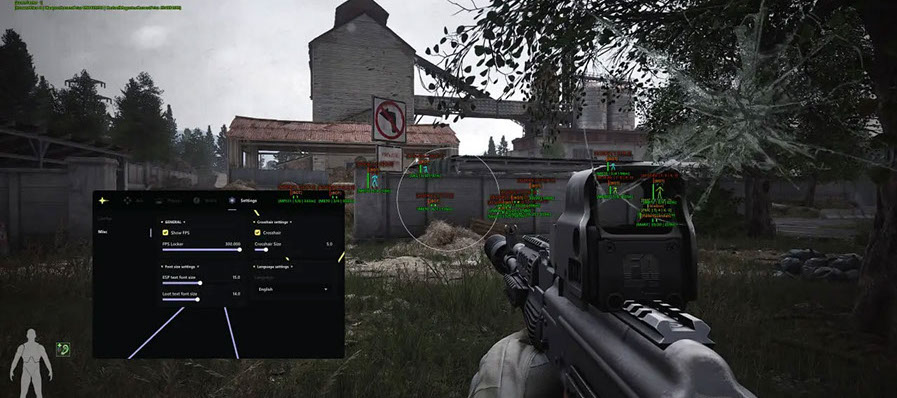
The cheat's functionality includes an advanced ESP system that allows you to see players and bots through obstacles. Outlines (boxes), skeletons, current weapons and enemy health levels are displayed, providing complete awareness on the battlefield.
The Aimbot module is implemented with a wide range of parameters: you can select the type of aiming, assign two activation keys, specify key areas for aiming (head, body), adjust the range of action (FOV) and smoothness of aiming, and also use the “only on visible targets” option. The automatic target locking system and the recoil control function (RCS) make shooting as accurate and natural as possible.
Ancient supports OBS recording bypass, making it ideal for streaming. The built-in spoofer helps avoid HWID blocking, and the system works taking into account the features of ACE anti-cheat, reducing the risk of detection.
Please note: the program does not support laptops.
System Requirements
Features
ESP (player and bot display)
Visual display functions provide complete information about the location of opponents:
Box - Displays frames around players and bots for easier navigation and instant target detection.
Skeleton - shows the target's skeleton, which allows you to accurately determine the pose and direction of movement.
Weapon - displays the enemy's current weapon, allowing you to assess the potential threat in advance.
Health - Displays the target's health level, making it easier to prioritize eliminating weakened enemies.
Aimbot (automatic targeting)
- The aiming module ensures accurate and controlled shooting:
- Aimbot Type - select the operating mode of the sight (by holding down the key or constantly active).
- Aim Key / Aim Key 2 - customizable auto-aim activation keys.
- Draw FOV - displays the aimbot's action area on the screen in the form of a circle.
- FOV Slider - adjustable aiming radius for precise target control.
- Smooth is a smoothness parameter that makes crosshair movement natural and realistic.
- Aim Bone - selecting a specific body part to target (head, chest, etc.).
- Force Key - additional force key.
- Only Visible - activation only on visible targets, excluding end-to-end targeting through walls.
- Lock Target - fixes the sight on one target until it is eliminated or leaves the action area.
- RCS (Recoil Control System) is a recoil control system that minimizes the spread of bullets when firing.
Customer Reviews
All reviewsFrequently Asked Questions
What features are included in Ancient?
What payment methods are accepted?
How to contact support?
Payment is confirmed, but the product is missing. How long should I wait?
I have a key. Where are the download and instructions?
After payment you will receive detailed instructions on activation, launch and use of the software.
Instructions will be sent to the email address specified before payment.
You will also find a download link and necessary components for the software.