Select an image to view it larger.
Arcane for Bodycam
Arcane — private Bodycam cheat with Aimbot, ESP and Freecam
Global keys — work worldwide.
Payment with a Binance card may be available for selected products. Contact us privately before buying to check availability and agree the details.
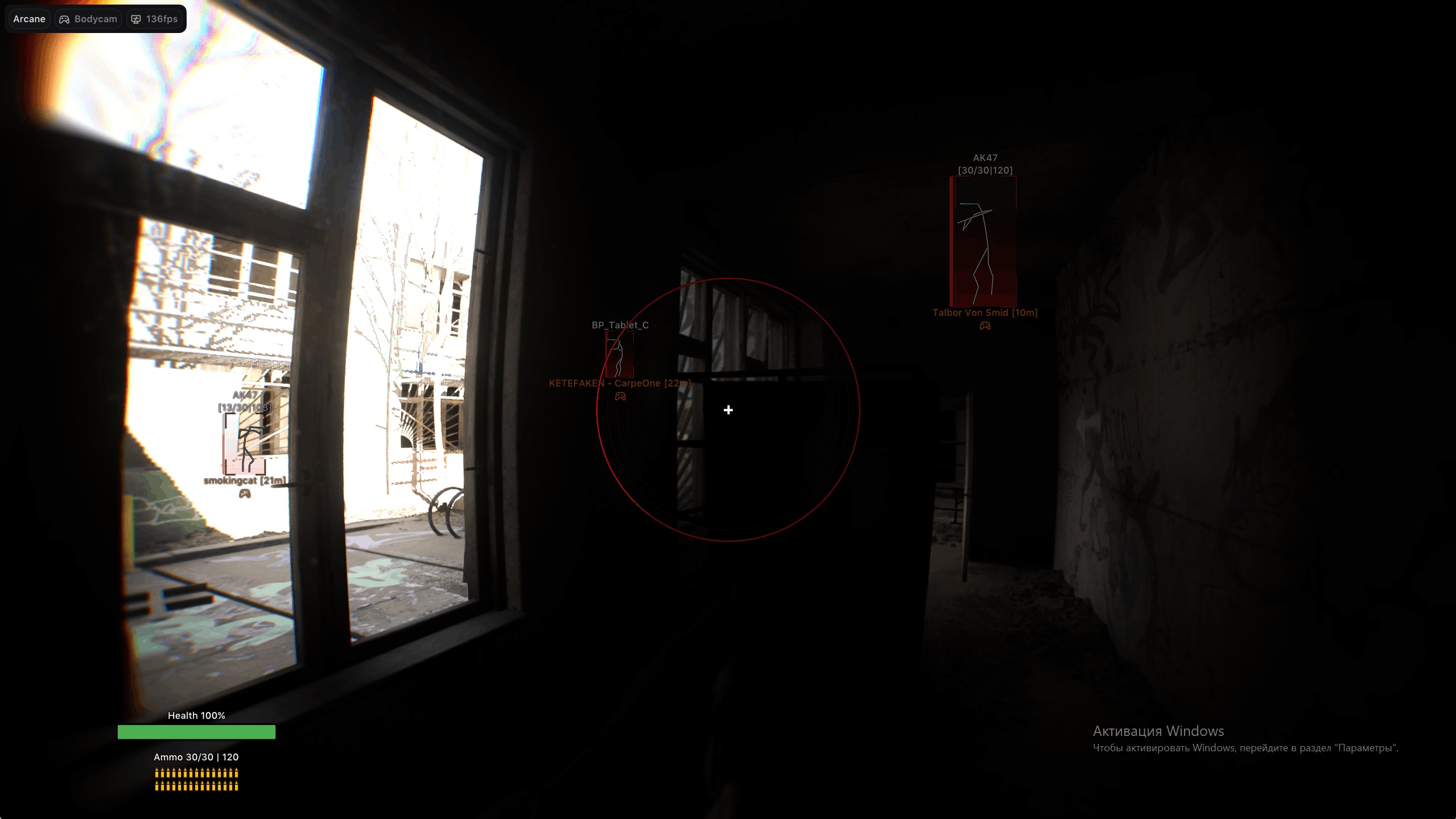
Arcane for Bodycam combines a configurable aimbot with player, bot, drone and weapon ESP, freecam and weapon settings. Its HUD shows health and ammo; crosshair styles, config profiles and menu settings are available.
Third-party software carries a risk of game-account restrictions. Check the product status and system requirements before payment.
System Requirements
Features
Aimbot
- Hold-key or always-on mode and configurable activation key
- Smoothing and maximum player distance
- FOV display, color, thickness and radius
- Teammate and drone targeting, including teammate drones
- Visibility check and player lock
- Selected or closest bone: head, neck, chest or stomach
Bots ESP
- Enable, teammate display, visibility check and render distance
- Name, distance, icon, weapon name and ammo
- Skeleton, view line and adjustable view-line length
- Regular or corner boxes with solid or gradient fill
- Health bar: solid, value-based or gradient; health text
- Health bar shown always or for non-zero health
Exploits
- Freecam: toggle key, forward/backward/right/left keys and speed
- No recoil, no camera recoil, no spread, no sway and no weapon kick
HUD and miscellaneous
- Crosshair: Plus, Circle, Dot, X Cross, Hollow Cross, Galactic Compass or Triangle
- Crosshair size and thickness
- HUD: self health, ammo, hovering display, circle and radius
- Menu DPI: 100%, 125% or 150%; FPS display
- Menu and unload keys
Players ESP
- Enable, teammate display, visibility check and render distance
- Name, distance, icon, weapon name and ammo
- Skeleton, view line and adjustable view-line length
- Regular or corner boxes with solid or gradient fill
- Health bar: solid, value-based or gradient; health text
- Health bar shown always or for non-zero health
Drones ESP
- Enable, teammate display, visibility check and render distance
- Drone name, owner name, distance and icon
- Regular or corner boxes with solid or gradient fill
- Health bar: solid, value-based or gradient; health text
- Health bar shown always or for non-zero health
Weapons ESP
- Render distance
- Assault rifles, sniper rifles, submachine guns and light machine guns
- Shotguns, pistols, grenades and other weapons
- Name, distance, icon and color
Configs
- Create, load, save, rename and remove configs
Settings
- Dark or light theme, watermark, layout mode and language
- Update list, subscription expiration and session duration
Customer Reviews
All reviewsFrequently Asked Questions
What features are included in Arcane?
What payment methods are accepted?
How to contact support?
Payment is confirmed, but the product is missing. How long should I wait?
I have a key. Where are the download and instructions?
After payment you will receive detailed instructions on activation, launch and use of the software.
Instructions will be sent to the email address specified before payment.
You will also find a download link and necessary components for the software.
Cheat community
Cheat updates, detection status and help from other players — in our Telegram and Discord.