Soft HUB for Bodycam
Soft HUB for Bodycam — Aimbot, ESP and an Informative HUD
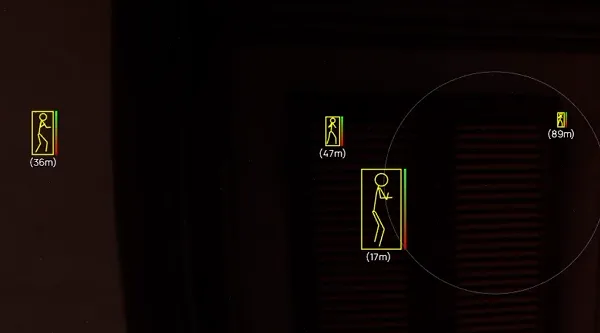
Soft HUB restores information that Bodycam intentionally leaves out of its standard interface. It highlights players and zombies through obstacles, displays health, names and distance, and adds a local HUD with your HP and ammunition count.
The aimbot works inside an adjustable FOV circle. You can choose the activation key, target bone, and whether targets are prioritised by distance or proximity to the centre of the screen. Weapon controls separately cover recoil, spread, reloads and camera shake.
The software is intended for the Steam version of Bodycam. A USB flash drive is required to launch it, while BIOS changes are not listed as necessary. The menu is in English. After payment, DigiSeller provides the key and an instruction button.
Important: Bodycam uses Easy Anti-Cheat. Third-party software can result in an account restriction; current product availability is not a guarantee against bans.
System Requirements
🔔 Cheat statuses update automatically from our Telegram bot via developer notifications — follow the news there. Many cheats update themselves after game changes, so a “Checking” status does not mean the cheat is broken — it is just uncertainty until confirmed. Not sure? Ask in the site chat or on our Contacts page.
Global keys — work worldwide.
Payment with a Binance card may be available for selected products. Contact us privately before buying to check availability and agree the details.
Features
Player and zombie ESP
- Box — frame around a target visible through obstacles
- Skeleton — model pose and body position
- Health — target health bar and numeric value
- Name — player name above the model
- Distance — target distance in metres
- Separate colours for players and bots
Weapon and camera
- No recoil — removes weapon recoil
- No spread — removes bullet spread
- No reload — removes reloads
- No camera shake — removes camera shake
Aimbot
- Separate master switch for the aimbot
- Custom activation key
- Target bone selection: head or chest
- Visible FOV circle adjustable from 1 to 100
- Priority by distance or proximity to the screen centre
- Separate highlight colour for the active target
HUD and rendering
- Draw local HUD — your own HP and ammunition counter
- Unlock shop items — client-side locker shop unlock
- Four render pacing modes: Eco, Balanced, Performance and Unrestricted
- Enemy draw distance adjustable from 1 to 150
Customer Reviews
All reviewsFrequently Asked Questions
What features are included in Soft HUB?
What payment methods are accepted?
How to contact support?
Payment is confirmed, but the product is missing. How long should I wait?
I have a key. Where are the download and instructions?
After payment you will receive detailed instructions on activation, launch and use of the software.
Instructions will be sent to the email address specified before payment.
You will also find a download link and necessary components for the software.
Cheat community
Cheat updates, detection status and help from other players — in our Telegram and Discord.