Arcane Web Radar for PUBG
Arcane Web Radar — Browser-Based Radar for PUBG
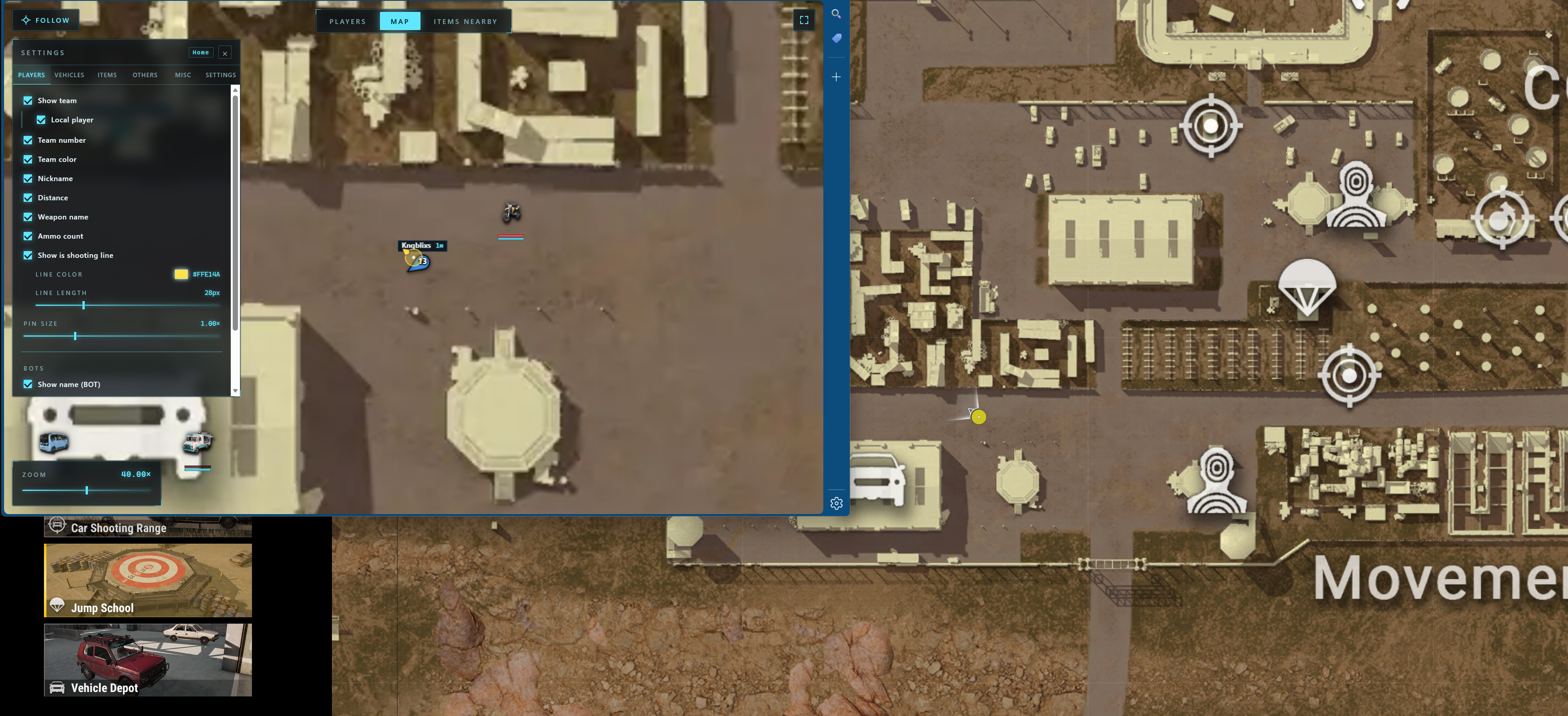
Arcane WebRadar for PUBG is a cheat implemented as a web radar that displays game world information in a browser rather than inside the PUBG client. This approach completely eliminates the use of visual overlays, ESP boxes, and other elements placed on top of the game.
After launching Arcane, match data is transmitted to the browser interface where the user sees a map and player list. This allows tracking enemy positions, vehicles, drops, and items while keeping a clean game screen without extra elements.
WebRadar is perfect for tactical play: analyzing surroundings, controlling zones, planning routes, and preventing unexpected encounters. Displaying information outside the game makes using the cheat convenient and clean, without interfering with PUBG's visual elements.
Arcane WebRadar supports Steam, Kakao and Epic Games versions of PUBG and works in all display modes — windowed, borderless, and fullscreen.
Cheat operation information
The cheat works through a browser interface (WebRadar)
No ESP, boxes, lines, or highlights in the game
All information is displayed in a separate browser window
Does not affect PUBG graphics or interface
Suitable for tactical analysis and map control
System Requirements
Global keys — work worldwide.
Payment with a Binance card may be available for selected products. Contact us privately before buying to check availability and agree the details.
Features
Players
- Show team: show all team members or selected members only
- Team number
- Team colors
- Nickname
- Distance
- Weapon name
- Ammo count and reloading status
- Shooting line
Items
- Style: icons, icons with names, or names
- Icon size
- Advanced item filter
Nearby items table
- Search for nearby items
- Item name
- Distance to item
- Actions: show the item on the map or build a route to it
Settings
- Automatic map scaling
- Follow the local player
- Follow a selected team member
Global player table
- Team number
- Name
- Stats: level, kills and spectators
- Weapon name
- Ammo count
- Distance
- Gear: weapons and armor
Vehicles
- Show vehicles
- Health
- Fuel
- Style: icons, icons with names, or names
- Icon size
Other
- Drops: player death crates and airdrops
- Show drop contents directly on the map
Misc
- No recoil (F6)
- Local aiming line
- Mortar trajectory and impact point
What's new in this cheat
1
New features, meaningful improvements and important fixes for this product.
Fixed map selection issue
Archived announcement. The date records the changes; the exact build date is unknown.
- Fixed map selection issue; please reinject
Customer Reviews
All reviewsFrequently Asked Questions
What features are included in Arcane Web Radar?
What payment methods are accepted?
How to contact support?
Payment is confirmed, but the product is missing. How long should I wait?
I have a key. Where are the download and instructions?
After payment you will receive detailed instructions on activation, launch and use of the software.
Instructions will be sent to the email address specified before payment.
You will also find a download link and necessary components for the software.
Cheat community
Cheats for PUBG and PUBG Mobile: updates, detection status and a players' chat.