Covcheg Rust External
Covcheg External — external cheat for RUST with aimbot and ESP
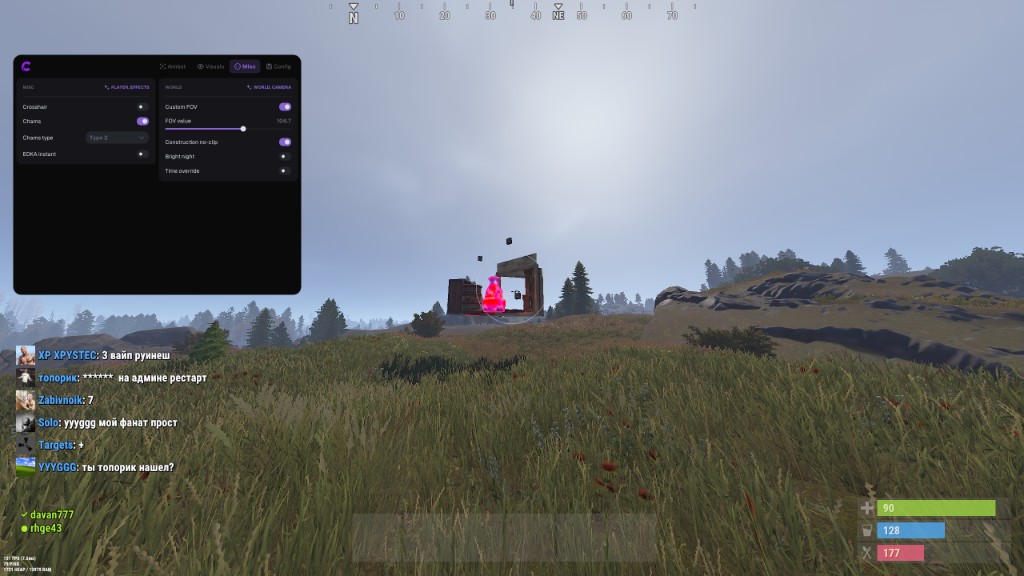
COVCHEG External is an external cheat for RUST designed for practical players who value the balance between price and quality. For an affordable cost, you get a safe and stable software with a basic set of features for comfortable gameplay.
The cheat includes a vector aimbot with flexible settings, ESP for tracking players, and Loot ESP for displaying resources and items on the map. The program features Chams visual settings, the ability to see through constructions, bright night mode, and FOV control.
The developer prioritizes security — the software maintains UNDETECTED status and gradually expands with new features without compromising detection protection. If you need a working and affordable external cheat for RUST — Covcheg External is an excellent choice.
System Requirements
🔔 Cheat statuses update automatically from our Telegram bot via developer notifications — follow the news there. Many cheats update themselves after game changes, so a “Checking” status does not mean the cheat is broken — it is just uncertainty until confirmed. Not sure? Ask in the site chat or on our Contacts page.
Global keys — work worldwide.
Payment with a Binance card may be available for selected products. Contact us privately before buying to check availability and agree the details.
Features
AIM
- Aimbot activation (Active) — enable vector aimbot
- Silent AIM — bullets hit the target without moving the crosshair
- Field of view (FOV) — adjust the target capture area size
- Draw FOV — display the capture area circle on screen
- Smoothing (Smooth) — adjust aiming smoothness
- Aim Distance — limit aimbot working range
- Bone selection (Bone Body / Force Head) — aim at body or head
- Remove Sway & Recoil — disable weapon sway and recoil
- Aim Key — assign activation button
- Visible Check — work only on visible targets
- Prediction — calculate bullet trajectory
Loot ESP
- Item ESP — display loot and resources
- Only Collectable — filter available items
- Ores — metal, sulfur, stone
- Wood — wood resources
- Stash — hidden stashes
- Crates — medical, food, tool, elite crates
- Minicopter — mini helicopter display
- Backpack — backpacks
- Max Distance — Loot ESP range limit
Player ESP
- Enable ESP (Player ESP) — display players through walls
- Box ESP (BOX) — WallHack with frames around players
- Names — show player nicknames above heads
- Skeleton — display skeletal model
- Visible Check — highlight visible players with color
- Distance — distance to targets in meters
- Max Distance — limit ESP range
- Ignore Sleepers — hide sleeping players
- Quick Slots — items in player hands
- Draw Player Type — display target type
- Ignore Scientist — hide NPC scientists
- Team ID — group identifier
- Ignore Team — hide teammates
- Chams — visual fill of player models
Misc
- Instant EOKA — instant shot from eoka pistol
- FOV Changer — change field of view
- Zoom Key — zoom activation key
- Remove Construction — see through buildings
- Bright Night — bright night mode
Config
- Language — menu language selection
- Menu Key — menu open/close button
- Config Slot — configuration slot
- Menu Scale — menu size adjustment
- ESP Font Size — ESP text size
- Save / Load — save and load configurations
- Unload Cheat — completely disable the cheat
What's new in this cheat
1
New features, meaningful improvements and important fixes for this product.
-
FlyHack
Archived announcement. The date records the changes; the exact build date is unknown.
- Added: FlyHack.
Customer Reviews
All reviewsFrequently Asked Questions
What features are included in Covcheg Rust External?
What payment methods are accepted?
How to contact support?
Payment is confirmed, but the product is missing. How long should I wait?
I have a key. Where are the download and instructions?
After payment you will receive detailed instructions on activation, launch and use of the software.
Instructions will be sent to the email address specified before payment.
You will also find a download link and necessary components for the software.
Cheat community
Cheat updates, detection status and help from other players — in our Telegram and Discord.