Play video 1
Select an image to view it larger.
Sidorovich for PUBG
Sidorovich PUBG DMA — PUBG Cheat with ESP, Aimbot and Radar
This software requires: DMA board (PCIe slot), second PC (radar), firmware for masking, KmBox (for aimbot).
Learn more about DMA cheats →Global keys — work worldwide.
Payment with a Binance card may be available for selected products. Contact us privately before buying to check availability and agree the details.
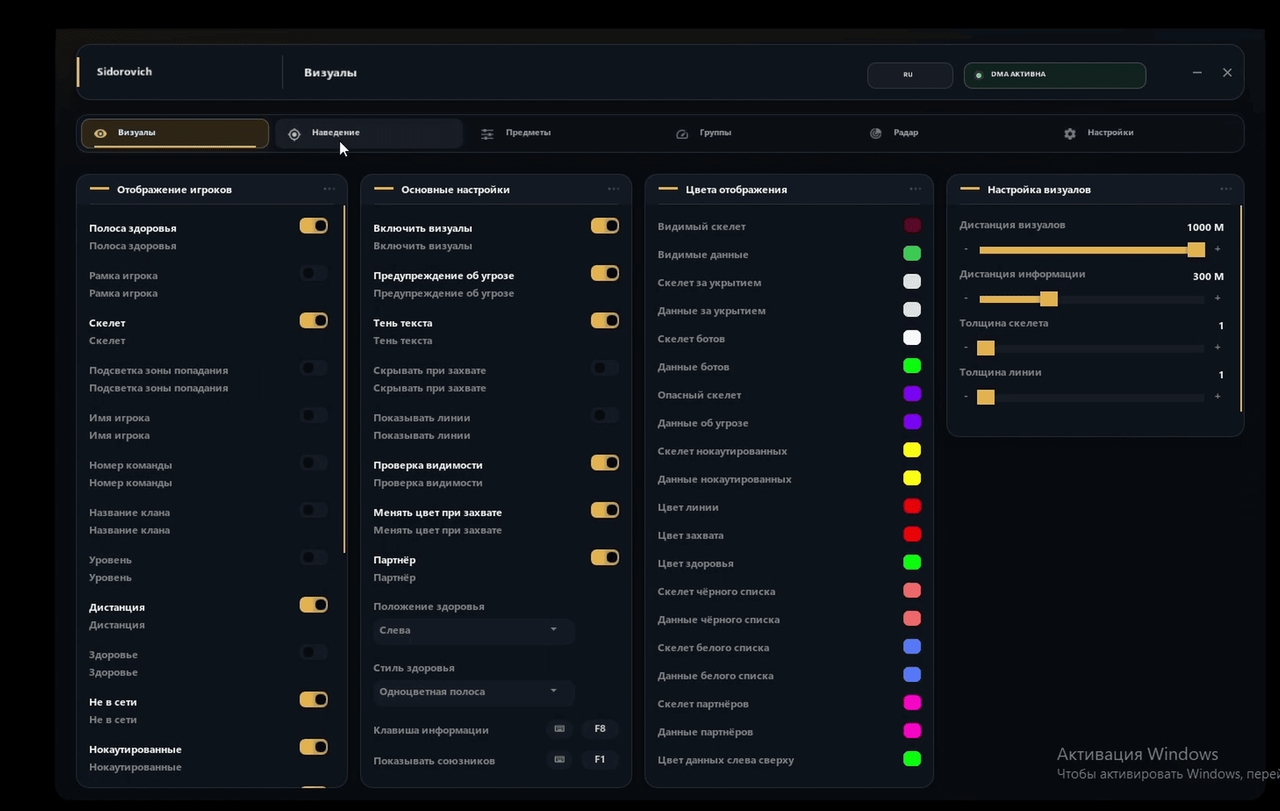
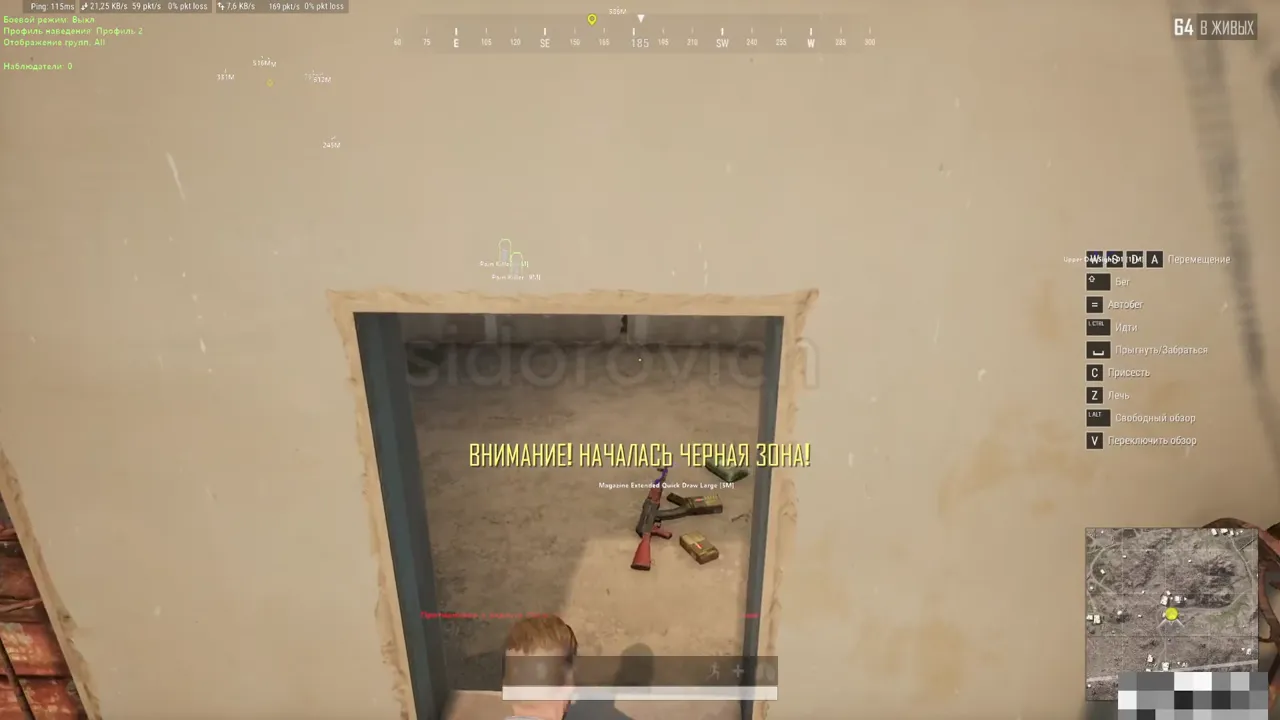
Sidorovich for PUBG is a DMA cheat that runs separately on a second computer. It combines player, item and vehicle information, configurable aiming, a map and grenade tools. Windowed, borderless and fullscreen modes are supported, along with Intel and AMD processors and Windows 10 and 11. A flashed DMA card and a second PC or laptop are mandatory; no built-in spoofer is included.
Player ESP helps you read the situation quickly by showing boxes and skeletons, health, nicknames, distance, weapons, team numbers, clans and player levels. Visible targets and enemies behind cover can be configured separately. Bots, knocked players, teammates, partners and users on white or black lists can also be highlighted.
The aimbot includes obstacle checks, maximum-distance and capture-radius limits, smoothing, target priority and optional aiming at knocked opponents. Wheel Aim is a separate tool for targeting vehicle wheels. Aim settings, hotkeys and radius colors can be adjusted in the menu.
Map awareness is covered by item, container, airdrop and vehicle ESP, loot filters and a radar for players, vehicles, death locations and other objects. Web Radar opens in a browser and is sold separately; the 30-day option bundled with one month of Web Radar server access may temporarily be out of stock at the seller.
The grenade and ballistics section displays warnings, a timer, blast radius and throw trajectory. Additional controls include safe exit, battle mode, VSync, cache refresh and model-detail presets. The overlay is hidden from OBS capture, but this does not remove the risks of using third-party software in an online game.
System Requirements
Features
Player ESP
- Health bar
- Player box
- Skeleton
- Hit-zone highlight
- Nickname
- Team number
- Clan name
- Player level
- Distance to player
Item ESP
- Item display
- Toggle hotkey
- Combined item display
- Item icons
- Lines to items
- Icons and text together
- Item groups A, B, C and D
- Separate keys for groups A, B, C and D
- Distance, font size and line thickness
Item filters
- Bandages
- First aid kits
- Med kits
- Painkillers
- Energy drinks
- Adrenaline syringes
Radar
- Players on the map and mini-map
- Vehicles on the map and mini-map
- Airdrops on the map and mini-map
- Death locations on the map and mini-map
- Secret rooms on the map and mini-map
- Icon scale
- Radar alerts
- Current and maximum distance
Aimbot activation
- Enable aimbot
- Obstacle check
- Do not lock a target without ammunition
- Randomized aiming
- Aim while scoped
- Primary aim key
- Forced aiming
- Aim at knocked targets
- Target-selection priority
Wheel Aim
- Aim at vehicle wheels
- Radius display
- Wheel capture radius
- Separate aim hotkey
Settings
- Safe exit
- Menu hotkey
- Combined mode
- Computer-mouse mode
- Battle mode
- Cache refresh
- VSync
Model quality
- Low detail
- Medium detail
- High detail
Player display
- Weapon and health
- Offline players
- Knocked players
- Separate controls for visible targets
- Separate controls for targets behind cover
- Bots and dangerous players
- Teammates and partners
- White and black lists
- Skeleton and line thickness with color controls
Airdrops and containers
- Airdrop display
- Items inside airdrops
- Airdrop distance and font size
- Container display
- Items inside containers
- Container distance and font size
- Toggle hotkeys
- Hide duplicate attachments
- Hide items when the backpack is full
Combat item filters
- C4
- Frag grenades
- Smoke grenades
- Stun grenades
Vehicle ESP
- Vehicle display
- Toggle hotkey
- Fuel level
- Vehicle durability
- Distance to vehicle
- Color controls
Web Radar
- Server IP connection
- Server port
- Server PIN
- Open radar link
- Connect to Web Radar
- Open the radar in a browser
- Sold separately
Aimbot controls
- Priority from the screen center
- Maximum distance
- Capture radius
- Smoothing
- Aim strength
- Smoothing coefficient
- Aim-point size
- Radius color controls
Grenades and ballistics
- Grenade warning
- Blast radius
- Grenade arc and trajectory
- Grenade timer
- Warning distance
- Grenade auto-aim
- Auto-aim graph
- Warning colors and sizes
- Grenade size and trajectory-line thickness
Frequently Asked Questions
What features are included in Sidorovich?
What payment methods are accepted?
How to contact support?
Payment is confirmed, but the product is missing. How long should I wait?
I have a key. Where are the download and instructions?
After payment you will receive detailed instructions on activation, launch and use of the software.
Instructions will be sent to the email address specified before payment.
You will also find a download link and necessary components for the software.
Cheat community
Cheats for PUBG and PUBG Mobile: updates, detection status and a players' chat.