Soft HUB EFT for Escape from Tarkov
Soft HUB ESP — private visual cheat for Escape From Tarkov
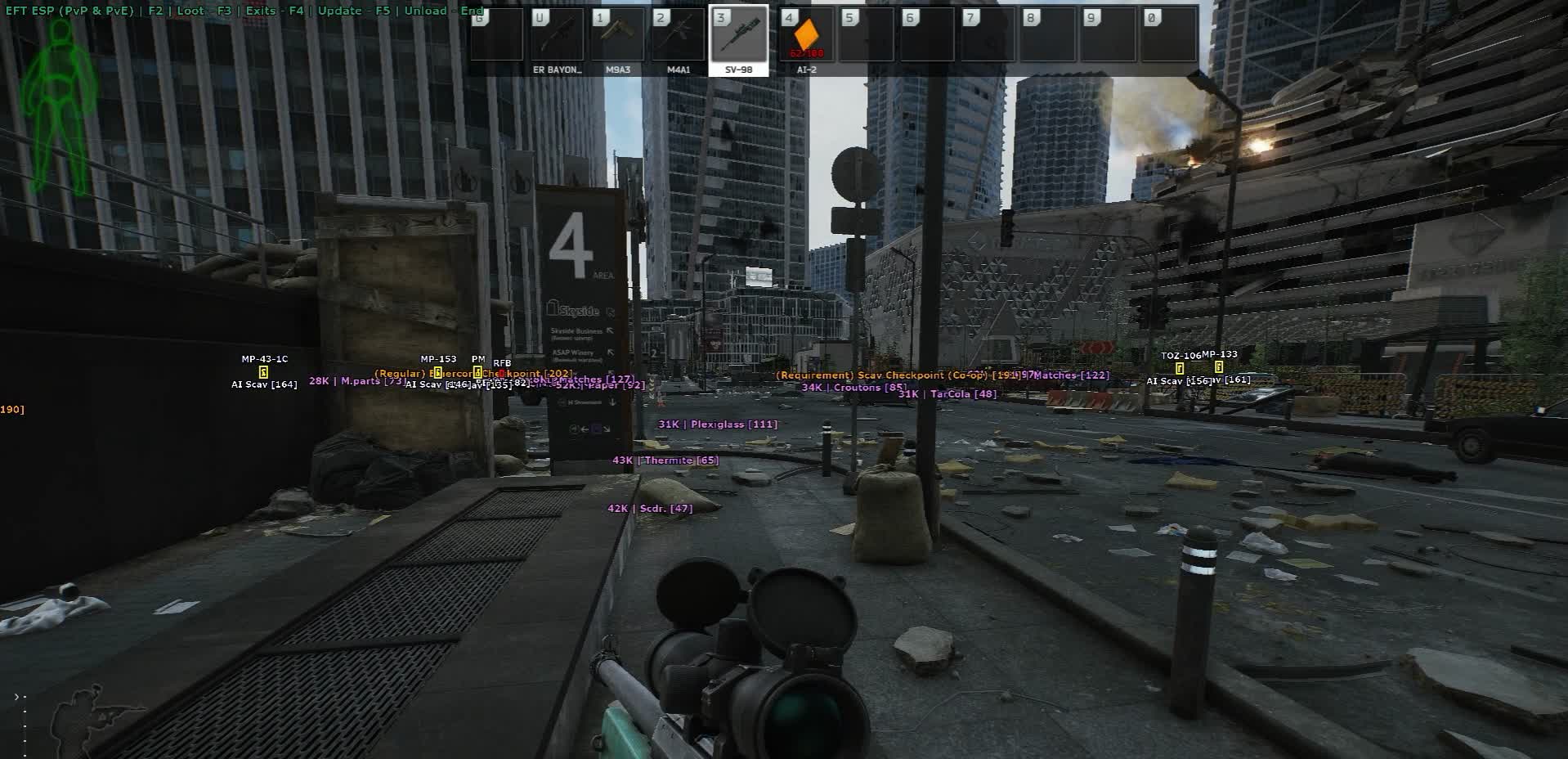
You drop into Customs or Reserve, gear up on loot, drag a backpack with a thermal scope and a case to the exit — and a hostile PMC drops you from a corner you never saw. That's how insurance, armor-piercing rounds and a couple of hours of a raid get lost. Soft Hub ESP for Escape From Tarkov solves exactly this: you move across the map already knowing who is where and how dangerous they are — and what's actually worth leaving your route for.
The cheat shows players and bots through walls: a 2D box with adjustable color and thickness, a skeleton with tunable highlighting, the weapon in hands, the nickname and side (PMC / Scav), distance and a line to the target. You see who's carrying a rig with GPNVGs and M995 ammo, and who you can simply walk around without wasting time. The skeleton helps you read posture and movement in the dense geometry of Reserve and Labs; the line completes the picture — it's clear where shots came from and where a looter went.
A separate module is exits. Each extract is highlighted by ownership: PMC, Scav or secret. This removes half the deaths on extract timing: on a new map you don't have to keep every staircase and factory gate in your head — you immediately see which exit is yours and what sector it's in. On maps with rotating extracts and secret exits via a stash or key it matters even more: secret ones are highlighted separately so you don't confuse them with the regular ones.
Loot is split into two layers. Containers and corpses — the ESP shows the contents, the price of each item and the total value of a crate or body. You set the minimum total price, render distance and color: empty lockers and Scav bodies with a single crust of bread get filtered out, leaving only meaningful points on the map. Handy on a loot run through utility rooms or when clearing a raid after a fight — you instantly see which body to run to first.
Spawned and dropped loot is split into 15 categories: gear, magazines, barter, meds, weapon parts, sights, provisions, ammo, ammo boxes, currency, weapons, containers, keys, suppressors, cosmetics. Each has its own minimum price and render distance, plus a toggle for whether to show it at all. You can build a 'Shoreline loot run' profile focused on keys, currency and meds, a separate 'wipe start' profile for ammo and magazines, and a third 'late wipe' one — only cases, armor-piercing rounds and rare attachments. Only what's worth going for stays on the map, not the entire barter table.
The build is pure ESP with no aimbot. The cheat does nothing for you: it doesn't snap your aim, doesn't shoot, doesn't move your mouse. It's just information that lowers your behavioral footprint — you play with your own hands, simply with better awareness. A good fit if you already shoot confidently in Tarkov and want to remove the blind spots.
The cheat works with the Escape From Tarkov launcher. Purchase is standard: you pay for a plan, the activation key arrives by email within a few minutes — not to a dashboard, not to Telegram, specifically to your email. Activation follows the instructions (the instruction button is provided together with the key).
System Requirements
🔔 Cheat statuses update automatically from our Telegram bot via developer notifications — follow the news there. Many cheats update themselves after game changes, so a “Checking” status does not mean the cheat is broken — it is just uncertainty until confirmed. Not sure? Ask in the site chat or on our Contacts page.
Global keys — work worldwide.
Payment with a Binance card may be available for selected products. Contact us privately before buying to check availability and agree the details.
Features
Visuals
- 2D Box — box around the enemy through walls: a basic position marker without clutter
- Box Customization — adjust the box color, line thickness and fill to suit your monitor
- Skeleton — model skeleton: you see the real pose (standing, crouching, prone, looting)
- Skeleton Customization — adjust skeleton line thickness and color
- Weapon — the weapon in the target's hands: instant target priority (SR-25 with a thermal vs a Saiga)
- Name & Side — player nickname and side: PMC or Scav
- Distance — distance to the target in meters
- Line — line from your position to the target for orientation in dense interiors
Loot — gear & weapons
- Gear — armor, rigs, helmets, backpacks, tactical bags
- Weapons — firearms on the ground and in lockers
- Weapon parts — barrels, receivers, handguards, grips
- Sights — optics, red dots, EOTech, thermal scopes
- Suppressors — suppressors of all calibers
- Magazines — magazines for weapons of all calibers
- Ammo — ammo of all calibers
- Ammo boxes — sealed ammo boxes
Loot filters
- Per-category Minimum Price — an independent minimum price for each category
- Per-category Render Distance — an independent render distance for each category
- Category Toggle — choose which categories to show at all (loot-run, wipe-start, late-wipe profiles)
Exits
- PMC Exits — PMC exits with a rotation marker and readiness timer
- Scav Exits — a separate set of exits for Scavs
- Secret Exits — secret extracts via a stash, key or a shared PMC + Scav exit
Containers & corpses
- Content List — the contents of a container or corpse through walls
- Per-item Price — the price of each item inside
- Total Container Price — the total value of a crate or body as a single number
- Minimum Total Price — filter by minimum total value: cheap points aren't drawn
- Render Distance — render distance for containers and corpses
- Color Customization — a separate highlight color for containers and corpses
Loot — valuables & consumables
- Containers — cases for ammo, weapons, meds, documents, keys
- Keys — room and container keys (Marked Room, Red Key, etc.)
- Currency — rubles, dollars, euros
- Meds — first-aid kits, painkillers, tourniquets, bandages, stims
- Barter — items for quests and trader exchanges
- Provisions — food, water, energy drinks, coffee
- Cosmetics — watches, headwear, face masks
* The feature list may be updated by the developer — keep an eye on the current version.
Customer Reviews
All reviewsFrequently Asked Questions
What features are included in Soft HUB EFT?
What payment methods are accepted?
How to contact support?
Payment is confirmed, but the product is missing. How long should I wait?
I have a key. Where are the download and instructions?
After payment you will receive detailed instructions on activation, launch and use of the software.
Instructions will be sent to the email address specified before payment.
You will also find a download link and necessary components for the software.
Cheat community
Cheat updates, detection status and help from other players — in our Telegram and Discord.