Arcane dla Sea of Thieves
Prywatny cheat Arcane do gry Sea of Thieves
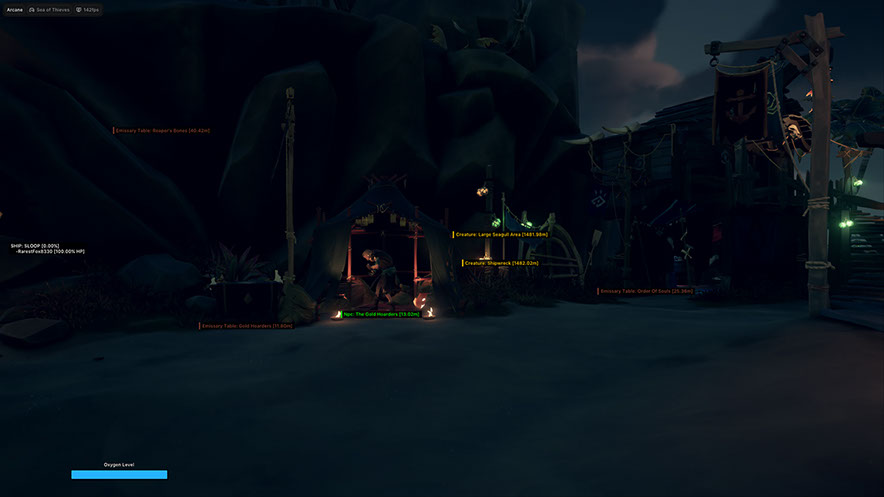
Arcane to prywatny kod do Sea of Thieves, który zapewnia pełną świadomość sytuacyjną na morzu i lądzie. Oprogramowanie pasuje zarówno do agresywnego PvP, jak i do swobodnego rolnictwa — zawsze będziesz wiedzieć, gdzie są wrogowie, łupy i zasoby.
U jego podstaw leży potężny system ESP. Obejmuje prawie wszystko: graczy, NPC, statki, przedmioty, beczki z zasobami, zwierzęta, aktywne wydarzenia, a nawet pojedyncze wyspy z filtrowaniem według regionu morskiego. Nie przegapisz skrzyni ze skarbami ani zbliżającego się wroga.
W walce PvP dostępny jest elastyczny aimbot z precyzyjnie dostosowanymi ustawieniami płynności i pola widzenia, a wizualizacja trajektorii armat i harpunów sprawia, że bitwy morskie są znacznie dokładniejsze — trafisz tam, gdzie się domyślałeś.
Wygodny interfejs HUD wyświetla informacje o załodze na mapie, a wbudowany system konfiguracji pozwala zapisywać ustawienia i udostępniać je znajomym za pomocą unikalnego klawisza. Menu obsługuje język angielski, rosyjski i chiński.
Zawiera funkcję fałszowania HWID. Działa z wersjami Steam i Xbox, Windows 10–11 (26H1, 26H2).
Wymagania systemowe
Klucze globalne — działają na całym świecie.
Dla wybranych produktów może być dostępna płatność kartą Binance. Napisz do nas prywatnie przed zakupem, aby sprawdzić dostępność i uzgodnić szczegóły.
Funkcje
AIMBOTA
- Włącz — aktywuj
- Keybind – klucz aktywacyjny
- Tryb celowania – tryb aktywacji: (przytrzymany, zawsze)
- Wybrana kość - Wybrana kość: (głowa, szyja, klatka piersiowa, miednica)
- Wybrany typ celu — wybrany typ celu: (wybrana kość, najbliższa kość)
- Blokada gracza - Trzymanie gracza
- Narysuj granicę FOV - narysuj okrąg FOV
- Rysuj tło FOV - Narysuj tło FOV
- Promień FOV – rozmiar okręgu FOV
- Współczynnik gładkości - gładkość
- Maksymalna odległość - maksymalna odległość
Statki ESP
- Nazwa – nazwa statku
- Box Owned – Boksowanie twojego statku
- Box Enemy - Boksowanie statków wroga
- Box AI - Boty na statkach bokserskich
- Odległość renderowania — odległość rysowania
Inne
- Towar handlowy - Kupcy
- Zasób - Zasoby
- Przedmiot questowy – Przedmiot questowy
- Flaga frakcji - Flagi frakcji
- Surowe jedzenie – surowe jedzenie
- Inni – Inni
- Odległość renderowania — maksymalna odległość
Wyspy ESP
- Szczegółowy filtr z możliwością wyszukiwania i wyświetlania wszystkich lub tylko wymaganych wysp
pistolet
- Imię - Imię
- Linia trajektorii – linia trajektorii pocisku
- Linia armat - Linia armat
- Krąg Armatni – Obszar Uderzenia
- Odległość ignorowania statku – odległość, aby ignorować statki
- Odległość renderowania — wyświetlana odległość
Beczka ESP
- Drewno - Drewno
- Żywność - Produkty spożywcze
- Kula armatnia – kula armatnia
- Zwyczajny – zwyczajny
- Odległość renderowania — wyświetlana odległość
Aktywuje
- Wydarzenie - wydarzenie
- Napad – napad
- Stworzenie - stworzenie
RÓŻNE
- Zmieniacz FOV - Zmiana kąta widzenia
- Tryb bitwy - tryb bitwy
- Celownik – Statyczny celownik
Hud
- Załogi - Lista załóg na mapie
- Tlen - Tlen (lokalny gracz)
- Styl tlenu — styl paska tlenu: (statyczny, oparty na wartościach, gradientowy)
- Warunki renderowania tlenu — warunki wyświetlania tlenu: (zawsze, gdy nie jest to pełna wartość)
Unoszące się
- Zmniejsz krycie po najechaniu - Zmniejsz krycie po najechaniu myszką
- Promień najechania – promień najechania kursorem
- Pokaż okrąg - pokaż okrąg
ESP graczy
- Ramka ograniczająca - Boks 2D: (Box, W rogach)
- Pole wypełnienia — Tło ramki: (statyczne, gradientowe)
- Pasek Zdrowia - Pasek Zdrowia
- Pasek tlenowy – pasek powietrza
- Warunki renderowania słupków — warunki wyświetlania słupków: (zawsze, gdy nie jest to wartość maksymalna)
- Pseudonim - Nicky
- Szkielet - Szkielety: (Grubość)
- Linia widoku - Linia wzroku: (Długość linii wzroku)
AI ESP
- Ramka ograniczająca - Boks 2D: (Box, W rogach)
- Pole wypełnienia — Tło ramki: (statyczne, gradientowe)
- Pasek Zdrowia - Pasek Zdrowia
- Warunki renderowania słupków — warunki wyświetlania słupków: (zawsze, gdy nie jest to wartość maksymalna)
- Pseudonim - Nicky
- Szkielet - Szkielety: (Grubość)
- Linia widoku - Linia wzroku: (Długość linii wzroku)
Przedmioty ESP
- Skrzynia - Skrzynia
- Czaszka - Czaszka
- Klejnot - kamień szlachetny
- Torebka - torebka
- Prezent - prezent
- Tomek – Tomek
- Specjalne - specjalne
- Zakopany skarb – Zakopany skarb
- Klucz - Klucz
Morza
- Starożytne Wyspy
- Brzegi Plant
- Dzicy
- Ryk Diabła
- Morze niczyje
- Brzegi Złota
- Inne
harpun
- Imię - Imię
- Linia prognozy -
- Linia Harpunów -
- Krąg Harpunów – Obszar trafienia
- Odległość renderowania — wyświetlana odległość
Zwierzę
- Przyjazny - Przyjazny
- Wrogi – wrogi
- Odległość renderowania — wyświetlana odległość
Lokalizacje statyczne
- Stół Emisariusza - Stół
- Wyspa -
USTAWIENIA
- Klawisz menu - Klawisz aktywacji
- Rozładuj klucz - Rozładuj klucz
- Skala DPI – rozmiar interfejsu użytkownika
- VSync — synchronizacja pionowa
- Motyw - Motyw: (Ciemny, Jasny)
- Znak wodny - znak wodny
- Język - Język: (EN, RU, CH)
KONFIGURACJE
- Stwórz - Stwórz
- Uzyskaj udostępniony - Uzyskaj dostęp współdzielony (możliwość pobrania konfiguracji znajomego za pomocą unikalnego klucza)
- Uruchom - Uruchom
- Zapisz - Zapisz
- Edytuj nazwę — zmień nazwę
- Udostępnij - udostępnij
- Usuń - usuń
Co nowego w tym czicie
3
Nowe funkcje, istotne ulepszenia i ważne poprawki tego programu.
Przebudowa kategoryzacji przedmiotów
Archiwalne ogłoszenie. Data oznacza zapis zmian; dokładna data kompilacji jest nieznana.
- Przebudowano kategoryzację przedmiotów, aby filtrowanie było bardziej intuicyjne i zapewnić przyszłą kompatybilność z nowo dodanymi przedmiotami w grze.
Naprawiono tryb Aim „On Hold”
Archiwalne ogłoszenie. Data oznacza zapis zmian; dokładna data kompilacji jest nieznana.
- Naprawiono Aim w trybie „On Hold”.
Naprawiono wykrywanie platformy gry
Archiwalne ogłoszenie. Data oznacza zapis zmian; dokładna data kompilacji jest nieznana.
- Naprawiono wykrywanie platformy gry
Recenzje klientów
Wszystkie recenzjeCzęsto zadawane pytania
Jakie funkcje zawiera Arcane?
Jakie metody płatności są akceptowane?
Jak skontaktować się z pomocą?
Płatność potwierdzona, ale brak produktu. Ile czekać?
Mam klucz. Gdzie pobrać program i instrukcję?
Po opłacie otrzymasz szczegółowe instrukcje dotyczące aktywacji, uruchomienia i użytkowania oprogramowania.
Instrukcje zostaną wysłane na adres e-mail podany przed płatnością.
Znajdziesz tam również link do pobrania i niezbędne komponenty.
Społeczność cheatów
Aktualizacje cheatów, status wykrywania i pomoc od innych graczy — na naszym Telegramie i Discordzie.