Arcane 용 Sea of Thieves
Sea of Thieves 게임의 개인 치트 Arcane
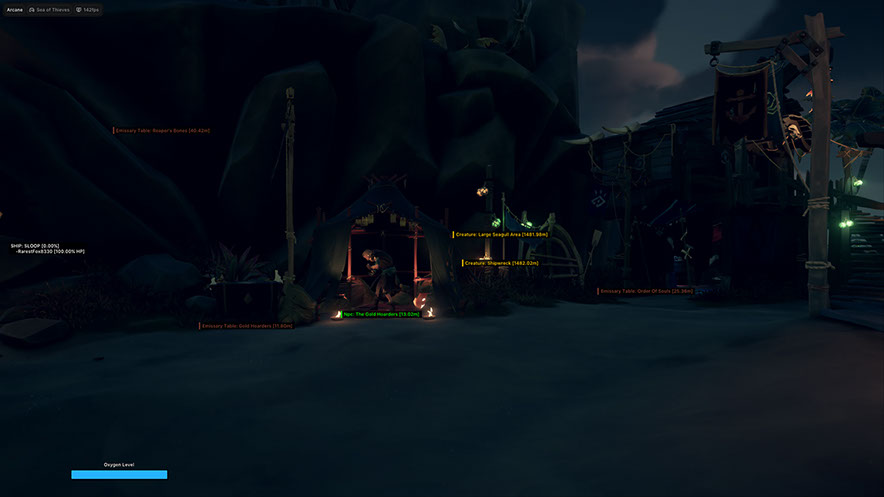
Arcane은 바다와 육지에 대한 완전한 상황 인식을 제공하는 Sea of Thieves의 비공개 치트입니다. 이 소프트웨어는 공격적인 PvP와 편안한 농업 모두에 적합합니다. 적, 전리품, 자원이 어디에 있는지 항상 알 수 있습니다.
핵심에는 강력한 ESP 시스템이 있습니다. 여기에는 플레이어, NPC, 선박, 아이템, 자원 통, 동물, 활성 이벤트, 바다 지역별로 필터링되는 개별 섬 등 거의 모든 것이 포함됩니다. 보물 상자나 다가오는 적도 놓치지 않을 것입니다.
PvP 전투에는 미세 조정된 부드러움과 FOV 설정을 갖춘 유연한 조준봇이 있으며, 대포와 작살의 궤적 시각화를 통해 해상 전투가 훨씬 더 정확해졌습니다. 추측했던 위치에 사격을 가할 수 있습니다.
편리한 HUD는 승무원 정보를 지도에 표시하고 내장된 구성 시스템을 사용하면 설정을 저장하고 고유한 키를 통해 친구들과 공유할 수 있습니다. 메뉴는 영어, 러시아어, 중국어를 지원합니다.
HWID 스푸퍼가 포함되어 있습니다. Steam 및 Xbox 버전, Windows 10~11에서 작동합니다.
시스템 요구사항
글로벌 키 — 전 세계에서 사용 가능.
일부 상품은 Binance 카드 결제가 가능할 수 있습니다. 구매 전에 개인 메시지로 이용 가능 여부와 세부 정보를 확인하세요.
기능
에임봇
- 활성화 - 활성화
- 키 바인딩 - 활성화 키
- 조준 모드 - 활성화 모드: (누르고 있을 때, 항상)
- 선택한 뼈 - 선택한 뼈: (머리, 목, 가슴, 골반)
- 선택한 대상 유형 - 선택한 대상 유형: (선택한 뼈, 가장 가까운 뼈)
- 플레이어 잠금 - 플레이어 고정
- FOV 테두리 그리기 - 원 FOV 그리기
- FOV 배경 그리기 - FOV 배경 그리기
- FOV 반경 - FOV 원 크기
- 평활도 - 평활도
- 최대 거리 - 최대 거리
ESP 배송
- 이름 - 선박 이름
- Box Owned - 배를 박싱하세요
- Box Enemy - 적함박싱
- Box AI - 복싱 선박 봇
- 렌더 거리 - 도면 거리
기타
- 판매자 상품 - 판매자
- 자원 - 자원
- 퀘스트 아이템 - 퀘스트 아이템
- 분파 깃발 - 파벌 깃발
- 생식 - 생식
- 기타 - 기타
- 렌더 거리 - 최대 거리
- FOV 체인저 - 시야각 변경
- 전투 모드 - 전투 모드
- 십자선 - 정적 십자선
바다
- 고대 섬
- 플랜티의 해안
- 더 와일드
- 악마의 포효
- 노 맨스 씨
- 더 쇼어스 오브 골드
- 기타
작살
- 이름 - 이름
- 예측선 -
- 하푼 라인 -
- 하푼 서클 - 히트 지역
- 렌더링 거리 - 표시 거리
동물
- 우호적 - 우호적
- 적대적 - 적대적
- 렌더링 거리 - 표시 거리
정적 위치
- 사절 테이블 - 테이블
- 섬 -
후드
- 승무원 - 지도에 표시된 승무원 목록
- 산소 - 산소(로컬 플레이어)
- 산소 스타일 - 산소 스트립 스타일: (정적, 값 기반, 그라데이션)
- 산소 렌더 조건 - 산소 표시 조건: (항상, 전체 값이 아닐 때)
구성
- 만들기 - 만들기
- 공유 받기 - 공유 액세스 받기(고유 키를 사용하여 친구의 구성을 다운로드하는 기능)
- 발사 - 발사
- 저장 - 저장
- 이름 편집 - 이름 변경
- 공유 - 공유
- 제거 - 제거
플레이어 ESP
- 경계 상자 - Boxing 2D: (상자, 모서리)
- 채우기 상자 - 상자 배경: (정적, 그라데이션)
- 건강 바 - 건강 바
- 산소 바 - 에어 스트립
- Bars Render Conditions - 바 표시 조건: (항상, 최대값이 아닐 때)
- 별명 - 니키
- 뼈대 - 뼈대: (두께)
- 시선 - 시선 : (시선의 길이)
AI ESP
- 경계 상자 - Boxing 2D: (상자, 모서리)
- 채우기 상자 - 상자 배경: (정적, 그라데이션)
- 건강 바 - 건강 바
- Bars Render Conditions - 바 표시 조건: (항상, 최대값이 아닐 때)
- 별명 - 니키
- 뼈대 - 뼈대: (두께)
- 시선 - 시선 : (시선의 길이)
품목 ESP
- 가슴 - 가슴
- 해골 - 해골
- 보석 - 보석
- 파우치 - 파우치
- 선물 - 선물
- 톰 - 톰
- 특별 - 특별
- 묻힌 보물 - 묻힌 보물
- 열쇠 - 열쇠
제도 ESP
- 필요한 섬 전체 또는 하나만 검색하고 표시할 수 있는 상세 필터
총
- 이름 - 이름
- 궤적선 - 발사체 궤적선
- 캐논 라인 - 캐논 라인
- 캐논 서클 - 충격 지역
- Ship Ignore Distance - 선박을 무시할 거리
- 렌더링 거리 - 표시 거리
배럴 ESP
- 목재 - 목재
- 식품 - 식품
- 캐논볼 - 캐논볼
- 보통 - 보통
- 렌더링 거리 - 표시 거리
활성화
- 이벤트 - 이벤트
- 레이드 - 레이드
- 생물-생물
설정
- 메뉴 키 - 활성화 키
- 언로드 키 - 언로드 키
- DPI 스케일 - UI 크기
- VSync - 수직 동기화
- 테마 - 테마: (어두움, 밝음)
- 워터마크 - 워터마크
- 언어 - 언어: (EN, RU, CH)
호버링
- 호버링 시 불투명도 감소 - 호버링 시 불투명도 감소
- 호버링 반경 - 커서 호버 반경
- 서클 표시 - 서클 표시
이 치트의 새 기능
3
이 프로그램의 새 기능, 주요 개선 사항 및 중요한 오류 수정입니다.
아이템 분류 개편
보관된 업데이트 공지입니다. 날짜는 변경 사항의 기록일이며 정확한 빌드 날짜는 알 수 없습니다.
- 더 직관적인 필터링과 게임에 새로 추가된 아이템과의 향후 호환성을 위해 아이템 분류를 개편했습니다.
“On Hold” 모드 Aim 수정
보관된 업데이트 공지입니다. 날짜는 변경 사항의 기록일이며 정확한 빌드 날짜는 알 수 없습니다.
- “On Hold” 모드의 Aim을 수정했습니다.
게임 플랫폼 감지 수정
보관된 업데이트 공지입니다. 날짜는 변경 사항의 기록일이며 정확한 빌드 날짜는 알 수 없습니다.
- 게임 플랫폼 감지를 수정했습니다
고객 리뷰
모든 리뷰자주 묻는 질문
Arcane에는 어떤 기능이 포함되어 있나요?
어떤 결제 수단을 사용할 수 있나요?
고객 지원은 어떻게 문의하나요?
결제가 확인됐지만 상품이 없습니다. 얼마나 기다려야 하나요?
키는 있습니다. 다운로드와 설명서는 어디에 있나요?
결제 후 소프트웨어의 활성화, 실행 및 사용에 대한 자세한 안내를 받으실 수 있습니다.
안내는 결제 전 제공한 이메일 주소로 전송됩니다.
다운로드 링크와 필요한 구성 요소도 함께 제공됩니다.
치트 커뮤니티
치트 업데이트, 탐지 상태, 다른 플레이어의 도움 — 텔레그램과 디스코드에서.