[ON] Aimbot [ON] ESP [ON] WH
Telegram Discord 製品ステータス IVSOFTE Pass Duck Hunt 使い方ガイド よくある質問

Mason Internal

Mason Internal は Arena Breakout: Infinite の最高のプライベート チートです
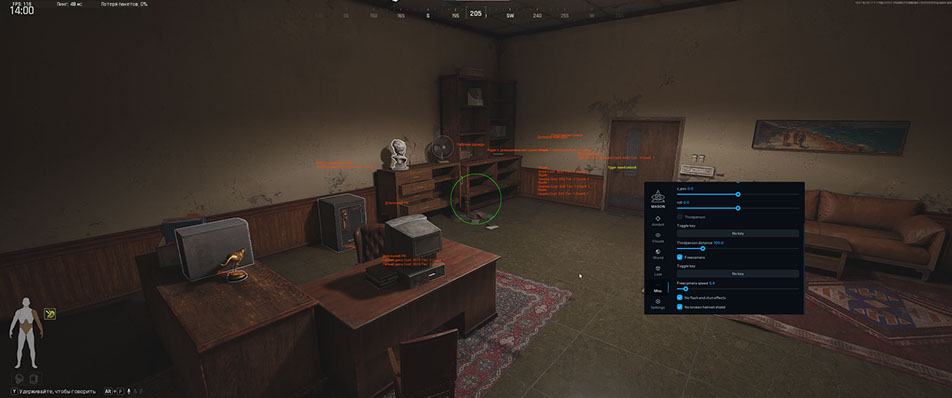
開発者: Mason

Mason Internal は、Arena Breakout: Infinite のプライベート内部チートです。 PvP および PvE 用の完全なツールキット: RCS を備えた正確なエイムボット、ダメージ チェンジャー、装甲ダメージなし、プレイヤーとボット用の ESP (3D/2D/コーナー ボックス、スケルトン、価格と希少性のインベントリ)、コンテナ用の戦利品 ESP、爆発タイマー付きドア ESP および手榴弾 ESP。

追加: 環境チェンジャー (夜、霧、空の色)、フリー カメラ、サードパーソン、スピードハック、エアスタック、ロング ジャンプ、スキンチェンジャー、揺れなし。 クイックロードとフォントのカスタマイズを備えた構成システム。 内蔵 HWID スプーファー、USB ドライブが必要です。

システム要件

対応ゲームバージョン
Steam / Client
プロセッサ
Intel and AMD (Xeon and FX support not guaranteed)
Supported Game Mode
Full Screen Window / Windowed / Full Screen
対応Windows OS
10&11 x64
対応アンチチート
Anti-Cheat Expert
USBフラッシュドライブ必要
Yes
内蔵スプーファー
Yes
配信/スクリーンショットで非表示
No
販売一時停止中

ゲームの更新が原因と思われます — ソフトウェアの更新が必要です。製品が更新されると、販売は自動的に再開されます。

TelegramとDiscordで最新情報をチェックしてください。Telegram | Discord

グローバルキー — 世界中で使用可能。

1 day$6.3購入
3 days$13.88購入
7 days$25.26購入
30 days$50.52購入
カードで支払えませんか?

銀行カードが当社の決済システムで使えない場合、Binance ギフトカード (USDT) でお支払いいただけます。

この方法には固定 +10% のサービス手数料がかかります。プロモコードや割引は適用できません。

  1. この支払い方法がご希望の商品に対応しているか、お問い合わせください
  2. お住まいの国のマーケットプレイス(Paxful、Binance、または現地の販売店)で必要な金額の Binance ギフトカード (USDT) を購入してください — お好みの支払い方法で
  3. ギフトカードのコードを送信してください — 購入を有効化し、商品をお届けします

USDT (TRC-20) はチェックアウト時にもご利用いただけます — 追加手数料なし。

保証
安全な決済
迅速なサポート
即時配信

機能

Aimbot

  • Aimbot on/off
  • Keybind
  • FOV
  • Visible only
  • Smoothness
  • Bone selection
  • Target type (Player, Bot)
  • RCS (Recoil Control) on/off
  • Recoil X / X-axis recoil control
  • Recoil Y / Y-axis recoil control
  • No breath on/off
  • Spray changer on/off
  • Spray value
  • Remove walk sway on/off
  • Fast zoom on/off
  • Fast zoom speed
  • Lean changer (use at your own risk)
  • Damage changer / Changing the hitbox where the bullet flies and its settings
  • Bot only / Only for bots (recommended)
  • No armor damage / Disabling armor on the enemy, even if he has armor, bullets will fly through the armor and hit as if without armor

Loot ESP

  • On/Off
  • Show loot boxes
  • Show items inside box
  • Show item names
  • Hide opened loot boxes
  • Show item price
  • Show rarity tier
  • Show item count
  • Minimum item price
  • Lootbox render distance

Environment

  • Environment changer on/off
  • Change sky color
  • Change sun light color
  • Change ground brightness
  • Ground brightness value
  • Night mode
  • Change light scaling
  • Light scaling value
  • Change fog color
  • Change sun halo color

Misc

  • Show if account encrypted (many reports)
  • Third person
  • Distance
  • Free camera
  • Adjusting the speed of the free camera
  • No flash/stun
  • Remove cracked helmet effect
  • Speedhack — risk function, movement only
  • With world time — speedhack for entire game (In some cases the game may go crazy!)
  • Speedhack value and bind
  • Speedhack works on short distances and on shooting
  • Airstack
  • Long jump
  • Long jump value
  • SkinChanger / Skin selection
  • No sway / Completely removes weapon sway
  • SpeedHack / Fast movement

Visuals

  • ESP players on/off
  • Show teammates
  • Box ESP
  • Box type (3D, 2D, Corner)
  • Corner size
  • Skeleton
  • Skeleton thickness
  • Show team ID
  • Show nickname
  • Show distance
  • (cm, dm, ft, m, km, mi)
  • Precision (decimals)
  • Current weapon name
  • Short/Full name
  • Show ammo
  • Show reload, zoom
  • Show inventory
  • Loot category filter (weapons, ammo, armor, meds, etc.)
  • Show inventory price
  • Price format (ones, thousands, millions)
  • Price precision
  • Render distance
  • ESP bots on/off
  • Show teammates
  • Same as players ESP
  • Local player ESP
  • Show ammo in current weapon
  • Box visible color override (for player and bot)
  • Battle mode (disable player/bot info by button) in Local tab

World

  • Door ESP
  • Door ESP on/off
  • Door type (regular, key needed, card needed)
  • Show open type
  • Show only doors you can open
  • Show only closed doors
  • Grenade ESP
  • Grenade ESP on/off
  • Box ESP + 3 box types
  • Grenade name
  • Explosion timer
  • Timer color change when active
  • Explosion radius
  • (for flash — max effect range)

General

  • Quickly load settings

Enter config name

  • Add

Current config

  • Load
  • Save
  • Delete
  • Open folder
  • Font type (6 options)
  • Font scale
  • Font leading
  • Text offset X/Y
📖 Arena Breakout: Infinite のメイソン チート セットアップ ガイド — 購入前にお読みください

カスタマーレビュー

すべてのレビュー

よくある質問

Mason Internal は Arena Breakout: Infinite の最高のプライベート チートですの使用は安全ですか?
はい、Mason Internal は Arena Breakout: Infinite の最高のプライベート チートですはセキュリティを重視して設計されています。高度なアンチチート回避技術を使用し、定期的にソフトウェアを更新しています。ただし100%のBAN防止保証はありません — 別アカウントの使用を推奨します。
Mason Internal は Arena Breakout: Infinite の最高のプライベート チートですのインストールと起動方法は?
購入後、oplata.infoへのリンクが届きます。手順書、ダウンロードリンク、アクティベーションキーが含まれています。ステップバイステップのガイドに従ってください — インストールは通常2〜5分です。
Arena Breakout Infiniteのアップデート後もMason Internal は Arena Breakout: Infinite の最高のプライベート チートですは動作しますか?
Arena Breakout Infiniteの各パッチ後、Mason Internal は Arena Breakout: Infinite の最高のプライベート チートですを迅速に更新します。更新は通常1〜48時間以内にリリースされます。更新中はサブスクリプションが凍結され、支払い済みの時間は失われません。
Mason Internal は Arena Breakout: Infinite の最高のプライベート チートですにはどんな機能が含まれていますか?
Mason Internal は Arena Breakout: Infinite の最高のプライベート チートですの機能セットは選択プランによって異なります。通常、Aimbot、ESP/Wallhack、Radarなどが利用可能です。機能の完全なリストは上記の商品説明をご覧ください。
どの支払い方法が利用できますか?
oplata.info(銀行カード、電子ウォレット、暗号資産)および一部商品のEliteSellerでのお支払いに対応しています。詳細はお支払いページをご覧ください。
サポートにはどう連絡しますか?
Telegram(@undetect)TelegramチャットDiscord、またはメール ivsofte@gmail.com で管理者に連絡できます。対応時間:10:00~翌0:00 (UTC+3)。
すべての質問と回答

お支払い後、ソフトウェアのアクティベーション、起動、使用方法の詳細な説明をお届けします。

説明はお支払い前に指定されたメールアドレスに送信されます。

ダウンロードリンクと必要なコンポーネントもそちらでご確認いただけます。