[ON] Aimbot [ON] ESP [ON] WH
Telegram Discord 제품 상태 IVSOFTE Pass Duck Hunt 설명서 자주 묻는 질문
Arena Breakout Infinite 치트 더보기

Mason Internal

Mason Internal은 Arena Breakout: Infinite의 최고의 개인 치트입니다.
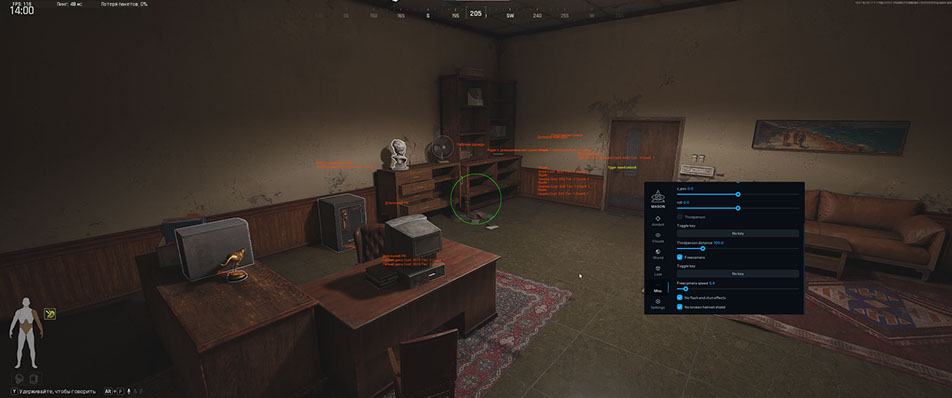
개발자: Mason

Mason Internal은 Arena Breakout: Infinite의 비공개 내부 치트입니다. PvP 및 PvE를 위한 전체 툴킷: RCS가 포함된 정확한 Aimbot, 데미지 체인저 및 방어구 손상 없음, 플레이어 및 봇용 ESP(3D/2D/코너 상자, 뼈대, 가격 및 희귀도가 포함된 인벤토리), 컨테이너용 전리품 ESP, 폭발 타이머가 포함된 도어 ESP 및 수류탄 ESP.

추가: 환경 체인저(야간, 안개, 하늘색), 무료 카메라, 3인칭, 스피드핵, 공중 스택, 멀리뛰기, SkinChanger, 흔들리지 않습니다. 빠른 로드 및 글꼴 사용자 정의 기능을 갖춘 구성 시스템. HWID 스푸퍼 내장, USB 드라이브 필요.

시스템 요구사항

지원 게임 버전
Steam / Client
프로세서
Intel and AMD (Xeon and FX support not guaranteed)
Supported Game Mode
Full Screen Window / Windowed / Full Screen
지원 Windows OS
10&11 x64
지원 안티치트
Anti-Cheat Expert
USB 플래시 드라이브 필요
Yes
내장 스푸퍼
Yes
스트림/스크린샷에서 숨기기
No
판매 일시 중단

게임 업데이트로 인한 것일 수 있습니다 — 소프트웨어 업데이트가 필요합니다. 제품이 업데이트되면 판매가 자동으로 재개됩니다.

Telegram과 Discord에서 업데이트를 확인하세요.Telegram | Discord

글로벌 키 — 전 세계에서 사용 가능.

1 day$6.3구매
3 days$13.88구매
7 days$25.26구매
30 days$50.52구매
카드로 결제할 수 없나요?

은행 카드가 결제 시스템에서 작동하지 않는 경우, Binance 기프트 카드 (USDT)로 결제할 수 있습니다.

이 방법에는 고정 +10% 수수료가 부과됩니다. 프로모션 코드 및 할인은 적용할 수 없습니다.

  1. 이 결제 방법이 원하시는 제품에 사용 가능한지 문의해 주세요
  2. 국내 마켓플레이스(Paxful, Binance 또는 현지 판매자)에서 필요한 금액의 Binance 기프트 카드(USDT)를 구매하세요 — 편리한 결제 수단으로
  3. 기프트 카드 코드를 보내주시면 — 구매를 활성화하고 제품을 전달해 드립니다

USDT (TRC-20)도 결제 페이지에서 사용할 수 있습니다 — 추가 수수료 없이.

보증
안전한 결제
빠른 지원
즉시 배송

기능

Aimbot

  • Aimbot on/off
  • Keybind
  • FOV
  • Visible only
  • Smoothness
  • Bone selection
  • Target type (Player, Bot)
  • RCS (Recoil Control) on/off
  • Recoil X / X-axis recoil control
  • Recoil Y / Y-axis recoil control
  • No breath on/off
  • Spray changer on/off
  • Spray value
  • Remove walk sway on/off
  • Fast zoom on/off
  • Fast zoom speed
  • Lean changer (use at your own risk)
  • Damage changer / Changing the hitbox where the bullet flies and its settings
  • Bot only / Only for bots (recommended)
  • No armor damage / Disabling armor on the enemy, even if he has armor, bullets will fly through the armor and hit as if without armor

Loot ESP

  • On/Off
  • Show loot boxes
  • Show items inside box
  • Show item names
  • Hide opened loot boxes
  • Show item price
  • Show rarity tier
  • Show item count
  • Minimum item price
  • Lootbox render distance

Environment

  • Environment changer on/off
  • Change sky color
  • Change sun light color
  • Change ground brightness
  • Ground brightness value
  • Night mode
  • Change light scaling
  • Light scaling value
  • Change fog color
  • Change sun halo color

Misc

  • Show if account encrypted (many reports)
  • Third person
  • Distance
  • Free camera
  • Adjusting the speed of the free camera
  • No flash/stun
  • Remove cracked helmet effect
  • Speedhack — risk function, movement only
  • With world time — speedhack for entire game (In some cases the game may go crazy!)
  • Speedhack value and bind
  • Speedhack works on short distances and on shooting
  • Airstack
  • Long jump
  • Long jump value
  • SkinChanger / Skin selection
  • No sway / Completely removes weapon sway
  • SpeedHack / Fast movement

Visuals

  • ESP players on/off
  • Show teammates
  • Box ESP
  • Box type (3D, 2D, Corner)
  • Corner size
  • Skeleton
  • Skeleton thickness
  • Show team ID
  • Show nickname
  • Show distance
  • (cm, dm, ft, m, km, mi)
  • Precision (decimals)
  • Current weapon name
  • Short/Full name
  • Show ammo
  • Show reload, zoom
  • Show inventory
  • Loot category filter (weapons, ammo, armor, meds, etc.)
  • Show inventory price
  • Price format (ones, thousands, millions)
  • Price precision
  • Render distance
  • ESP bots on/off
  • Show teammates
  • Same as players ESP
  • Local player ESP
  • Show ammo in current weapon
  • Box visible color override (for player and bot)
  • Battle mode (disable player/bot info by button) in Local tab

World

  • Door ESP
  • Door ESP on/off
  • Door type (regular, key needed, card needed)
  • Show open type
  • Show only doors you can open
  • Show only closed doors
  • Grenade ESP
  • Grenade ESP on/off
  • Box ESP + 3 box types
  • Grenade name
  • Explosion timer
  • Timer color change when active
  • Explosion radius
  • (for flash — max effect range)

General

  • Quickly load settings

Enter config name

  • Add

Current config

  • Load
  • Save
  • Delete
  • Open folder
  • Font type (6 options)
  • Font scale
  • Font leading
  • Text offset X/Y
📖 Arena Breakout: Infinite용 메이슨 치트 설정 가이드 — 구매 전 읽기

고객 리뷰

모든 리뷰

자주 묻는 질문

Mason Internal은 Arena Breakout: Infinite의 최고의 개인 치트입니다.을(를) 사용하는 것이 안전한가요?
네, Mason Internal은 Arena Breakout: Infinite의 최고의 개인 치트입니다.은(는) 안전을 최우선으로 설계되었습니다. 최신 안티치트 우회 기술을 사용하며 정기적으로 업데이트합니다. 다만 100% 밴 방지 보장은 없으므로 별도 계정 사용을 권장합니다.
Mason Internal은 Arena Breakout: Infinite의 최고의 개인 치트입니다.을(를) 어떻게 설치하고 실행하나요?
구매 후 oplata.info 링크를 받게 되며, 설치 안내, 다운로드 링크, 활성화 키가 포함되어 있습니다. 단계별 가이드를 따르면 됩니다 — 설치는 보통 2-5분 정도 소요됩니다.
Arena Breakout Infinite 업데이트 후에도 Mason Internal은 Arena Breakout: Infinite의 최고의 개인 치트입니다.이(가) 작동하나요?
매 Arena Breakout Infinite 패치 후 Mason Internal은 Arena Breakout: Infinite의 최고의 개인 치트입니다.을(를) 신속하게 업데이트합니다. 업데이트는 보통 1-48시간 이내에 릴리스됩니다. 업데이트 중에는 구독이 동결되어 결제한 시간을 잃지 않습니다.
Mason Internal은 Arena Breakout: Infinite의 최고의 개인 치트입니다.에는 어떤 기능이 포함되어 있나요?
Mason Internal은 Arena Breakout: Infinite의 최고의 개인 치트입니다.의 기능 세트는 선택한 플랜에 따라 다릅니다. 일반적으로 Aimbot, ESP/Wallhack, Radar 등이 제공됩니다. 전체 기능 목록은 위의 상품 설명에 나와 있습니다.
어떤 결제 수단을 사용할 수 있나요?
oplata.info(은행 카드, 전자지갑, 암호화폐)와 일부 상품의 EliteSeller로 결제를 받습니다. 자세한 내용은 결제 페이지를 참고하세요.
고객 지원은 어떻게 문의하나요?
Telegram(@undetect), Telegram 채팅, Discord 또는 이메일 ivsofte@gmail.com로 관리자에게 연락하세요. 업무 시간: 10:00–00:00 (UTC+3).
모든 질문과 답변

결제 후 소프트웨어의 활성화, 실행 및 사용에 대한 자세한 안내를 받으실 수 있습니다.

안내는 결제 전 제공한 이메일 주소로 전송됩니다.

다운로드 링크와 필요한 구성 요소도 함께 제공됩니다.