Phoenix ESP 용 PUBG
PUBG용 작업 치트 Phoenix ESP 구매
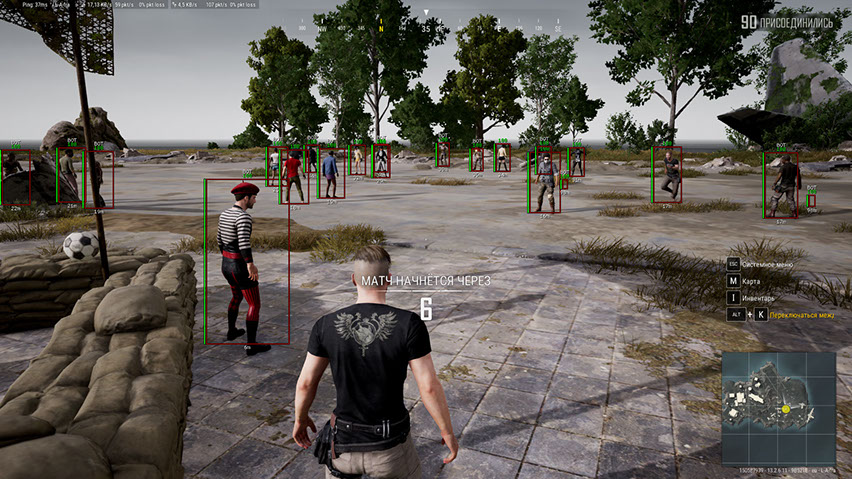
동영상에는 Aimbot 기능이 포함된 정식 버전이 나와 있습니다. 이 페이지는 적을 조준하는 기능이 없는 Wallhack 버전을 제공합니다.
Wh-Satano PUBG Hack(Phoenix) — 이전에는 PUBG Wallhack으로 알려졌습니다. 역사적으로 우리는 PUBG용 합법적인 소프트웨어를 전문으로 하여 신뢰할 수 있는 Wallhack 전용 제품을 만들었습니다. 2021년부터 이 소프트웨어는 적극적으로 개발 및 업데이트되어 4년 넘게 게임을 위한 최고의 솔루션 중 하나로 남아 있습니다.
핵심 기능은 맞춤설정 유연성이 극대화된 ESP(WH)입니다. 플레이어 ESP는 상자, 뼈대, 닉네임, 인벤토리 콘텐츠 등 다양한 옵션을 제공합니다. satano PUBG를 사용하면 실시간 플레이어와 봇 모두에 대한 완전한 정보를 볼 수 있습니다.
이 기능은 플레이어에게만 국한되지 않습니다. 고급 필터가 포함된 전리품 ESP를 사용하면 필요한 항목만 표시할 수 있습니다. 편리한 목록에서 에어드랍, 컨테이너, 시체는 물론 플레이어 인벤토리까지의 콘텐츠를 확인할 수 있습니다.
자동차에서 보트, 항공기에 이르기까지 모든 차량을 쉽게 찾을 수 있게 해주는 차량용 ESP는 특별히 언급할 가치가 있습니다.
모든 설정은 러시아어와 영어로 제공되는 편리하고 세련된 메뉴를 통해 구성됩니다. 내장된 HWID 스푸퍼를 통해 추가 보안 계층이 제공되어 하드웨어 금지를 방지합니다.
PUBG를 위한 안정적이고 안전하며 저렴한 치트가 필요하다면 Wh-Satano PUBG(예: PUBG Wallhack)를 선택하세요. 이 솔루션은 시간과 수천 명의 플레이어를 통해 입증되었습니다!
시스템 요구사항
🔔 치트 상태는 개발자 알림에 따라 텔레그램 봇에서 자동으로 업데이트됩니다 — 그곳에서 소식을 확인하세요. 많은 치트는 게임 변경 후 스스로 업데이트되므로 «확인 중» 상태가 치트가 작동하지 않는다는 뜻은 아니며, 확인 전까지의 불확실성일 뿐입니다. 확실하지 않나요? 사이트 채팅에서 문의하거나 연락처를 확인하세요.
글로벌 키 — 전 세계에서 사용 가능.
일부 상품은 Binance 카드 결제가 가능할 수 있습니다. 구매 전에 개인 메시지로 이용 가능 여부와 세부 정보를 확인하세요.
기능
플레이어 ESP
- 플레이어 ESP — 적에 대한 다양한 정보 제공
- Visible Check - 시야에 있는 적과 벽 뒤에 있는 적의 색상이 다르게 표시됩니다.
- 봇 표시(AI) — 봇과 플레이어를 구별하며 봇 상자 근처에 봇 태그가 표시됩니다.
- 상자 — 상자를 사용하여 벽과 장애물 뒤에 있는 캐릭터를 강조 표시합니다.
- 상자 스타일(2D, 모서리, 채우기) — 상자의 시각적 스타일 설정
- Health (Text, Bar) — 플레이어 HP를 텍스트 및 막대 표시기로 표시합니다.
- 스켈레톤 — 모델에 스켈레톤을 오버레이하여 플레이어를 강조 표시합니다.
- Knocked — ESP는 쓰러진(다운된) 플레이어에 대해 작동합니다.
- 장비 - 현재 플레이어 장비를 표시합니다.
- 무기 — 적들이 어떤 무기를 들고 있는지 보여줍니다.
- 탄약 — 탄창 및 보유량의 총알 수
- 맞춤선 — 모델에서 상대방 모델까지 그린 선
- 킬 점수 — 플레이어당 킬 수
- 레벨 — 플레이어 레벨을 표시합니다.
- 거리 — 다른 플레이어와의 거리(미터)
- 최대 거리 - ESP 기능 범위를 제한합니다.
- Enemy Only — ESP 기능은 적 플레이어에게만 작동합니다.
기타
- 십자선 — 화면 중앙의 정적 십자선
- 관중 — 게임을 관전하는 플레이어 수를 보여줍니다.
- 전투 모드 — 플레이어 WH를 제외한 모든 ESP 기능을 비활성화합니다.
- 전투 필터 — 전투 모드에 표시되는 개체에 대한 필터
- 색상 — 대부분의 시각적 기능에 대한 색상 사용자 정의
- 언어 — 치트 메뉴는 러시아어와 영어를 지원합니다
- HWID-Spoofer — 하드웨어 금지 우회 스푸퍼 포함
월드 ESP
- 차량 - WH를 통해 차량 위치를 표시합니다.
- 차량 정보(건강, 연료) — 차량의 연료 및 내구성 정보
- 에어드롭 — 에어드롭 위치를 표시합니다.
- 에어드롭 콘텐츠 — 에어드롭 내부에 전리품 목록을 표시합니다.
- 시체 — 죽은 플레이어 상자(시체)를 표시합니다.
- 시체 내용 — 플레이어 시체의 인벤토리 내용을 표시합니다.
- 이름 — 표시된 객체의 이름
- 거리 — 물체까지의 거리(미터)
- 최대 거리 — 다양한 객체 유형에 대한 조정 가능한 표시 범위
- 수류탄 표시 — 투척된 수류탄과 폭발까지의 시간을 표시합니다.
전리품 ESP
- 전리품 ESP — 땅에 떨어진 다양한 전리품을 확인하세요
- 전리품 필터 — 카테고리별 유연한 전리품 필터링 시스템
- Armor 1 / 2 / 3 LVL — 레벨 1, 2, 3의 갑옷, 헬멧 및 배낭
- 블레이드 — 근접 무기 강조 표시
- 권총 — 권총 위치 표시
- 기관단총 - 기관단총을 보여줍니다.
- Shotguns — 산탄총을 보여줍니다.
- 소총 — 돌격소총 위치 표시
- 스나이퍼(Snipers) - 스나이퍼 무기 위치를 표시합니다.
- 스코프 — 다양한 스코프 및 광학 장치
- 의약품 - 의료 키트, 붕대, 진통제, 에너지 음료 및 아드레날린
- 부착물 — 무기 개조
- 수류탄 — 수류탄 및 기타 투척형 무기
- 거리 — 표시된 항목까지의 거리(미터)
- 최대 거리 - 전리품 WH 표시 범위를 제한합니다.
이 치트의 새 기능
최근 소프트웨어 업데이트 기록 — 최신순.
-
Phoenix ESP PUBG (Wallhack) — UI revamped and protection updated
The cheat menu UI has been fully redesigned and refreshed. Language switching (English / Russian) is restored. The font has been changed to a more comfortable and pleasant one for gameplay. Minor bugs and rough edges fixed. Security and anti-ban protection improved.
고객 리뷰
모든 리뷰자주 묻는 질문
Phoenix ESP에는 어떤 기능이 포함되어 있나요?
어떤 결제 수단을 사용할 수 있나요?
고객 지원은 어떻게 문의하나요?
결제 후 소프트웨어의 활성화, 실행 및 사용에 대한 자세한 안내를 받으실 수 있습니다.
안내는 결제 전 제공한 이메일 주소로 전송됩니다.
다운로드 링크와 필요한 구성 요소도 함께 제공됩니다.
치트 커뮤니티
PUBG 및 PUBG 모바일 치트: 업데이트, 탐지 상태, 플레이어 채팅.