Arcane Web Radar für ARC Raiders
Arcane Web Radar — browser radar for ARC Raiders
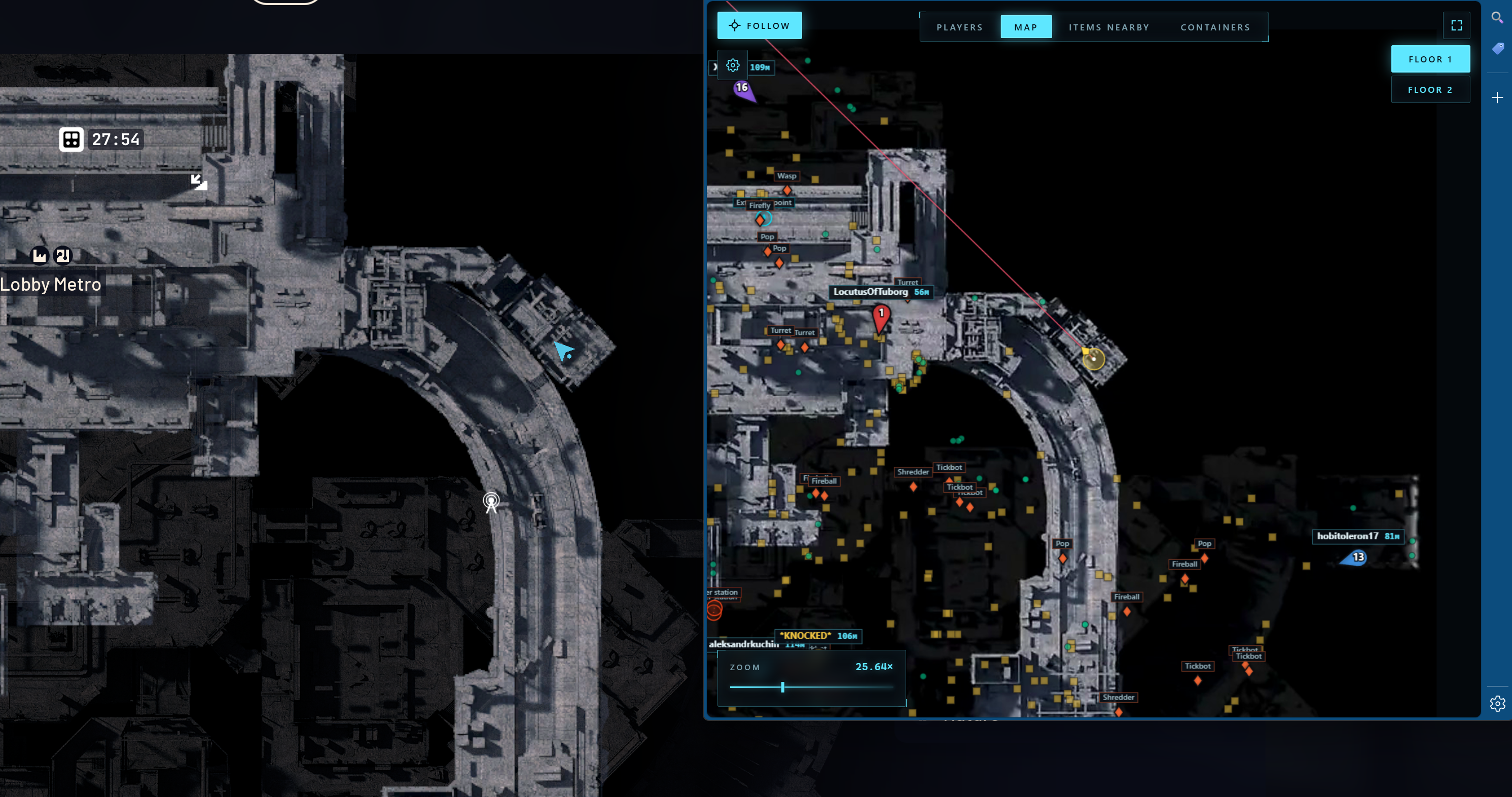
Arcane Web Radar for ARC Raiders is a private browser-based radar that displays all in-game data in a separate browser window instead of overlaying ESP on top of the game client. There are no boxes, skeletons or lines on your screen — the ARC Raiders client stays clean, while all the tactical information lives on a second monitor, phone or tablet.
The radar shows player and teammate positions with names, distances and weapons, ARC machines, containers, loot and key map objects: extraction points, supply call stations, supply stations, power stations, probes, mines, quest items, carryables and grenades. Every category has its own settings: font size, opacity, type filter.
On top of that there are Global Player, Nearby Items and Nearby Containers tables with search, sorting by distance and quick actions — mark on map, build a route to the target. Auto camera scaling and a follow mode for the local player or a specific teammate make team play especially comfortable.
Steam, Xbox and Epic Games versions are supported. The radar works in windowed, borderless and full screen modes. There is no injection into game memory — data is delivered to a separate web interface, which reduces risk and keeps cheat usage clean.
Systemanforderungen
🔔 Cheat-Status wird automatisch aus unserem Telegram-Bot nach Entwickler-Benachrichtigungen aktualisiert — folge den News dort. Viele Cheats aktualisieren sich nach Spieländerungen selbst, daher bedeutet der Status „Wird geprüft“ nicht, dass der Cheat defekt ist — es ist nur Ungewissheit bis zur Bestätigung. Nicht sicher? Frag im Website-Chat oder unter Kontakte.
Globale Schlüssel — funktionieren weltweit.
Für ausgewählte Produkte kann die Zahlung mit einer Binance-Karte verfügbar sein. Schreiben Sie uns vor dem Kauf privat, um Verfügbarkeit und Details zu klären.
Funktionen
Spieler
- Team anzeigen (die Möglichkeit, alle Teammitglieder oder nur bestimmte anzuzeigen)
- Teamnummer
- Teamfarbe
- Spitzname
- Entfernung
- Waffenname
- Ziellinie anzeigen
- Spielergröße
Behälter
- Container anzeigen
- Versteck geöffnet
- Namen anzeigen
- Distanz anzeigen
- Schriftgröße
- Opazität
- Typenauswahl
VERSCHIEDENES
- Ziellinie anzeigen
- Automatische Skalierung
- Folgen Sie dem lokalen Spieler
- Fähigkeit, einem bestimmten Teammitglied zu folgen
Global Player-Tabelle
- Teamnummer
- Name
- Waffe
- Gesundheit
- Entfernung
- Aktionen: Auf der Karte anzeigen, Route zum Spieler
Container in der Nähe Tisch
- Status (Offen / Geschlossen)
- Name
- Typ
- Entfernung
- Aktionen: Container auf der Karte anzeigen, Route zum Container
ARCs
- ARCs anzeigen
- Namen anzeigen
- Distanz anzeigen
- Schriftgröße
Artikel
- Artikel anzeigen
- Namen anzeigen
- Distanz anzeigen
- Schriftgröße
- Opazität
- Kategorieauswahl
Objekte
- Namen anzeigen
- Distanz anzeigen
- Schriftgröße
- Opazität
- Extraktionspunkte
- Versorgungsrufstation
- Versorgungsstation
- Kraftwerk
- Sonde
- Meins
- Suche
- Tragbar
- Granate
Tabelle „Artikel in der Nähe“.
- Suchen Sie nach Artikeln in der Nähe
- Name
- Entfernung
- Aktionen: Artikel auf der Karte anzeigen, Route zum Artikel
Was ist neu in diesem Cheat
Verlauf der letzten Software-Updates – von den neuesten zu den älteren.
-
Arcane Web Radar for ARC Raiders — new browser radar
Added Arcane Web Radar for ARC Raiders — a private browser-based radar with no overlays or memory injection. Displays players, ARC machines, containers, loot and key map objects (extraction points, supply stations, power stations, quest items) in a separate browser window. Steam, Xbox and Epic Games supported.
Kundenbewertungen
Alle BewertungenHäufig gestellte Fragen
Welche Funktionen sind in Arcane Web Radar enthalten?
Welche Zahlungsmethoden werden akzeptiert?
Wie erreiche ich den Support?
Nach der Zahlung erhalten Sie detaillierte Anleitungen zur Aktivierung, zum Start und zur Nutzung der Software.
Die Anleitung wird an die vor der Zahlung angegebene E-Mail-Adresse gesendet.
Dort finden Sie auch den Download-Link und die notwendigen Komponenten.
Cheat-Community
Cheat-Updates, Erkennungsstatus und Hilfe von anderen Spielern — in unserem Telegram und Discord.