Arcane Web Radar per ARC Raiders
Arcane Web Radar — browser radar for ARC Raiders
Le vendite sono temporaneamente sospese
- Consegna immediata
- Pagamento sicuro
- Supporto quotidiano
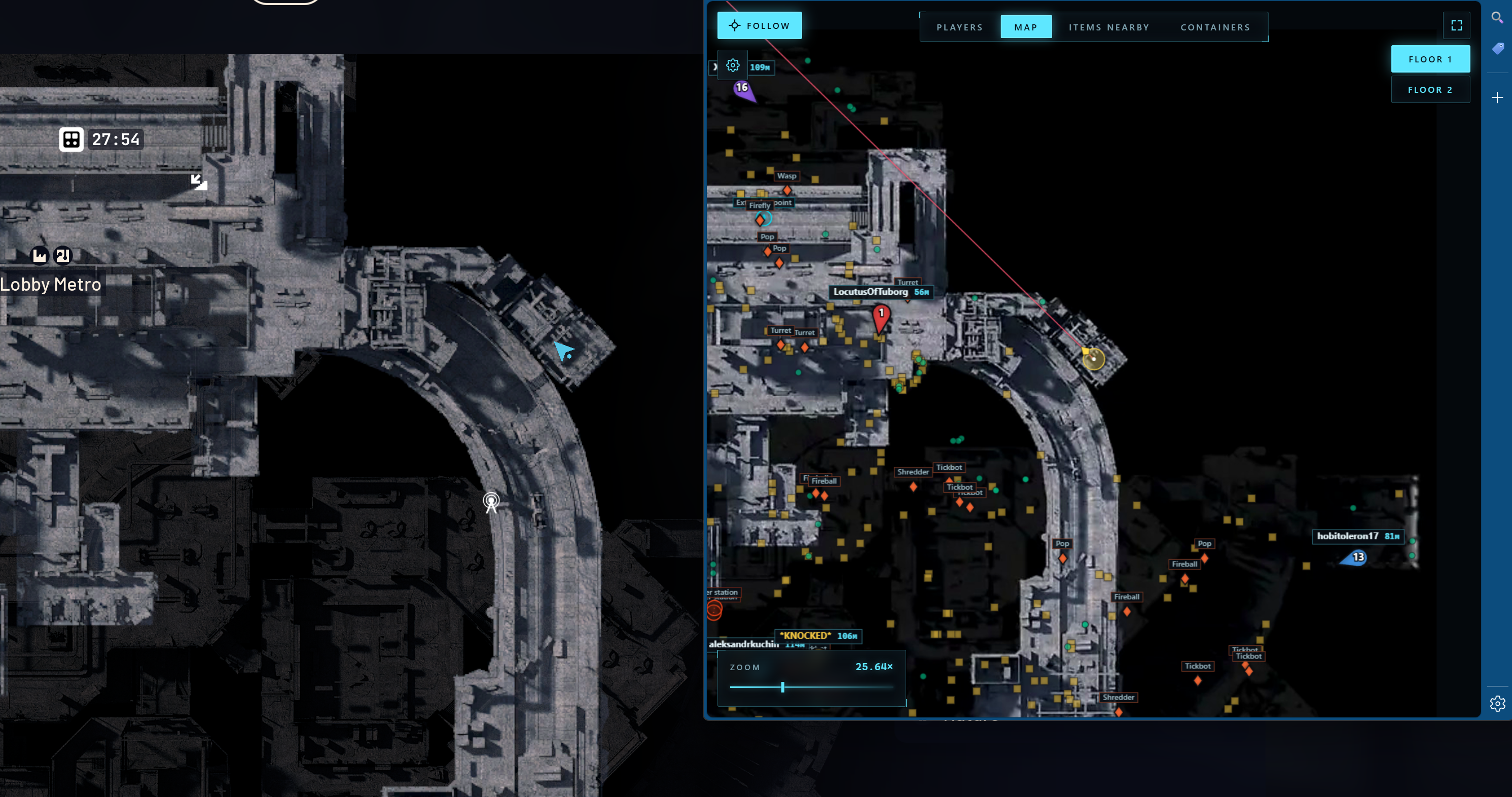
Arcane Web Radar for ARC Raiders is a private browser-based radar that displays all in-game data in a separate browser window instead of overlaying ESP on top of the game client. There are no boxes, skeletons or lines on your screen — the ARC Raiders client stays clean, while all the tactical information lives on a second monitor, phone or tablet.
The radar shows player and teammate positions with names, distances and weapons, ARC machines, containers, loot and key map objects: extraction points, supply call stations, supply stations, power stations, probes, mines, quest items, carryables and grenades. Every category has its own settings: font size, opacity, type filter.
On top of that there are Global Player, Nearby Items and Nearby Containers tables with search, sorting by distance and quick actions — mark on map, build a route to the target. Auto camera scaling and a follow mode for the local player or a specific teammate make team play especially comfortable.
Steam, Xbox and Epic Games versions are supported. The radar works in windowed, borderless and full screen modes. There is no injection into game memory — data is delivered to a separate web interface, which reduces risk and keeps cheat usage clean.
Requisiti di sistema
🔔 Gli stati dei cheat si aggiornano automaticamente da il nostro bot Telegram tramite le notifiche degli sviluppatori — segui le novità lì. Molti cheat si aggiornano da soli dopo le modifiche al gioco, quindi lo stato «In verifica» non significa che il cheat non funzioni — è solo incertezza in attesa di conferma. Non sei sicuro? Chiedi nella chat del sito o consulta Contatti.
Chiavi globali: funzionano in tutto il mondo.
Il pagamento con carta Binance può essere disponibile per alcuni prodotti. Contattaci in privato prima dell’acquisto per verificarne la disponibilità e concordare i dettagli.
Caratteristiche
Giocatori
- Mostra team (la possibilità di visualizzare tutti i membri del team o solo quelli specifici)
- Numero della squadra
- Colore della squadra
- Soprannome
- Distanza
- Nome dell'arma
- Mostra la linea di mira
- Dimensioni dei giocatori
Contenitore
- Mostra contenitori
- Nascondi aperto
- Mostra nome
- Mostra la distanza
- Dimensione del carattere
- Opacità
- Selettore di tipi
VARIE
- Mostra la linea di mira
- Ridimensionamento automatico
- Segui il giocatore locale
- Capacità di seguire un membro specifico del team
Tabella dei giocatori globali
- Numero della squadra
- Nome
- Arma
- Salute
- Distanza
- Azioni: mostra sulla mappa, indirizza al giocatore
Tabella contenitori nelle vicinanze
- Stato (Aperto/Chiuso)
- Nome
- Tipo
- Distanza
- Azioni: Mostra contenitore sulla mappa, Indirizza al contenitore
ARC
- Mostra ARC
- Mostra nome
- Mostra la distanza
- Dimensione del carattere
Elementi
- Mostra elementi
- Mostra nome
- Mostra la distanza
- Dimensione del carattere
- Opacità
- Selettore di categoria
Oggetti
- Mostra nome
- Mostra la distanza
- Dimensione del carattere
- Opacità
- Punti di estrazione
- Stazione di chiamata per rifornimenti
- Stazione di rifornimento
- Centrale elettrica
- Sonda
- Mio
- Ricerca
- Trasportabile
- Granata
Tabella Articoli nelle vicinanze
- Cerca oggetti nelle vicinanze
- Nome
- Distanza
- Azioni: Mostra elemento sulla mappa, Indirizza verso l'elemento
Novità di questo cheat
Cronologia degli ultimi aggiornamenti software — dai più recenti ai più datati.
-
Arcane Web Radar for ARC Raiders — new browser radar
Added Arcane Web Radar for ARC Raiders — a private browser-based radar with no overlays or memory injection. Displays players, ARC machines, containers, loot and key map objects (extraction points, supply stations, power stations, quest items) in a separate browser window. Steam, Xbox and Epic Games supported.
Recensioni dei clienti
Tutte le recensioniDomande frequenti
What features are included in Arcane Web Radar?
Quali metodi di pagamento accettate?
Come contatto il supporto?
Dopo il pagamento riceverai istruzioni dettagliate sull'attivazione, il lancio e l'utilizzo del software.
Le istruzioni verranno inviate all'indirizzo email specificato prima del pagamento.
Troverai anche un collegamento per il download e i componenti necessari per il software.
Community di cheat
Aggiornamenti dei cheat, stato di rilevamento e aiuto da altri giocatori — sul nostro Telegram e Discord.