Arcane Web Radar pour ARC Raiders
Arcane Web Radar — browser radar for ARC Raiders
Ventes temporairement suspendues
- Livraison instantanée
- Paiement sécurisé
- Support 24h/24
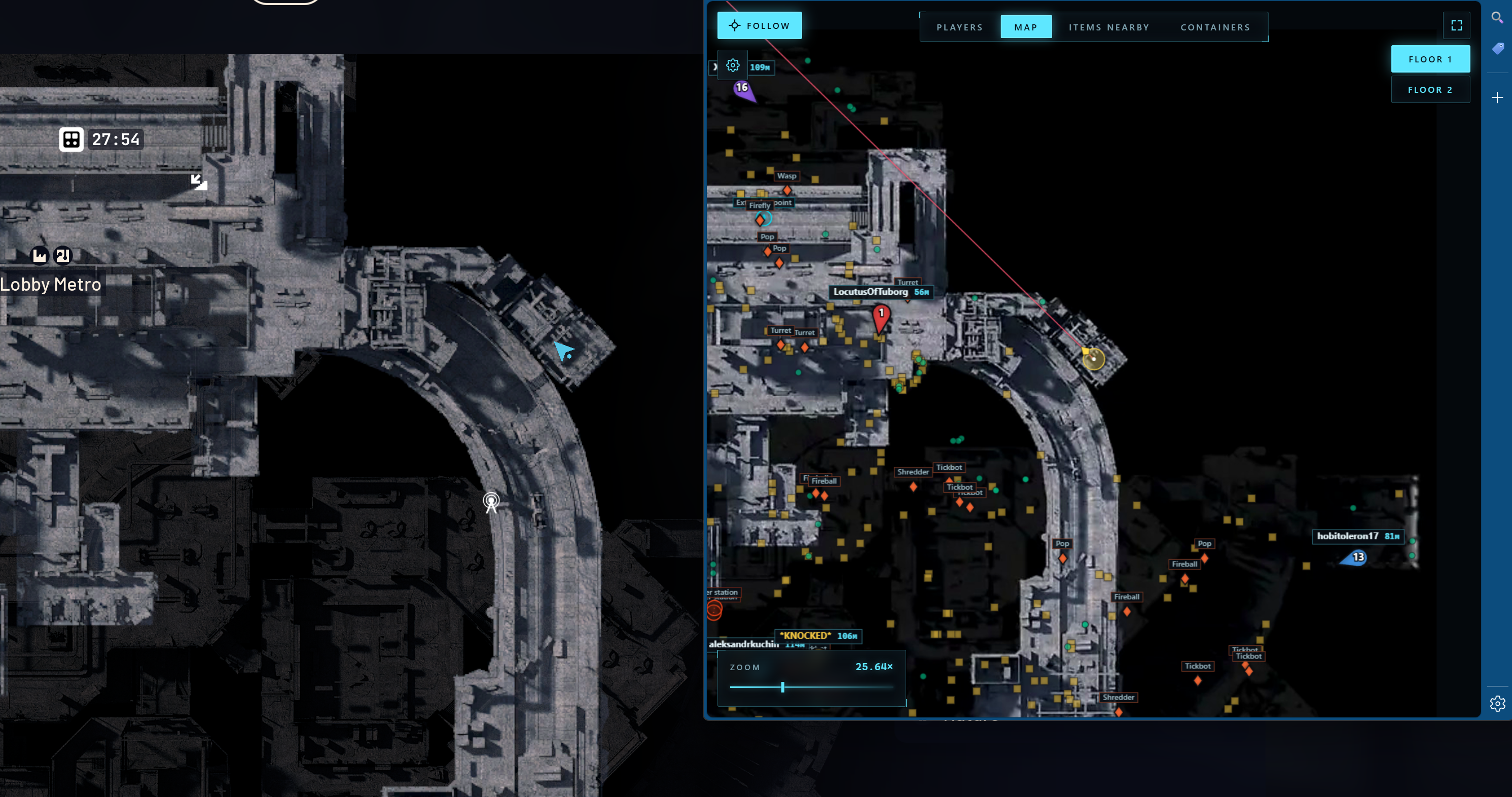
Arcane Web Radar for ARC Raiders is a private browser-based radar that displays all in-game data in a separate browser window instead of overlaying ESP on top of the game client. There are no boxes, skeletons or lines on your screen — the ARC Raiders client stays clean, while all the tactical information lives on a second monitor, phone or tablet.
The radar shows player and teammate positions with names, distances and weapons, ARC machines, containers, loot and key map objects: extraction points, supply call stations, supply stations, power stations, probes, mines, quest items, carryables and grenades. Every category has its own settings: font size, opacity, type filter.
On top of that there are Global Player, Nearby Items and Nearby Containers tables with search, sorting by distance and quick actions — mark on map, build a route to the target. Auto camera scaling and a follow mode for the local player or a specific teammate make team play especially comfortable.
Steam, Xbox and Epic Games versions are supported. The radar works in windowed, borderless and full screen modes. There is no injection into game memory — data is delivered to a separate web interface, which reduces risk and keeps cheat usage clean.
Configuration requise
🔔 Les statuts des cheats se mettent à jour automatiquement depuis notre bot Telegram via les notifications des développeurs — suivez les news là-bas. Beaucoup de cheats se mettent à jour tout seuls après les changements du jeu, donc un statut « Vérification » ne signifie pas que le cheat est cassé — c’est juste une incertitude en attendant confirmation. Pas sûr ? Demandez sur le chat du site ou consultez Contacts.
Clés globales — fonctionnent dans le monde entier.
Si votre carte bancaire ne fonctionne pas avec notre système de paiement, vous pouvez payer avec une Binance Gift Card (USDT).
Cette méthode comporte des frais fixes de +10 %. Les codes promo et les réductions ne peuvent pas être appliqués.
- Contactez-nous pour confirmer que ce mode de paiement est disponible pour le produit souhaité
- Achetez une Binance Gift Card (USDT) du montant nécessaire sur une plateforme de votre pays (Paxful, Binance ou revendeurs locaux) — avec le moyen de paiement qui vous convient
- Envoyez-nous le code de la carte cadeau — nous activerons votre achat et livrerons le produit
USDT (TRC-20) est également disponible comme option de paiement lors du checkout — sans frais supplémentaires.
Fonctionnalités
Joueurs
- Afficher l'équipe (la possibilité d'afficher tous les membres de l'équipe ou seulement certains)
- Numéro d'équipe
- Couleur de l'équipe
- Surnom
- Distance
- Nom de l'arme
- Afficher la ligne de visée
- Taille des joueurs
Conteneur
- Afficher les conteneurs
- Masquer ouvert
- Afficher le nom
- Afficher la distance
- Taille de la police
- Opacité
- Sélecteur de types
DIVERS
- Afficher la ligne de visée
- Mise à l'échelle automatique
- Suivre un joueur local
- Possibilité de suivre un membre spécifique de l'équipe
Tableau des joueurs mondiaux
- Numéro d'équipe
- Nom
- Arme
- Santé
- Distance
- Actions : Afficher sur la carte, Itinéraire vers le joueur
Tableau à proximité des conteneurs
- Statut (Ouvert / Fermé)
- Nom
- Tapez
- Distance
- Actions : Afficher le conteneur sur la carte, Itinéraire vers le conteneur
ARC
- Afficher les ARC
- Afficher le nom
- Afficher la distance
- Taille de la police
Articles
- Afficher les éléments
- Afficher le nom
- Afficher la distance
- Taille de la police
- Opacité
- Sélecteur de catégorie
Objets
- Afficher le nom
- Afficher la distance
- Taille de la police
- Opacité
- Points d'extraction
- Poste d'appel d'approvisionnement
- Station de ravitaillement
- Centrale électrique
- Sonde
- Le mien
- Quête
- Transportable
- Grenade
Tableau des éléments à proximité
- Rechercher des objets à proximité
- Nom
- Distance
- Actions : Afficher l'élément sur la carte, Itinéraire vers l'élément
Quoi de neuf dans ce cheat
Historique des dernières mises à jour — du plus récent au plus ancien.
-
Arcane Web Radar for ARC Raiders — new browser radar
Added Arcane Web Radar for ARC Raiders — a private browser-based radar with no overlays or memory injection. Displays players, ARC machines, containers, loot and key map objects (extraction points, supply stations, power stations, quest items) in a separate browser window. Steam, Xbox and Epic Games supported.
Avis clients
Tous les avisQuestions fréquentes
Est-il sûr d'utiliser Arcane Web Radar ?
Comment installer et lancer Arcane Web Radar ?
Arcane Web Radar fonctionne-t-il après une mise à jour de ARC Raiders ?
Quelles fonctionnalités sont incluses dans Arcane Web Radar ?
Quels modes de paiement sont acceptés ?
Comment contacter le support ?
Après le paiement, vous recevrez des instructions détaillées sur l'activation, le lancement et l'utilisation du logiciel.
Les instructions seront envoyées à l'adresse e-mail indiquée avant le paiement.
Vous y trouverez également le lien de téléchargement et les composants nécessaires.
Communauté de cheats
Mises à jour des cheats, statut de détection et aide d'autres joueurs — sur notre Telegram et Discord.