Mason for Albion Online
Working private cheat Radar Mason for the game Albion Online

One of the most popular online games today is Albion Online. Its open world, the ability to freely explore, fight and create attracts hundreds of thousands of players from all over the world. However, as with all games, sometimes additional features are needed to achieve success.
That is why we offer you a high-quality private cheat radar Mason for the game Albion Online. This cheat is equipped with all the necessary features to help you achieve high results in the game. It has a wide range of capabilities and will provide you with complete control over the surrounding objects in the world of Albion.
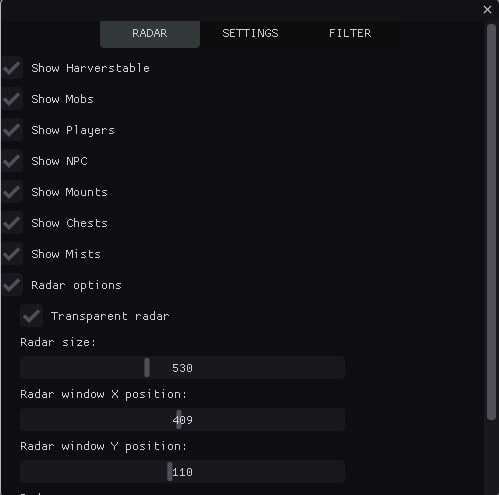
One of the key features of the Mason cheat is a mini-map, which displays all the important elements of the game. You will be able to see all mobs, resources (wood, stone, ore), enemies, NPCs, mounts, chests and much more. This will allow you to easily find the necessary resources, treasures and opponents. In addition, the Mason cheat provides many additional settings that will allow you to completely customize the display on the minimap. You can change display colors, filter items by level and chest.
One of the main advantages of the Mason cheat is its reliability. The radar operates with minimal chance of blocking and is easy to launch and install. You can easily take advantage of all its functions and start enjoying the benefits of the cheat in the Albion Online game.
In addition, we guarantee qualified support in case of difficulties. Our team is always ready to help and answer all your questions.
Mason's private cheat radar is therefore an indispensable tool for Albion Online players who want to achieve maximum results and improve their gaming experience. Allow yourself to increase your chances of winning and enjoy all the benefits of the game with the help of the Mason cheat.
Order the Mason private cheat radar right now and become an unstoppable and successful player in the world of Albion Online!
System Requirements
🔔 Cheat statuses update automatically from our Telegram bot via developer notifications — follow the news there. Many cheats update themselves after game changes, so a “Checking” status does not mean the cheat is broken — it is just uncertainty until confirmed. Not sure? Ask in the site chat or on our Contacts page.
Global keys — work worldwide.
Payment with a Binance card may be available for selected products. Contact us privately before buying to check availability and agree the details.
Features
MAIN
- Show Resources / Display resources (wood, stone, ore, etc.)
- Show Mobs / Display mobs
- Show Players / Display players
- Show NPC / Display NPCs
- Show Chests / Display chests
- Show Mists / Display mists
- Show Mounts / Display mounts
- Counter of objects of each type / Shows the count of each object type on the radar (CHEST, MOB, HARV, etc.)
- Minimum/maximum distance for display / Filter objects by distance; objects outside range are hidden
- Sound notifications / Sound alerts when detecting different object types (players, chests, resources)
- Tracking the nearest object / Automatically detects and shows info for the nearest object to the player
- Export coordinates to a file / Saves coordinates of all detected objects to a text file (hotkey: F3)
- History of discovered objects / Tracks discovery history with timestamps
- Hotkeys / Quick access: F1 (menu), F2 (save), F3 (export coordinates)
- Automatic configuration saving / Auto-saves settings every 30 seconds
- Displaying the distance to objects / Shows distance in meters to each object on the radar
- Player approaching warning / Sound warning when other players approach within a set distance
- Grouping objects by type / Groups objects by type for easier analysis
- Direction indicator / Shows direction on the radar
- Automatic hiding of distant objects / Hides objects outside scan radius
- Detection time statistics / Tracks detection stats (first/last seen, count)
- Improved sound notifications / Different sounds for different object types (chests, resources, players)
- Visual indicators / Pulsing circles for important objects (chests, artifacts)
- Object Priority System / Object prioritization for sorting (chests — highest priority)
- Object caching / Object caching for performance
CHESTS
- Chests filter / Chest filter
- Only 1-st TIER chests / Display 1st tier chests
- Only 2-st TIER chests / Display 2nd tier chests
- Only 3-st TIER chests / Display 3rd tier chests
- Only 4-st TIER chests / Display 4th tier chests
VISUAL EFFECTS
- Lines to objects / Draws lines from radar center to each object for better visualization
- Trajectories of movement / Shows movement trails with configurable length
- Visibility zones / Visualizes scan zone
- Color gradients / Gradient coloring for objects
- Object animations / Pulsing effects with configurable speed
- Shadows / Shadows under objects for depth
- Glow effects / Glow around objects
- Radar grid / Coordinate grid for orientation
- Zone boundaries / Visual radar boundaries with corner markers
- Directional arrows / Arrows showing direction to objects
- Object icons / Unique icons for different object types
- Gradient lines / Lines with smooth color transition
- Contours of objects / Contours with configurable thickness
- Hover highlight / Highlight on mouse hover
- Distance rings / Concentric rings for distance visualization
- Particle effects / Particles around important objects (chests, artifacts)
- Visual markers / Star markers for important objects (chests, artifacts)
- Pulsating effects / Object pulsation
- 3D depth effect / Depth effect for objects
RADAR
- Radar options / Radar settings
- Transparent radar / Set radar transparency
- Radar size / Set radar size
- Radar X position / Set radar position on X axis
- Radar Y position / Set radar position on Y axis
- Radar zoom / Set radar zoom in/out
- Scan radius / Set object scan radius
VISUALS COLORS
- Mobs color / Set mob display color
- NPC color / Set NPC display color
- Players color / Set player display color
- Mounts color / Set mount display color
- Mists / Set mist display color
- Resources TIER 1 color / Set tier 1 resource color
- Resources TIER 2 color / Set tier 2 resource color
- Resources TIER 3 color / Set tier 3 resource color
- Resources TIER 4 color / Set tier 4 resource color
- Resources TIER 5 color / Set tier 5 resource color
- Resources TIER 6 color / Set tier 6 resource color
- Resources TIER 7 color / Set tier 7 resource color
- Resources TIER 8 color / Set tier 8 resource color
- Chests color / Set chest display color
RESOURCES
- Enable filter / Enable filter
- Resources filter / Resource display filter
- Only 1-st TIER items / Display 1st tier items
- Only 2-st TIER items / Display 2nd tier items
- Only 3-st TIER items / Display 3rd tier items
- Only 4-st TIER items / Display 4th tier items
- Only 5-st TIER items / Display 5th tier items
- Only 6-st TIER items / Display 6th tier items
- Only 7-st TIER items / Display 7th tier items
- Only 8-st TIER items / Display 8th tier items
Customer Reviews
All reviewsFrequently Asked Questions
What features are included in Mason?
What payment methods are accepted?
How to contact support?
After payment you will receive detailed instructions on activation, launch and use of the software.
Instructions will be sent to the email address specified before payment.
You will also find a download link and necessary components for the software.
Cheat community
Cheat updates, detection status and help from other players — in our Telegram and Discord.