Mason 용 Albion Online
Albion Online 게임에 대한 개인 치트 Radar Mason 작업

오늘날 가장 인기 있는 온라인 게임 중 하나는 Albion Online입니다. 오픈 월드, 자유롭게 탐험하고, 싸우고, 창조할 수 있는 능력은 전 세계 수십만 명의 플레이어를 끌어들입니다. 그러나 모든 게임과 마찬가지로 성공을 위해서는 추가 기능이 필요한 경우도 있습니다.
이것이 바로 Albion Online 게임을 위한 고품질 개인 치트 레이더 Mason을 제공하는 이유입니다. 이 치트는 게임에서 높은 결과를 얻는 데 필요한 모든 기능을 갖추고 있습니다. 다양한 기능을 갖추고 있으며 Albion 세계의 주변 물체를 완벽하게 제어할 수 있습니다.
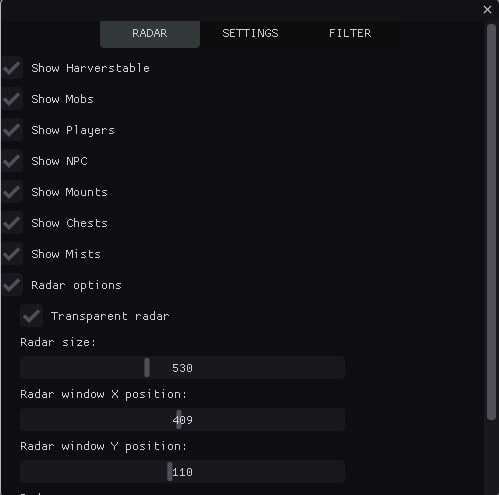
Mason 치트의 주요 기능 중 하나는 게임의 모든 중요한 요소를 표시하는 미니 맵입니다. 모든 몹, 자원(나무, 돌, 광석), 적, NPC, 탈것, 상자 등을 볼 수 있습니다. 이를 통해 필요한 자원, 보물 및 상대를 쉽게 찾을 수 있습니다. 또한 Mason 치트는 미니맵 표시를 완전히 사용자 정의할 수 있는 다양한 추가 설정을 제공합니다. 표시 색상을 변경하고 레벨 및 상자별로 항목을 필터링할 수 있습니다.
Mason 치트의 주요 장점 중 하나는 신뢰성입니다. 레이더는 차단 가능성을 최소화하면서 작동하며 발사 및 설치가 쉽습니다. Albion Online 게임에서 모든 기능을 쉽게 활용하고 치트의 이점을 누릴 수 있습니다.
또한 어려움이 있을 경우 적격한 지원을 보장합니다. 우리 팀은 항상 귀하의 모든 질문에 도움과 답변을 제공할 준비가 되어 있습니다.
따라서 Mason의 개인 치트 레이더는 최대 결과를 달성하고 게임 경험을 향상시키려는 Albion Online 플레이어에게 없어서는 안될 도구입니다. 메이슨 치트의 도움으로 승리 확률을 높이고 게임의 모든 혜택을 누리세요.
지금 바로 Mason 개인 치트 레이더를 주문하고 Albion Online 세계에서 막을 수 없는 성공적인 플레이어가 되어보세요!
시스템 요구사항
🔔 치트 상태는 개발자 알림에 따라 텔레그램 봇에서 자동으로 업데이트됩니다 — 그곳에서 소식을 확인하세요. 많은 치트는 게임 변경 후 스스로 업데이트되므로 «확인 중» 상태가 치트가 작동하지 않는다는 뜻은 아니며, 확인 전까지의 불확실성일 뿐입니다. 확실하지 않나요? 사이트 채팅에서 문의하거나 연락처를 확인하세요.
기능
메인
- 자원 표시 / 자원 표시(목재, 석재, 광석 등)
- 몹 표시 / 몹 표시
- 플레이어 표시 / 플레이어 표시
- NPC 표시 / NPC 표시
- 상자 표시 / 상자 표시
- 미스트 표시 / 미스트 표시
- 마운트 표시/디스플레이 마운트
- 유형별 개체 카운터 / 레이더에 있는 개체 유형별 개수를 표시합니다(CHEST, MOB, HARV 등).
- 표시를 위한 최소/최대 거리/거리별로 개체 필터링; 범위 밖의 개체는 숨겨집니다.
- 다양한 개체 유형(플레이어, 상자, 리소스) 감지 시 소리 알림/소리 알림
- 가장 가까운 물체 추적 / 가장 가까운 물체를 자동으로 감지하여 플레이어에게 정보 표시
- 좌표를 파일로 내보내기 / 감지된 모든 객체의 좌표를 텍스트 파일로 저장합니다(단축키: F3)
- 검색된 개체의 기록/타임스탬프를 사용하여 검색 기록을 추적합니다.
- 단축키/빠른 액세스: F1(메뉴), F2(저장), F3(좌표 내보내기)
- 자동 구성 저장 / 30초마다 설정 자동 저장
- 물체까지의 거리 표시 / 레이더의 각 물체까지의 거리를 미터 단위로 표시
- 플레이어 접근 경고 / 설정된 거리 내에 다른 플레이어가 접근하면 소리로 경고
- 유형별로 객체 그룹화 / 더 쉬운 분석을 위해 유형별로 객체를 그룹화
- 방향 표시기 / 레이더에 방향 표시
- 멀리 있는 물체를 자동으로 숨김 / 스캔 반경 밖의 물체를 숨김
- 탐지 시간 통계 / 탐지 통계 추적(처음/마지막으로 본 횟수, 횟수)
- 향상된 소리 알림/다양한 개체 유형(상자, 자원, 플레이어)에 따라 다른 소리
- 시각적 표시기/중요한 물건(상자, 유물)에 대한 펄스 원
- 개체 우선 순위 시스템/정렬을 위한 개체 우선 순위 지정(상자 - 최고 우선 순위)
- 객체 캐싱 / 성능을 위한 객체 캐싱
상자
- 가슴 필터 / 가슴 필터
- 1등급 상자만 표시 / 1등급 상자 표시
- 2단계 상자만 표시 / 2단계 상자 표시
- 3단계 상자만 표시 / 3단계 상자 표시
- 4단계 상자만 표시 / 4단계 상자 표시
시각 효과
- 객체에 대한 선 / 더 나은 시각화를 위해 레이더 중앙에서 각 객체까지 선을 그립니다.
- 이동 궤적 / 구성 가능한 길이로 이동 경로 표시
- 가시성 구역/스캔 구역 시각화
- 색상 그라디언트 / 개체의 그라디언트 색상 지정
- 개체 애니메이션/구성 가능한 속도의 펄스 효과
- 그림자/깊이를 위한 물체 아래의 그림자
- 글로우 효과/객체 주변 글로우
- 레이더 그리드/방향을 위한 좌표 그리드
- 구역 경계/코너 마커가 있는 시각적 레이더 경계
- 방향 화살표/객체 방향을 표시하는 화살표
- 개체 아이콘/다양한 개체 유형에 대한 고유 아이콘
- 그라데이션 선/부드러운 색상 전환이 있는 선
- 객체의 윤곽 / 구성 가능한 두께의 윤곽
- 호버 강조 표시 / 마우스 호버 강조 표시
- 거리 시각화를 위한 거리 링/동심 링
- 파티클 효과 / 중요한 물체(상자, 유물) 주변의 파티클
- 중요한 물건(상자, 유물)에 대한 시각적 마커/별 마커
- 맥동 효과 / 물체 맥동
- 3D 깊이 효과 / 사물에 대한 깊이 효과
레이더
- 레이더 옵션 / 레이더 설정
- 투명 레이더 / 레이더 투명도 설정
- 레이더 크기 / 레이더 크기 설정
- 레이더 X 위치/X축에 레이더 위치 설정
- 레이더 Y 위치/Y축에 레이더 위치 설정
- 레이더 줌/레이더 확대/축소 설정
- 스캔 반경 / 물체 스캔 반경 설정
시각적 색상
- 몹 색상 / 몹 표시 색상 설정
- NPC 색상 / NPC 표시 색상 설정
- 플레이어 색상 / 플레이어 표시 색상 설정
- 마운트 색상 / 마운트 디스플레이 색상 설정
- 미스트 / 미스트 표시 색상 설정
- 자원 TIER 1 색상 / tier 1 자원 색상 설정
- 자원 TIER 2 색상 / tier 2 자원 색상 설정
- 자원 TIER 3 색상 / tier 3 자원 색상 설정
- 자원 4티어 색상 / 4티어 자원 색상 설정
- 자원 5티어 색상 / 5티어 자원 색상 설정
- 자원 6티어 색상 / 6티어 자원 색상 설정
- 자원 TIER 7 색상 / tier 7 자원 색상 설정
- 자원 8티어 색상 / 8티어 자원 색상 설정
- 가슴 색상 / 가슴 표시 색상 설정
자원
- 필터 활성화 / 필터 활성화
- 리소스 필터 / 리소스 표시 필터
- 1차 TIER 아이템만 표시 / 1차 TIER 아이템 표시
- 2차 TIER 아이템만 표시 / 2차 TIER 아이템 표시
- 3차 TIER 아이템만 표시 / 3차 TIER 아이템 표시
- 4차 TIER 아이템만 표시 / 4차 TIER 아이템 표시
- 5차 TIER 아이템만 표시 / 5차 TIER 아이템 표시
- 6차 TIER 아이템만 표시 / 6차 TIER 아이템 표시
- 7차 TIER 아이템만 표시 / 7차 TIER 아이템 표시
- 8차 TIER 아이템만 표시 / 8차 TIER 아이템 표시
고객 리뷰
모든 리뷰자주 묻는 질문
Mason에는 어떤 기능이 포함되어 있나요?
어떤 결제 수단을 사용할 수 있나요?
고객 지원은 어떻게 문의하나요?
결제가 확인됐지만 상품이 없습니다. 얼마나 기다려야 하나요?
키는 있습니다. 다운로드와 설명서는 어디에 있나요?
결제 후 소프트웨어의 활성화, 실행 및 사용에 대한 자세한 안내를 받으실 수 있습니다.
안내는 결제 전 제공한 이메일 주소로 전송됩니다.
다운로드 링크와 필요한 구성 요소도 함께 제공됩니다.
치트 커뮤니티
치트 업데이트, 탐지 상태, 다른 플레이어의 도움 — 텔레그램과 디스코드에서.